There’s no single way to categorize webinar software — and that’s where much of the confusion comes from. Most platforms are typically grouped in one of two ways:
- How the webinar runs (functionality) — live or automated.
- Who it’s designed for (use case) — for small businesses, enterprises, sales teams, marketers, training and onboarding teams, educators, etc.
We put together this guide to break it down. We’ll start by comparing live vs. automated, since that’s usually the primary consideration when comparing systems. Then, we’ll dig into webinar software by use case.
To learn more about our automated webinar system after reading, you can join our free demo below to see it in action, or start a 14-day free trial to explore the system.
Live Webinar Software
Live webinar software is somewhat self-explanatory — it lets you present in real time to an audience that's tuned in at the same moment. Think of it like a virtual conference room: you show up, your audience shows up, and everything happens together.
The host controls the session as it unfolds — usually presenting a slide deck or sharing their screen — and can invite audience participation through live chat, polls, Q&A, breakout rooms, and even "bring to stage" features that let attendees partake in the presenting.
Because everything happens in real time, live webinar software works best when you need to incorporate audiences in discussions: live Q&A, tailoring content to the room, or building that "we're all here together right now" energy.
The trade-off? Everyone has to show up at the same time, and the host needs to think on their feet — adjusting content on the fly, handling technical hiccups, or responding to questions in real time.
As real-time, in-the-moment events, live webinars happen once and end when the host closes out the session; however, most platforms let you record and send replay links afterward.
When is live webinar software best?
Live webinars work well when the event itself is unique or time-sensitive, or when the audience is actively shaping the session through discussion, collaboration, or group activities. Here are some common scenarios:
- One-time, special events — product launches, company-wide announcements, investor updates, or quarterly reviews where timing and “being in the room” really matter.
- Internal alignment meetings — all-hands, leadership Q&As, and cross-team updates where leaders need to read the room and respond to concerns in real time.
- Virtual summits and conferences — multi-session online events with live speakers, panel discussions, and networking activities like roundtables.
- Live training or workshops — hands-on teaching where attendees learn and collaborate together as a group.
- Sessions driven by attendee input — AMAs, office hours, town halls, or guest speaker sessions where questions, polls, and chat steer the conversation.
- Enterprise or high-ticket sales — where hosts are customizing the pitch to the prospect, adjusting based on their questions, or addressing specific objections.
Features to look for in live webinar software
Not all live webinar platforms are built the same. If you're running live events, here's what to prioritize:
- Presenter and co-host controls — You'll want screen sharing, slide sharing, multi-presenter support, and the ability to bring participants on stage or spotlight specific speakers so you can smoothly hand off between hosts and guests.
- Moderator capabilities (especially essential for larger events) — Hosts should have the ability to mute participants, highlight or delete chat messages, manage breakout rooms, remove disruptive attendees, and control who can speak or present.
- Attendee capacity that matches your needs — Make sure the platform can handle your expected audience size without incurring crazy fees or crashing. Many tools cap attendee seats by pricing tier, so be sure to double-check these details before committing to any platform.
- Reliability and performance at scale — It’s essential that your webinar software can still run smoothly, without glitching or lag, during high-traffic events. Look for uptime guarantees and status pages, or check reviews to see how tools handle hundreds (or thousands) of live attendees.
- Recording and replay options — Most hosts will also want a platform that lets them record sessions and send replays to registrants who couldn't make it or want to rewatch. Look for automatic recording, cloud storage, and easy ways to share replays or download files. (This is also useful for repurposing live events into automated, evergreen assets.)
- Live chat and audience participation tools — Obviously, live chat is essential if you want the ability to host live Q&As at the end of presentations, but you may also want to trigger things like polls or surveys to keep viewers engaged and gather real-time feedback during sessions.
- Registration, reminders, and calendar invites — Built-in registration pages, email reminders, and calendar links help maximize show-up rates for one-time events.
Automated Webinar Software
Automated webinar software lets you pre-record webinars and schedule them to run on autopilot — whether that's on a recurring schedule, on specific days and times, or on demand whenever someone wants to watch.
It's convenient because hosts don't need to be present in real time or even be available during sessions. Hosts can design the webinar in advance, pre-program interactive features like polls, quizzes, Q&As, and CTAs, and enable chat — so the experience still feels personal and dynamic even without a live presenter.
Then, the platform handles delivery completely. Hosts can reply to chats in real time if they're monitoring sessions or respond later, so they never miss a chance to engage with attendees.
Automated webinars take the stress off hosts, improve attendance by offering flexible viewing options, and let teams reuse the same content for new audiences. They allow you to scale webinar efforts and reach new audiences and time zones, without hosting the same webinar over and over, or burning out your hosts.
Automated webinars go by many names: on-demand, just-in-time, recurring, evergreen, simulive, and asynchronous. One thing they all have in common is that the content is pre-recorded. Here's a short glossary of the main terms you’ll hear and the nuances between them:
|
When is automated webinar software best?
Automated webinars work best when you're running the same content repeatedly, need to reach the largest possible audience, or want your webinars working for you around the clock. Here are some common scenarios:
- Running the same webinar repeatedly — If you're delivering the same demo, training, or presentation over and over, automating it saves you from hosting the same session live every time. Record it once, and then let the platform handle the rest, so every attendee gets the same high-quality experience.
- Lead generation that runs 24/7 — Automated webinars are ideal for always-on funnels where prospects discover your content through ads, search, or email. They can instantly register for a session that moves them toward a trial, demo, or purchase. This lets you constantly fill your pipeline, even outside of regular business hours. Then you can even trigger follow-up sequences based on who registered, attended, or clicked CTAs.
- Customer onboarding and product training — New customers can get up to speed immediately instead of scheduling time with your team or waiting for the next scheduled training. You can deliver consistent onboarding experiences without tying up your team's time.
- Online courses and continuing education — Automated webinars work well for online courses or learning experiences that students can watch on their own schedule. Educators can combine pre-recorded lessons with interactive elements such as quizzes and action items to assess students’ knowledge as they go.
- Reaching global audiences — You can set automated webinars so that their recurring schedules are time-zone friendly, always running at convenient local times for your audiences. Instead of forcing everyone to show up at 2 pm EST (or hosting the same webinar at multiple times), you can offer on-demand, just-in-time, or recurring schedules that work for people anywhere.
- Scaling internal training — Whether it's new hire onboarding or helping current staff level up their skillsets, automated webinars allow you to offer employee trainings consistently without repeatedly pulling trainers away from their regular work.
Features to look for in automated webinar software
When evaluating automated webinar platforms, look for tools that balance automation with engagement. Here's what matters most:
- Flexible live chat — Chat is crucial for automated webinars. eWebinar offers a unique chat that lets hosts respond in real-time when they’re available or reply later by email, without missing any attendee questions. This is the feature that allows you to retain a personal touch at scale.
- Interactive elements — Even though there’s no live presenter, your webinar should still feel engaging and encourage audience participation. Look for platforms that let you preprogram polls, quizzes, CTAs, questions, and other interactive elements throughout the session to keep viewers interested and actively participating.
- Personalization options — You should personalize each attendee’s experience by including their names in messages, adjusting interactions based on how they reply (conditional interactions), and sending targeted follow-ups.
- Scheduling and on-demand access — You'll want flexibility in how registrants can watch: on-demand, just-in-time, or recurring schedules (with automatic time zone adjustments). Ideally, you should be able to combine viewing options and offer a variety of ways to tune in, so your attendance rates are as high as possible.
- Registration page builders — This saves you from having to use external tools to design landing pages. Look for AI-powered page builders, plug-and-play templates, branding options, and customizable registration forms to collect the attendee info that’s important for your goals.
- Registration widgets — You can embed these widgets across your website landing pages or in other platforms (like SaaS products) to offer a variety of options to register for webinars. This makes it as easy as possible for people to join your webinars from anywhere they might find online.
- Automated reminders and follow-ups — Automated email reminders and follow-ups help maximize attendance and move people through your funnel without manual work.
- Analytics and engagement tracking — You'll want to see who registered, how many registrants actually attended, how long they watched, which interactions they engaged with, and what CTAs they clicked. Look for platforms with detailed reporting to really understand whether your webinars are successful, identify areas for improvement, and fine-tune follow-ups.
- Integrations — Strong integrations with your CRM, marketing automation, or LMS enable you to auto‑register attendees, use webinars in your existing workflows, sync engagement data, and trigger tailored follow-ups.
Example of modern automated webinar software: eWebinar
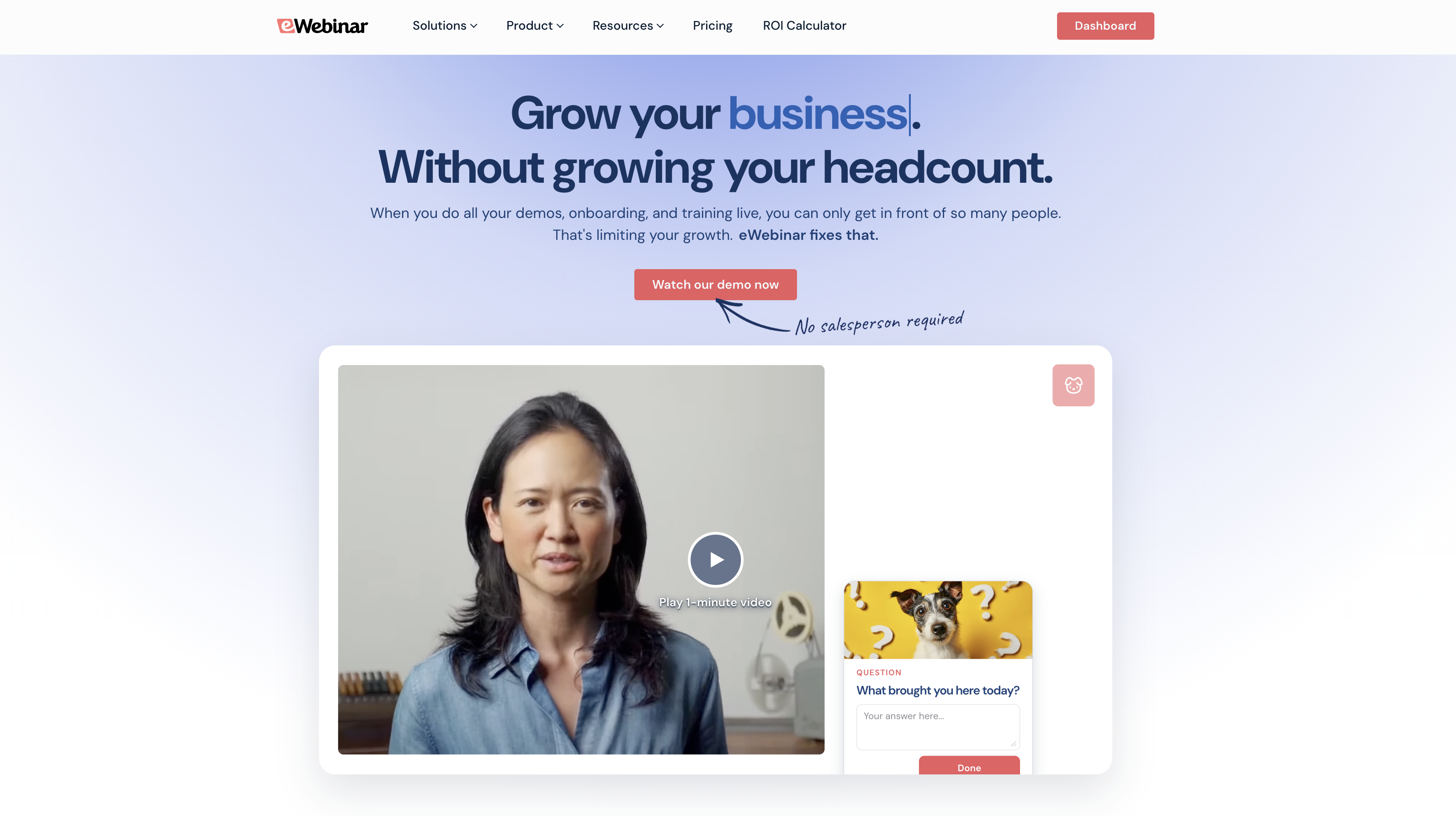
We launched eWebinar over five years ago to solve two problems: help teams run the most engaging automated webinars possible, and let them scale webinar efforts without burning out their resources.
Our platform is an all-in-one solution that covers everything from webinar creation to promotion and reporting on outcomes. It includes:
- A user-friendly webinar builder with templates and modules that walk you through the entire process
- The most extensive gallery of engagement tools, so you can design interactive webinars and tailor experiences based on your goals and audiences
- Asynchronous chat that lets you engage with attendees any time — you can send replies during sessions if you’re available, or get back to them later if you’re not
- Flexible scheduling tools that let you offer a variety of ways to tune into webinars — create recurring schedules and enable on-demand and just-in-time viewing options
- AI-powered tools to design attention-grabbing registration pages and automate reminders and follow-ups
- Webinar Series to create multi-webinar learning paths that let attendees track their progress
- Detailed analytics and heatmaps to measure attendance, engagement, and effectiveness in various ways
We prioritize ease of use so anybody, regardless of experience or skill level, can join our platform and easily create professional webinars. And our platform is flexible and scalable enough to support virtually any use case.
In the following sections, we’ll discuss our core webinar features in more detail, but if you’re interested in learning more about our solution, you can start your 14-day free trial here or join our demo below.
User-friendly webinar builder
Our user-friendly webinar builder prompts you through every step to create webinars so there’s zero guesswork.
- You can build a webinar from scratch or select a template — templates come with suggested goals, interactions, scripts, and landing pages to expedite webinar creation while following best practices.
But let’s say you’re building a webinar from scratch. You’ll then…
- Upload your webinar recording. You can add files from your device, import videos from Zoom or Descript, or add URLs from video-hosting platforms like Wistia.
- Give your webinar a clear, catchy name.
- Pick a viewing option (if it’s a one-time event, on a recurring schedule, or available for on-demand or just-in-time viewing). Note: You'll start with one viewing option, but can add more later.
- Define the goal of your webinar — if you want viewers to sign up for a trial, test a particular product feature, purchase a product, schedule time with you, or advance to another webinar.
- Add brand elements like logos and custom colors. These will automatically display in webinar rooms, on registration pages, and throughout webinar experiences.
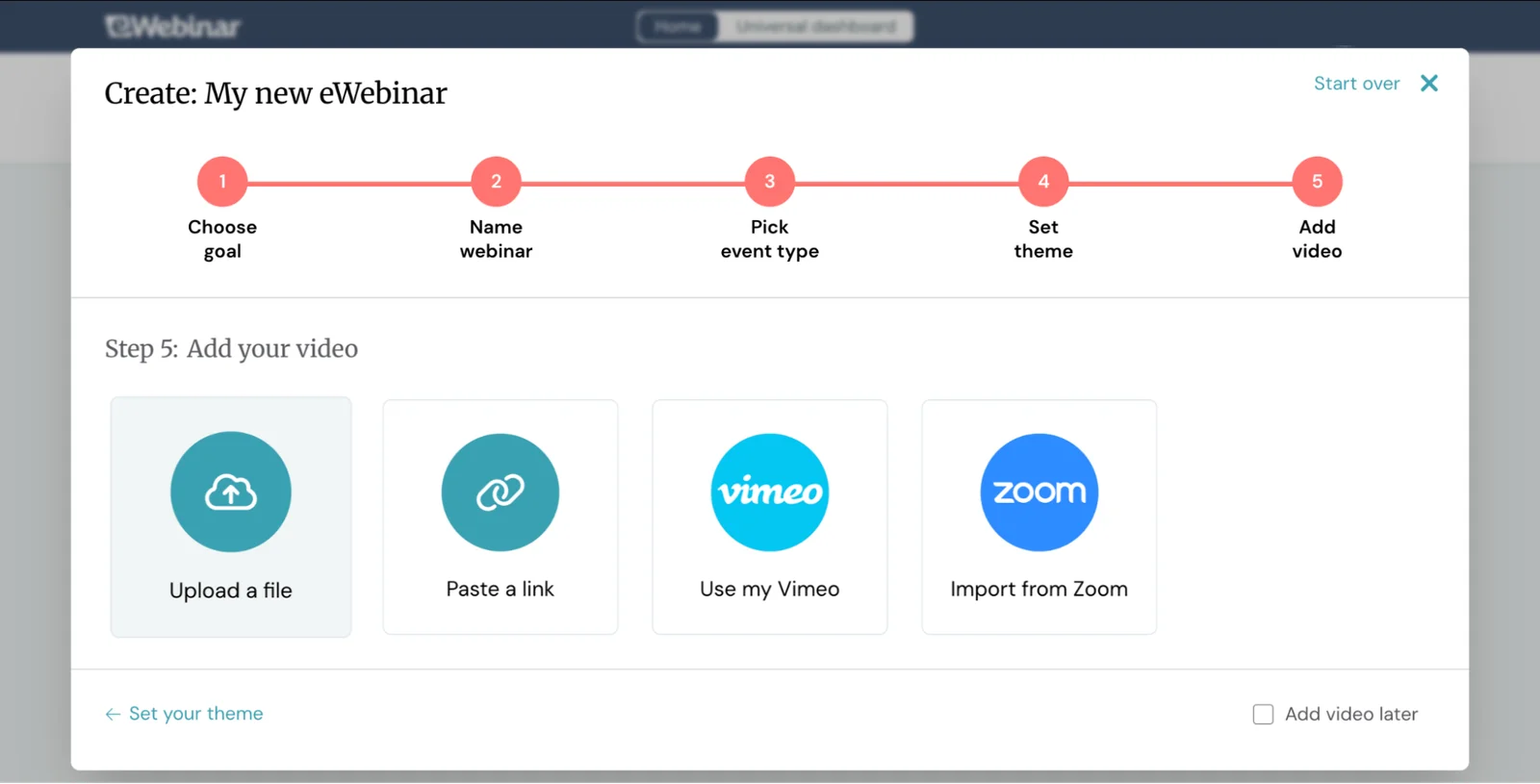
It’s as easy as 1-2-3. Then our system guides you through adding interactions.
Largest gallery of interactions
eWebinar has the largest gallery of interactions (20+!), so you can pre-program engagement all throughout webinar sessions. Check them out below:
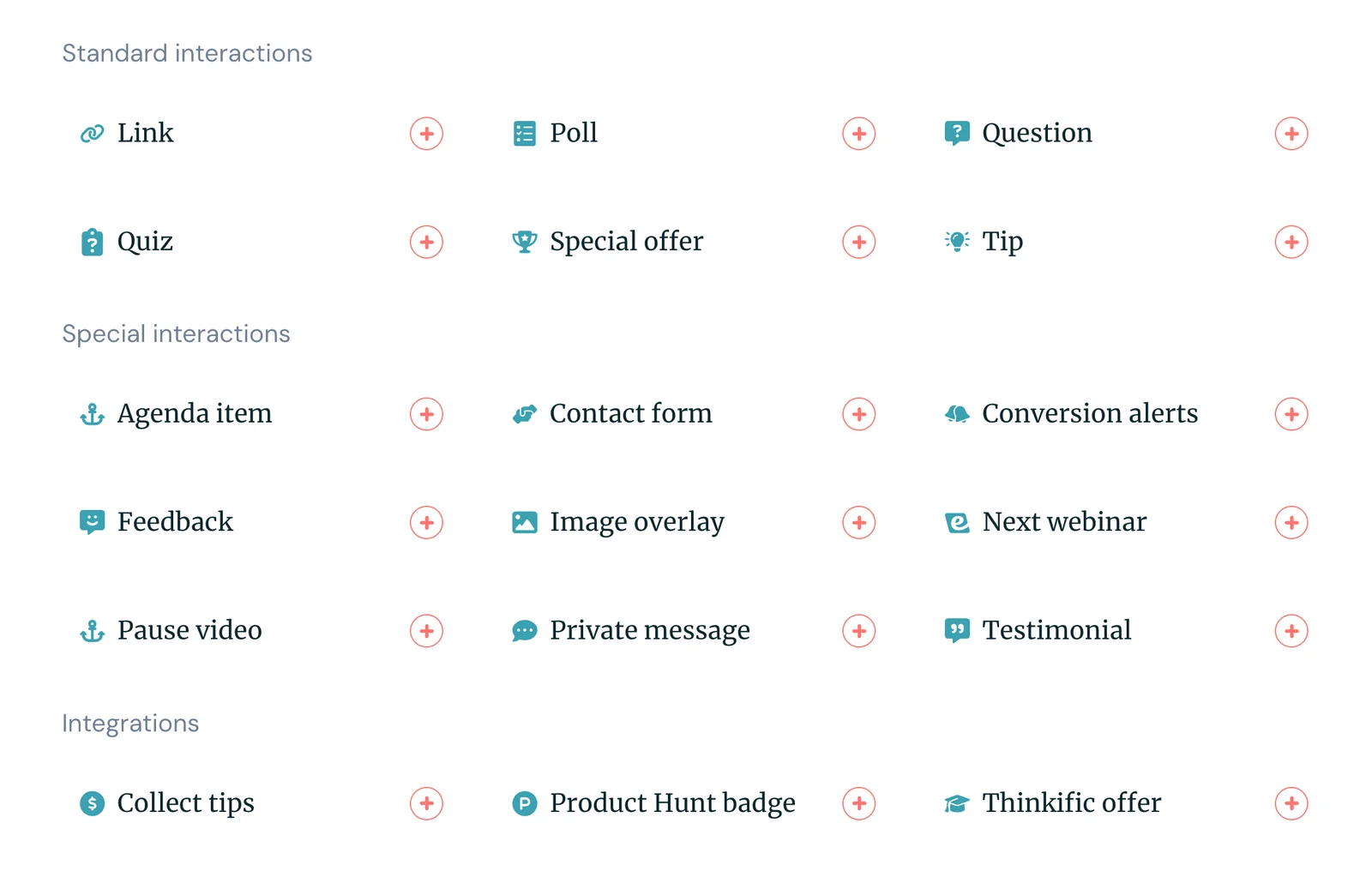
We’ve even added AI tools to this module so our system can suggest interactions based on your webinar content and goals. Our system provides pre-written copy in these interactions and tells you where to place them in your recording, so you know exactly how to engage users.
You can also take things a step further here by creating conditional interactions, where you can create interaction chains based on attendee replies. So if someone answers one way, they’ll see one interaction. If they answer another, they’ll see a different interaction.
For example, if an attendee fails a quiz, you could display a tip or offer a handout with more information on the material — if they pass the quiz, you could display another quiz or question that tests their knowledge in more detail.
This is one of the best ways to tailor attendee experiences and keep them engaged. Interactions are geared toward their interests or knowledge levels so they can easily follow along with content.
Our variety of interactions lets us support all kinds of users: sales teams can include special offers or CTAs for new customers, marketing teams can add polls to assess viewer interests, training teams and educators can plug in quizzes to test knowledge as participants progress through webinars.
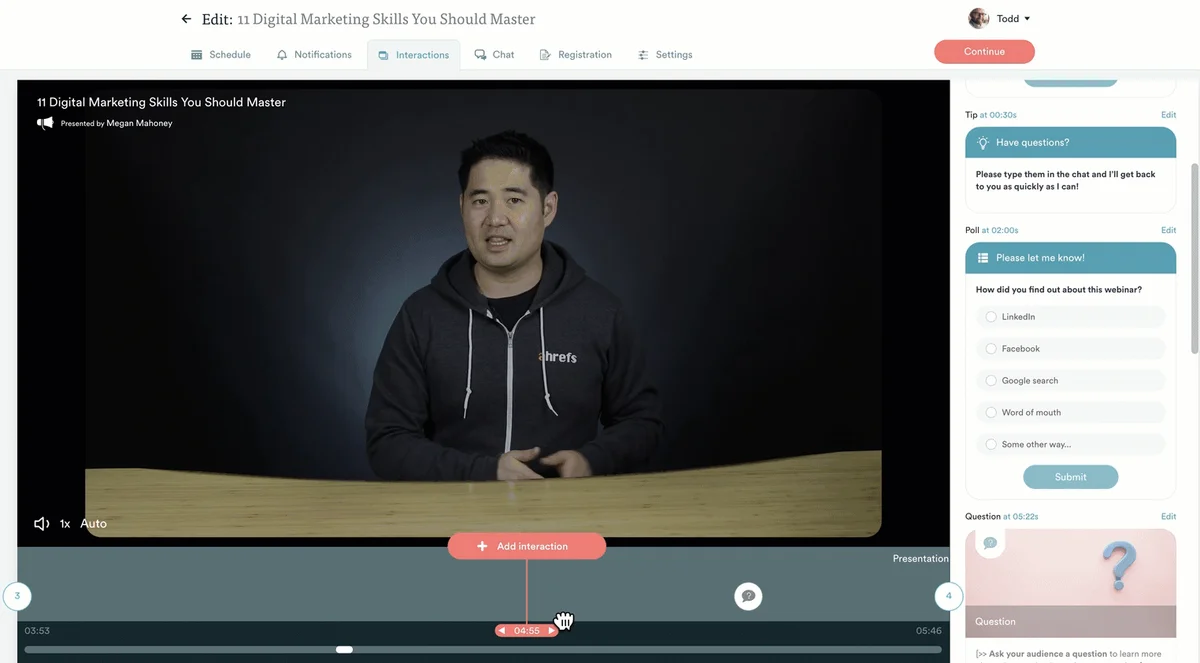
Then, we make it super easy to add interactions throughout webinars, so you can add as many as you like without spending hours tweaking recordings.
You simply scroll to the moment you want to place an interaction, and select the interaction you want to appear. Then you can playback and preview interactions to make sure they display exactly when you want them.
Asynchronous chat
In addition to our interactions, our system fuels attendee engagement via chat.
You can set a personalized welcome message that thanks viewers for joining the webinar and invites them to chat with your team. Then, our asynchronous chat is designed so you never miss a message or chance to engage. Here’s how it works:
- Moderators can view all chats in a central admin dashboard or Slack (if integrated). This lets them easily see which chats have been replied to and which ones are still waiting. You can assign multiple moderators, so you don’t have just one person fielding every conversation.
- Moderators can reply in real-time if they’re online and available.
- They can reply later on if they’re not available during sessions — and set up an autoresponder to let attendees know when they’ll hear back. Replies after webinars end are sent to attendees’ emails so they can pick up the conversation where they left off.
This is what truly allows teams to automate webinar experiences because it frees moderators from having to monitor chat around the clock — they can still have thoughtful conversations with viewers regardless of when they’re tuning into webinars.
Flexible scheduling options
As mentioned above, eWebinar lets you offer a variety of viewing options so registrants can watch your webinars when it’s convenient for them.
You can enable recurring schedules, on-demand, and just-in-time viewing for the same webinar so attendees can choose to watch in the moment or register for a later session. Our system also lets you provide automatic replay links, so registrants can opt for those and watch any time they wish — they don’t need to join a session first.
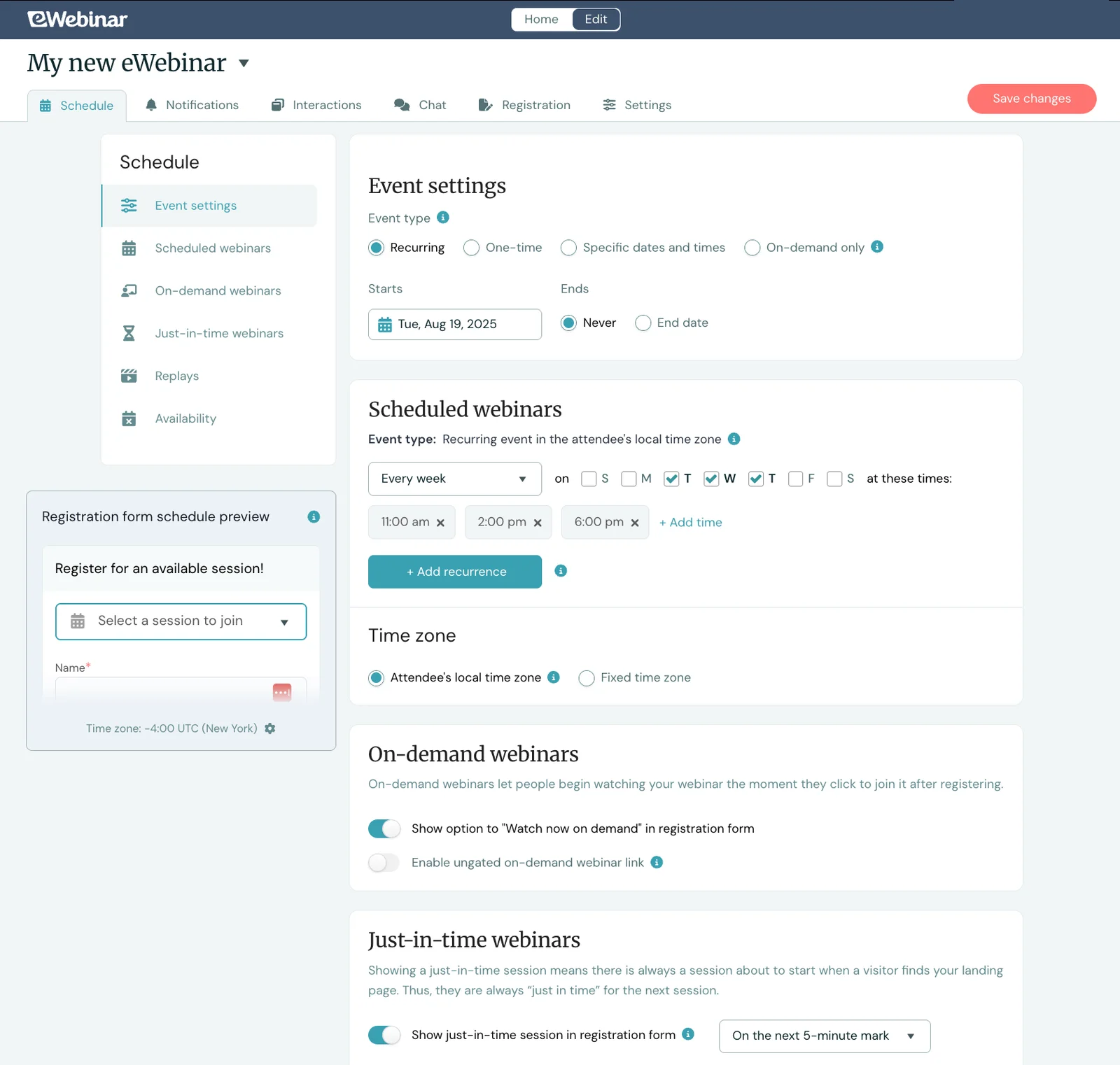
Of course, our system also supports automatic time zone adjustments so webinars play at convenient local times for all audiences.
AI-powered tools
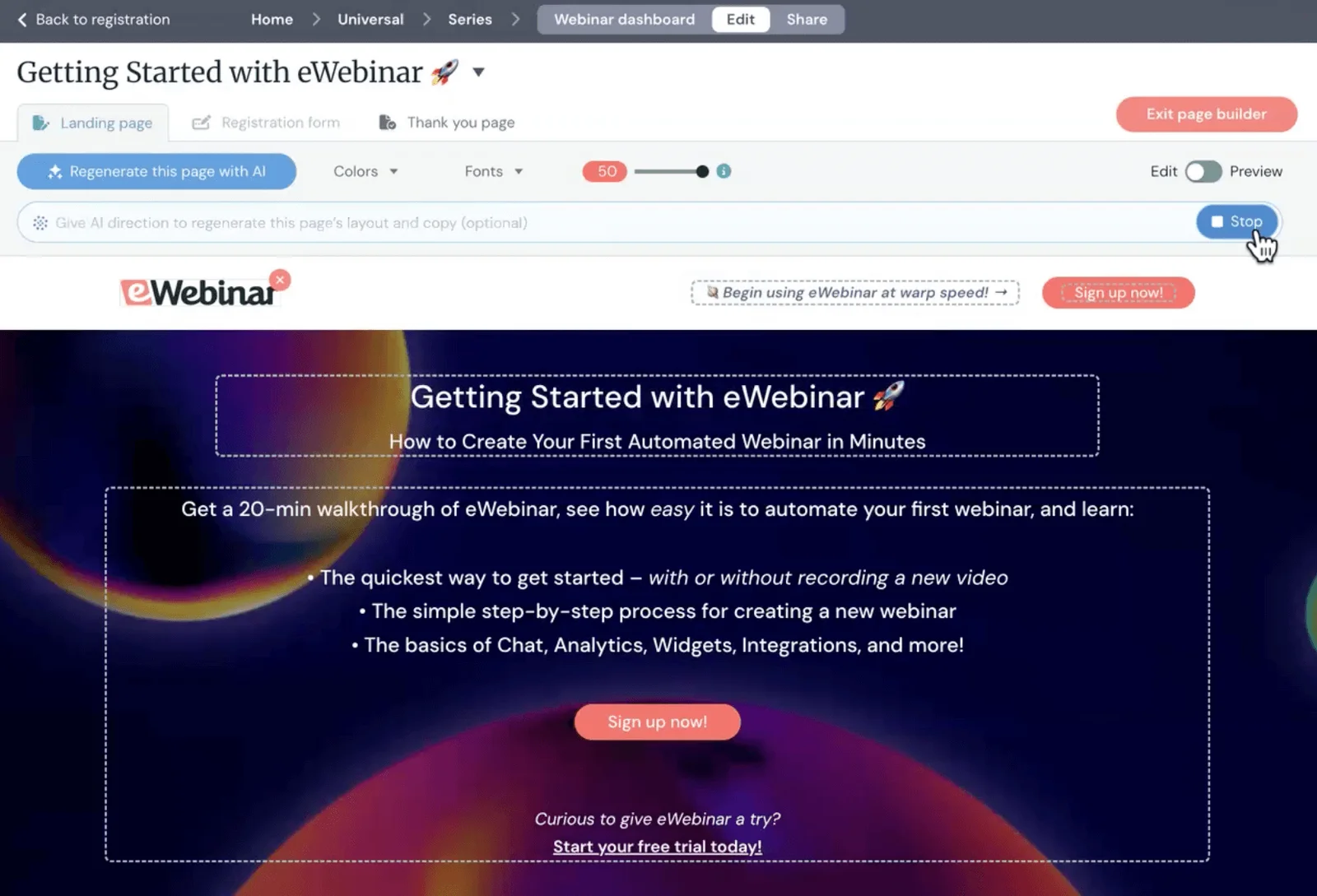
In addition to our AI-powered interactions, eWebinar also provides AI tools to build out registration pages. The AI handles the full page design and generates copy for you to edit, so it’s a quick and easy process.
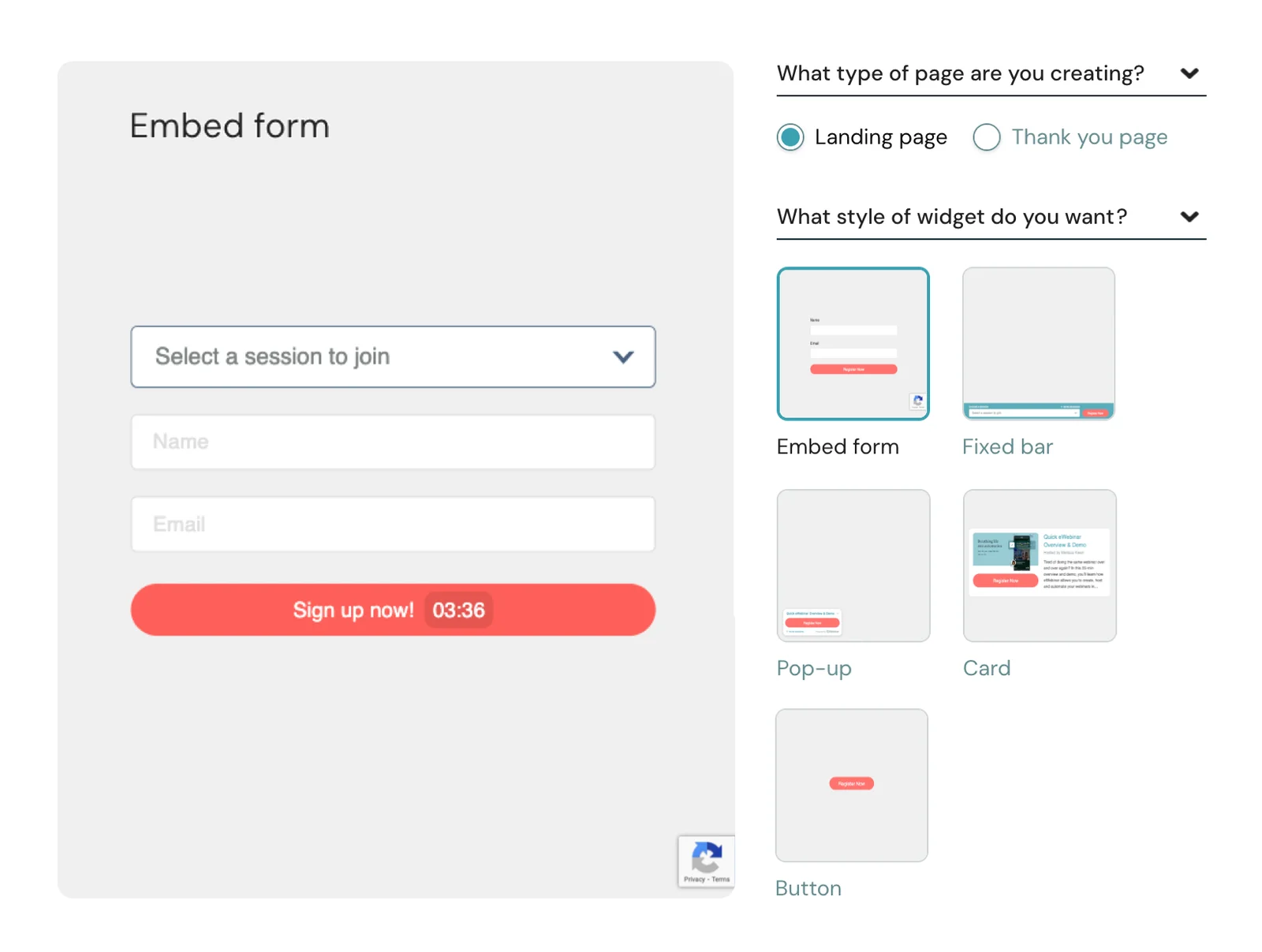
We also offer a variety of registration widgets so you can place these across your site and provide multiple options to join sessions. (For example, you can see our registration widget in the bottom of the left-hand corner across all of our site pages, and we include simple registration forms within the post you’re reading.)
After users register, our system sends automatic reminders (e.g., one day and one hour before sessions) and follow-ups (e.g., five minutes after sessions). We provide pre-written copy in these communications so the entire process is hands off.
That said, these are completely customizable, so you can change up the schedule or copy if you wish. You can also add more reminders or follow-ups to this queue.
Webinar series
eWebinar's Webinar Series feature lets you create multi-webinar experiences where registrants progress through a structured learning path.
You can build a Series from multiple webinars and set rules to control how registrants progress through your course:
- Specify if users must watch webinars in order, or if they can jump around, and how many webinars they must watch to pass.
- Add minimum watch times per webinar.
- Include quizzes or other action items for registrants to complete before advancing. You can also require registrants to achieve a certain quiz grade before they can move forward.
Then, you can gamify the experience with a progress bar and reward users for completing courses with certificates.
eWebinar provides registrants with their own personalized series page where they can monitor progress, view and access all webinars, reference chat conversations with your team, and download completion certificates when they finish the series.
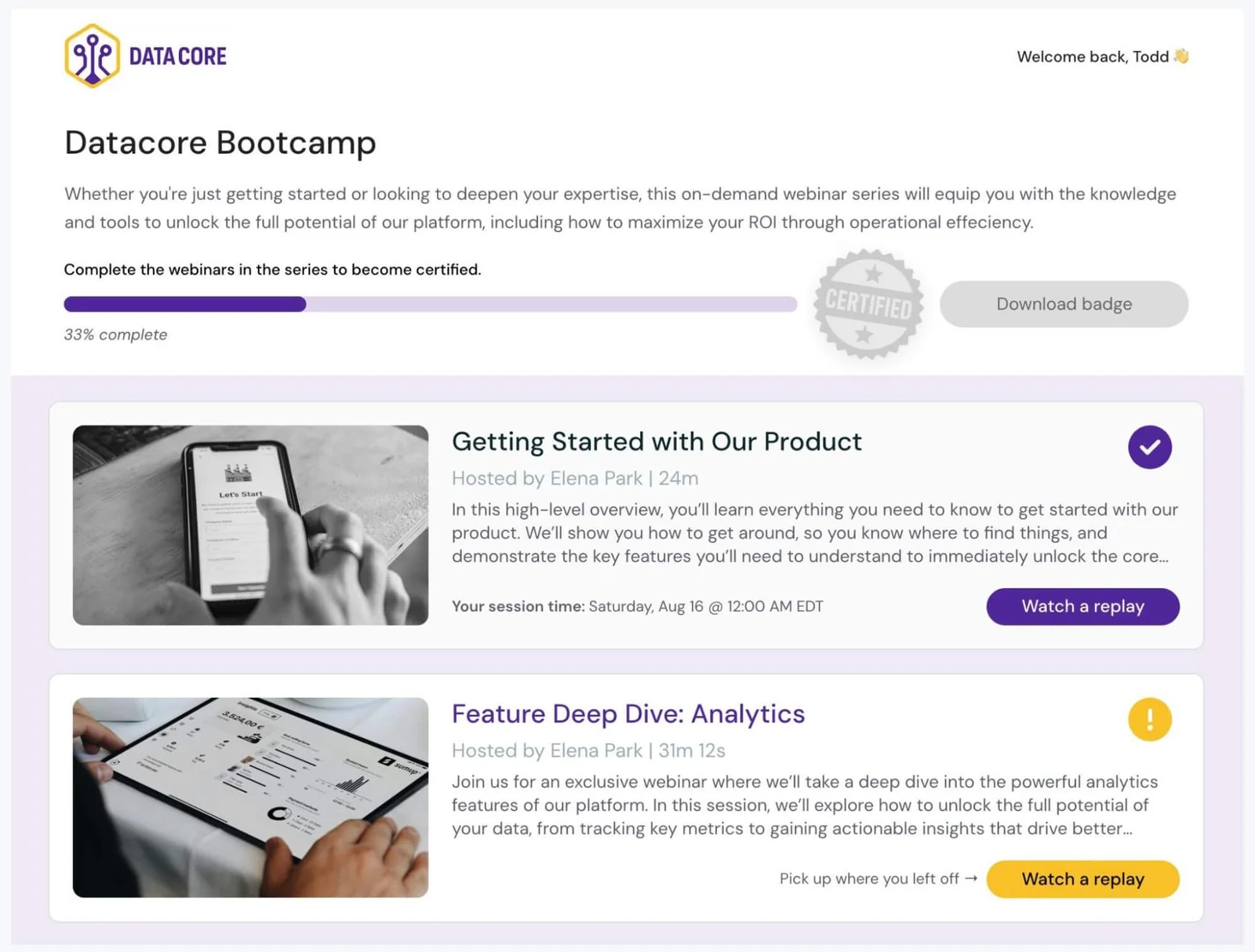
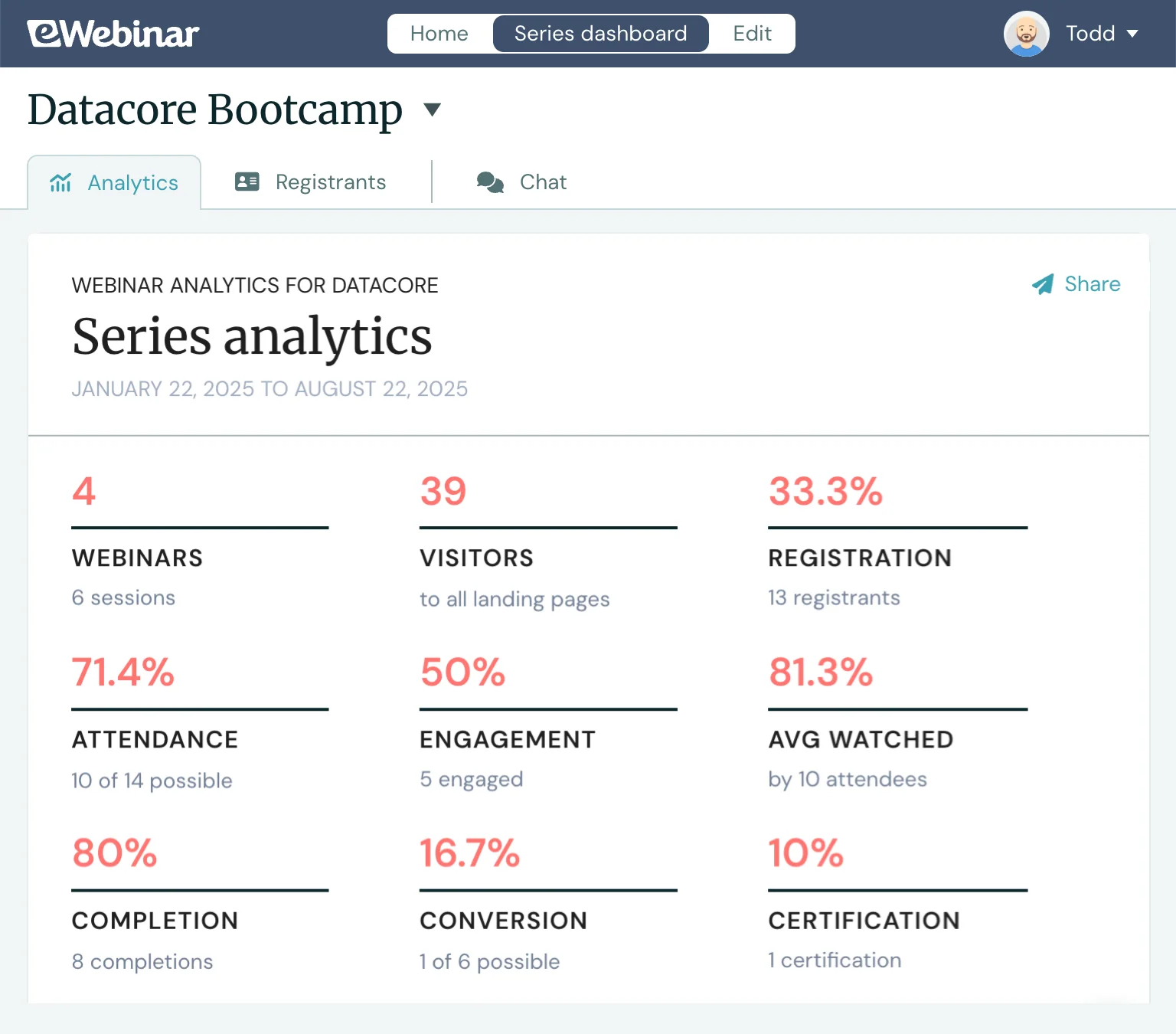
And on your end, you can track registrant progress and see who’s completed the full program. We also provide analytics to measure performance (at the webinar or series level) and dig into individual participant journeys.
Our Webinar Series tool is perfect for onboarding, training programs, and online education courses — you control the learning path with tools to hold participants accountable, and everything scales effortlessly.
Analytics dashboards & heatmaps
Our analytics dashboards pull a variety of data points so you can understand how your webinars are performing:
- Registration rates
- Attendance rates
- Registration vs. attendance rates
- Engagement rates — including average watch times, how many stayed until the end of webinars, and how many times attendees interacted with webinars
- Completion rates
- Conversion rates
- How users joined webinars — if they watched on-demand, registered for a session, or viewed a replay link
You can also analyze engagement per interaction — see which interactions got the most responses and view all of the replies — so you can adjust and fine-tune interactions throughout your experience.
Our system also provides heatmaps so you can see exactly what moments in your webinar spark engagement and how users interact. You can see when viewers send chats, like, or react to content — and when engagement starts to fall off or attendees exit webinars early.
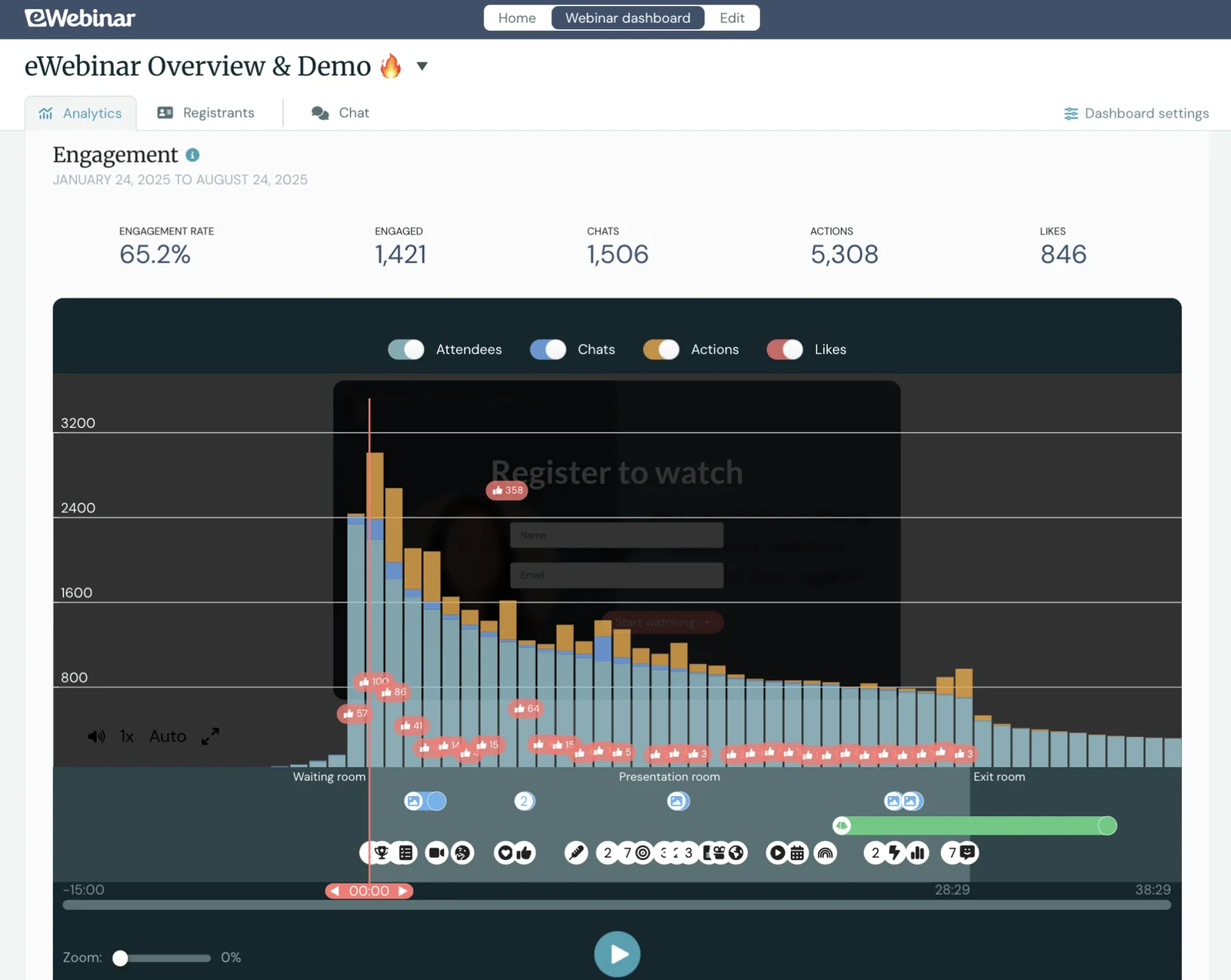
This gives you a better understanding of how your material resonates with audiences and where you need to make improvements. For example, if you notice viewers dropping off at the 20-minute mark during a particular webinar, you can watch it back to see what you’re discussing at that moment and rework it to keep their attention.
All of this data syncs with your CRM or marketing automation tools (if integrated), so you can trigger follow-ups based on who watched what, segment leads based on engagement, guide additional email marketing campaigns, and measure ROI on your webinar efforts.
Webinar Software by Use Case
Most webinar platforms can serve multiple audiences, but different user types have different requirements.
For small businesses
Small businesses need webinar software that's easy to set up, affordable, and doesn't require a steep learning curve. The best webinar software for small businesses should offer:
- Straightforward pricing (no hidden fees or complicated tiers).
- User-friendly features like templates that let users get their first webinar live without a lot of training or technical know-how.
- Built‑in registration pages and email reminders to simplify this process and save time.
- Strong customer support to answer questions as you learn the platform.
eWebinar, Demio, EasyWebinar, and ClickMeeting are other names small businesses might consider.
For enterprises
Enterprise teams need platforms that can handle security and compliance requirements and scale with them — with features like SSO, advanced admin controls, data management options, GDPR and SOC 2 compliance, and support for multiple teams or business units within a single account.
ON24, Webex Webinars, and Zoom Webinars (a.k.a. Zoom Events) are popular enterprise webinar software.
For sales teams & marketers
Sales and marketing teams need webinar software that seamlessly integrates with their existing tech stack and helps move prospects through the funnel. Webinar solutions for these users should include native CRM and marketing automation integrations, detailed engagement analytics, and automation that keeps leads warm without manual follow-up.
eWebinar, GetResponse, BigMarker, and WebinarNinja are other names with strong marketing tools and integrations.
Read more: 15 Best Webinar Software for Marketing
For training & onboarding teams
Training and onboarding teams need platforms that make it easy to deliver the same in-depth information and instructions for new audiences. The right webinar tools will have strong engagement features that keep people focused during training sessions and help information stick. You'll also want detailed tracking and reporting to see who completed training and where people might be getting stuck or dropping off.
eWebinar, GoToWebinar, Livestorm, and EverWebinar are names that training and onboarding teams may consider.
For online educators
Online educators need platforms that support structured learning experiences. You'll want platforms that let you:
- Build multi-webinar courses with quizzes to test students during lessons, and set gated controls or requirements to advance between webinars.
- Track student progress.
- Issue completion certificates.
You'll also want tools to support students' experiences, including personalized dashboards that let them access lessons and replays, monitor their progress, and download their certificates.
eWebinar, EdisonOS, WebinarGeek, and LiveWebinar are names educators may consider.
Read more: Best Webinar Platforms for Education
Choosing the Right Webinar Software for Your Needs
Before we wrap, let’s summarize the key things to consider when comparing webinar software.
- Start with live vs. automated — This is the biggest decision you'll make. Ask yourself: What are you running webinars for? How often will you run them? If you're delivering the same content repeatedly or need 24/7 lead generation, automation makes sense. If you're hosting one-off virtual events or presentations centered around attendee input, live is the way to go.
Note: A robust webinar strategy will likely use both. But be careful not to fall into the trap of thinking a hybrid system, that supports automated and live, is best. The reality is that nearly all webinar platforms are "live first" and their automation features are more of an afterthought. To achieve what we've discussed in this post regarding automation, you must choose a tool that can support it, like eWebinar.
Read more about this decision in our guides below:
- Audience size and capacity — Make sure the platform can handle your expected attendee numbers without performance issues or steep pricing jumps. Check whether attendee limits are enforced per session, per month, or per tier.
- Audience engagement tools that match your goals — Think about how you want attendees to interact. Nearly every webinar platform offers some form of chat because it’s the best, most common way to engage with viewers. But in addition, you should think about the types of interactivity tools your webinars will require. Do you need polls, quizzes, surveys, and CTAs? Breakout rooms or “bring to stage” tools?
- Scalability — Can the platform grow with you? If you're starting small but plan to scale, look for tools that won't force you to migrate as your needs evolve.
- Reporting and analytics — You need to know what’s working. Look for platforms that track registration, attendance, engagement, drop-off points, and CTA performance so you can improve webinars as you go.
You can compare all of the best webinar platforms in our 20 Best Webinar Software Buyer’s Guide.
Interested in eWebinar? Test Drive Our Platform Today
Whether you’re running live events or want to host webinars on autopilot, the right platform makes all the difference.
If you're looking for an automated solution that balances ease of use with powerful engagement tools, eWebinar is built for exactly that. Our users rate us a glowing 4.9 stars because eWebinar packs in all the tools to create interactive, professional webinars — from a user-friendly builder and asynchronous chat to detailed analytics and flexible scheduling.
Ready to see how eWebinar can transform your webinar strategy? Start your 14-day free trial or join our demo to explore the platform firsthand.