ON24 was recently acquired by Cvent, leaving the platform's future uncertain. While ON24 may continue operating, the acquisition has many customers concerned about potential changes to features, pricing, and support — prompting them to explore alternatives before those changes hit.
But even before the Cvent acquisition, users mentioned several other frustrations that have them considering alternatives:
- Frequent bugs with both live and automated webinars
- A clunky, outdated interface that's hard to navigate
- Weak mobile apps that don't match the desktop experience
- Reporting tools that fall short of what teams need
- Support that's difficult to reach and often unhelpful
- High pricing that doesn't feel justified given these ongoing issues
We compiled this guide of ON24 alternatives for teams looking to make the switch.
We discuss Cvent and Splash (another Cvent product) to help you understand the acquiring company, and cover a variety of other alternatives — from webinar software like eWebinar to comprehensive event management platforms — so you can find the best fit for your needs.
To learn more about eWebinar after reading, start a 14-day free trial or tune into our demo below.
1. eWebinar
All-in-one automated webinar software to scale webinar strategies without losing their personal touch
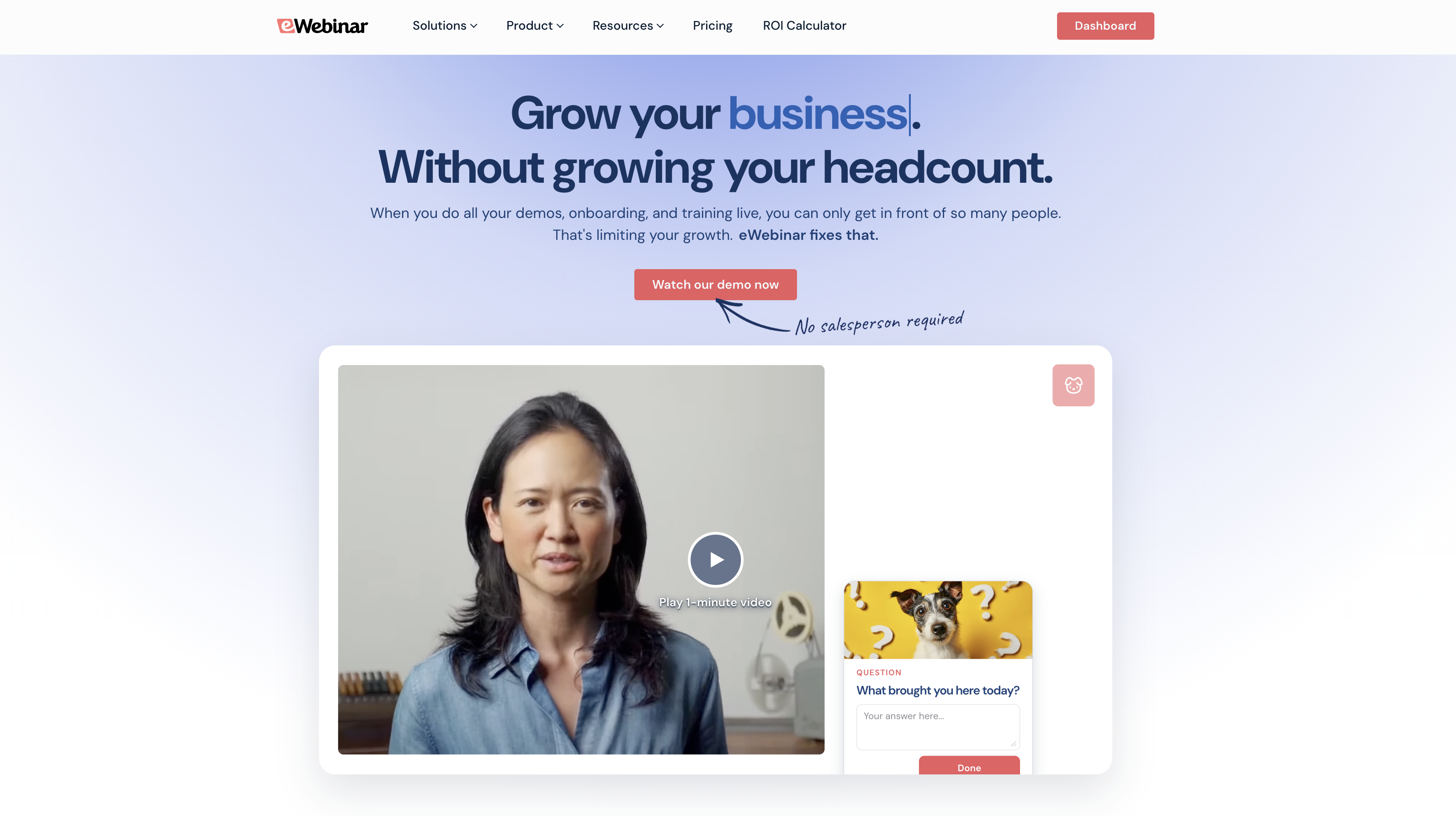
eWebinar takes a fundamentally different approach than ON24. While ON24 is built for large-scale enterprise events, webcasting, and live presentations, eWebinar specializes in automated webinars that run on autopilot — no live presenter required.
If your team is running repeat, recurring webinars, like trainings, product demos, or onboarding webinars, eWebinar can save you countless hours. You can record webinars once, pre-program interactions like polls, quizzes, and action items throughout, and schedule them to play automatically. Then attendees can join at times that work for their schedule, engage with the content, chat with your team, and get the same polished experience every time.
This makes eWebinar a strong fit for teams who need to scale webinars without adding new team members or burning out their presenters, rather than teams hosting one-off major events or large conferences — which is where ON24 traditionally shines.
eWebinar is one of the most highly rated automated webinar software in the space. We’ve held a solid 4.9-star rating since our debut five years ago because our platform completely changed the way teams approach automated webinars.
The long-standing thought with automated webinars is that they’re basically a recording. Not much different from a YouTube video. But our toolkit lets teams create engaging, interactive webinars that perform just as well (honestly, better) than live experiences. Here’s how:
1) We've built the largest gallery of pre-programmable interactions so you can place these throughout your recordings to keep attendees engaged. Programming interactions ahead of time is so much easier and more reliable than manually triggering them during live events — where hosts juggle presenting, monitoring chat, and remembering to launch polls at the right moment. Things can slip through the cracks in live sessions. With eWebinar, the interactions hit every time, exactly when you want them.
2) eWebinar's unique chat tool lets you respond to attendees during and after webinars. If you're available, you can reply in real-time. If not, responses go directly to their email. Everybody gets a reply.
3) Attendees watch on their schedule, not yours. They don't have to slot time in their calendar to tune in when your team is available. This flexibility leads to better attendance and engagement than forcing people into specific live time slots.
We don't shy away from automation or try to pretend eWebinar webinars are live. Attendees know they're tuned into an automated event — and we've found they really don't care. What they care about is the actual content and whether it's engaging and relevant to them.
In the following sections, we’ll review eWebinar's core features and show you exactly how automated webinars work in our system. If you want to explore further, you can start your 14-day free trial here or tune in to our demo below.
User-friendly webinar builder
Our webinar builder makes it super easy to transform recordings into professional webinars. It guides you through every step, so there’s no learning curve. You start here by choosing whether to create webinars with a template or build them from scratch.
We organize templates by use case (e.g., onboarding, training, sales) so it’s easy to find one that fits your webinar. Templates come with predefined goals, suggested interactions, and pre-built registration pages to guide and support your webinar strategies.
But let’s say you decide to build from scratch — even this approach is fast and simple.
- Upload your recording. You can add files from your device, import videos from Zoom or Descript, or paste URLs from video-hosting sites like Wistia.
- Name your webinar and choose its language.
- Specify how often it plays — as a one-time event, a recurring webinar, or on demand. You’ll select a viewing main option here, but you can add others later in our scheduler.
- Select the goal of your webinar (a.k.a., the conversion you want at the end of the webinar). You may want attendees to purchase your product, sign up for a trial, schedule a meeting with your teams, or advance to another webinar.
- Add branding elements, such as logos and custom colors. Our system displays your brand logos and colors on registration pages, in webinar rooms, and during webinar experiences. You only have to import these once, and our system stores them for future webinars.
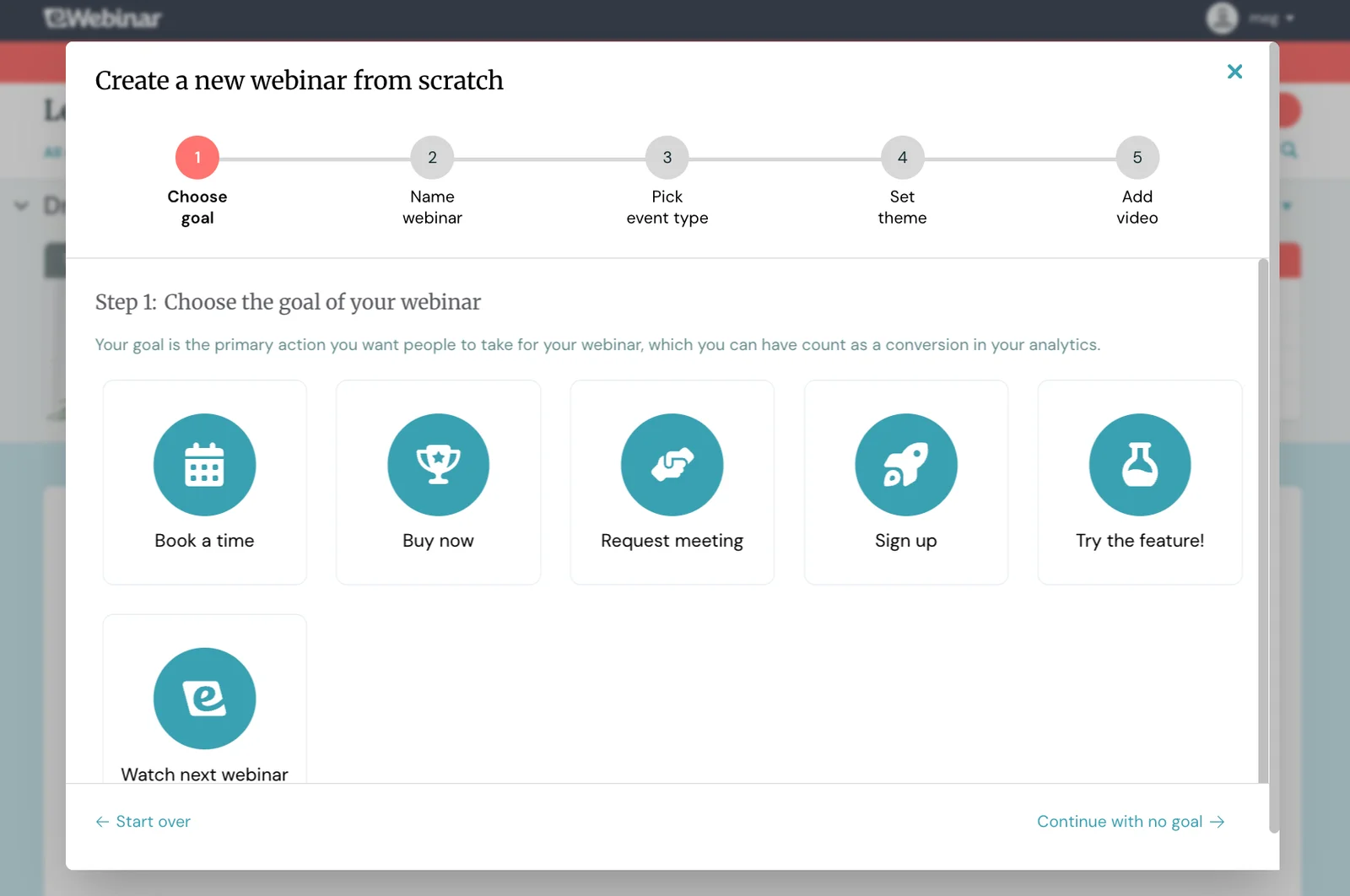
After you upload your webinar and define the details, you can begin adding interactivity.
The most extensive gallery of interactive features
As mentioned above, eWebinar offers the largest selection of interactive features to keep attendees locked in and actively participating in the webinar experience — not just passively watching. But these also serve another purpose: they let you capture valuable feedback you can use for future webinars or retargeting strategies.
Our interactions gallery includes polls, quizzes, tips, Q&As, feedback requests, action items, handouts, special offers, and more — giving you the variety to keep things interesting rather than just throwing poll after poll at attendees.
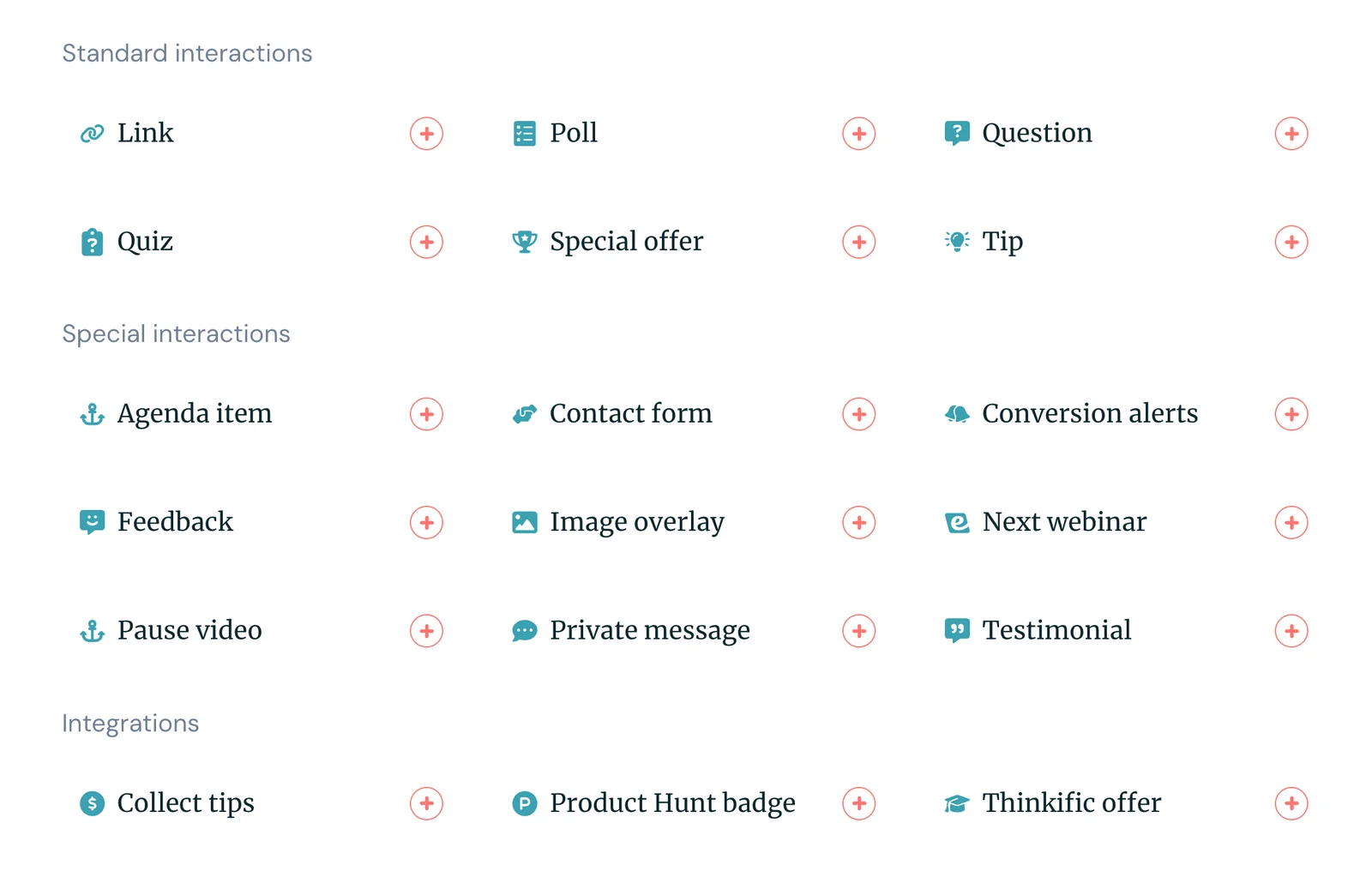
And we offer a user-friendly interactions editor that makes adding interactions simple and straightforward — so you can include as many as you want without the frustration or time sink that often causes teams to skimp on them.
Here’s how to do it:
- Find the moment in your recording where you want interactions to display
- Select the interaction you want to place
- Fill in the copy
- Hit "save"
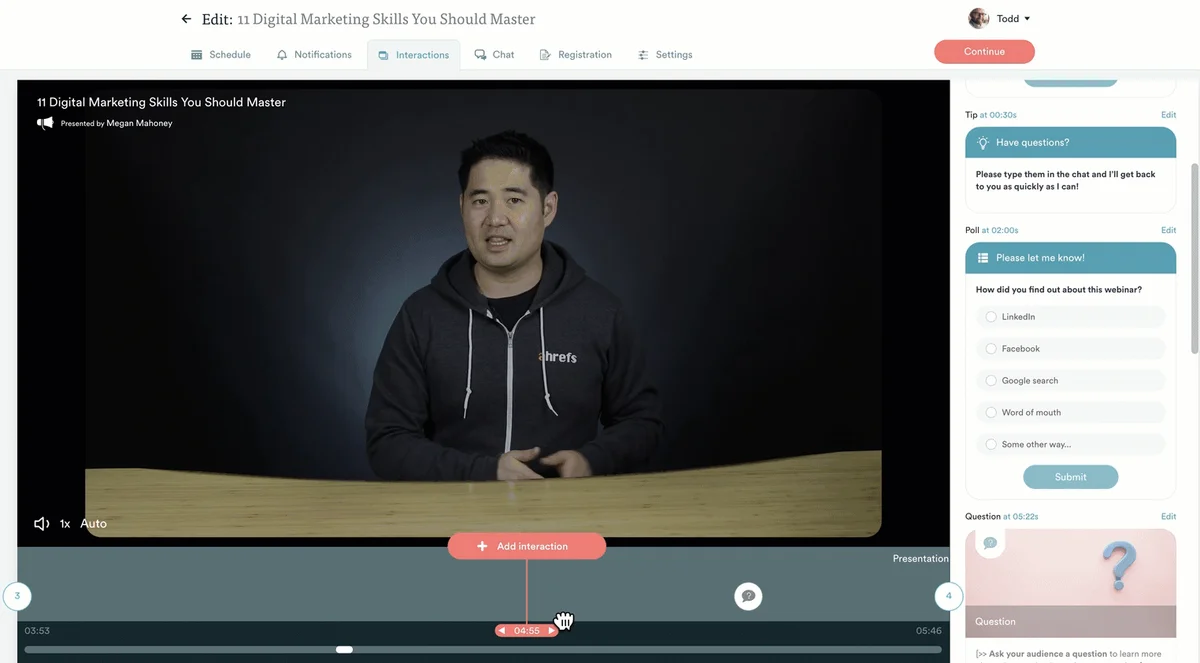
You can preview interactions as you place them, so you know they appear exactly where you want them.
We also offer AI-powered interactions to take some of the guesswork out of placing interactions. Our system reviews the content of your recording, with the webinar goal in mind, to suggest interactions and where to place them. Suggestions also include pre-written copy so you know exactly how to engage attendees.
Read more: 16 Strategies to Boost Webinar Engagement
Flexible live & asynchronous chat
Our chat feature is what really sets us apart from other automated webinar solutions — and it's what allows teams to actually automate their webinar strategies without needing moderators available around the clock.
Most automated webinar platforms only allow moderators to reply during live sessions. If no one's available to respond in real-time, attendees are left hanging — which defeats the whole purpose of automation. Sure, you can run webinars 24/7, but you still need someone monitoring chat around the clock, or you're ignoring your audience.
The typical workaround is to turn off chat entirely and use email communications instead — attendees submit a contact form during the webinar, and moderators respond later. But this approach is clunky and impersonal. Attendees lose the direct, immediate connection with hosts, and they're forced through extra steps instead of firing off a quick question.
Our chat solves this by letting attendees message moderators anytime — whether moderators are available or not. All messages appear in a central hub where moderators can see who's reached out, what's been answered, and what's still open. If they're online, they can reply in real-time just like any live chat. If they're not, they can respond later, and their replies go directly to attendees' email addresses, where conversations can continue naturally.
This means your webinars can truly run on autopilot. You're not chained to your desk monitoring chat, and attendees still get the personal, responsive experience they want.
Convenient scheduling to reach audiences when they're most interested
eWebinar's scheduling tools let you combine a variety of viewing options — recurring schedules, on-demand viewing, just-in-time sessions, and instant replays — so attendees can tune in whenever works best for them.
As we explained above, you'll select one viewing option when creating your webinar (like on-demand or recurring), but you can add others later to give attendees multiple ways to watch.
For example, you might set a recurring schedule to run webinars every Tuesday and Thursday at 2 pm, while also offering on-demand viewing for people who can't make those times or want to tune in immediately. You could even take it a step further and enable just-in-time sessions that start within minutes of someone landing on your registration page.
Our system also lets you offer instant replays during registration. Attendees don't have to attend a session first — they simply receive a replay link via email and can watch whenever they want.
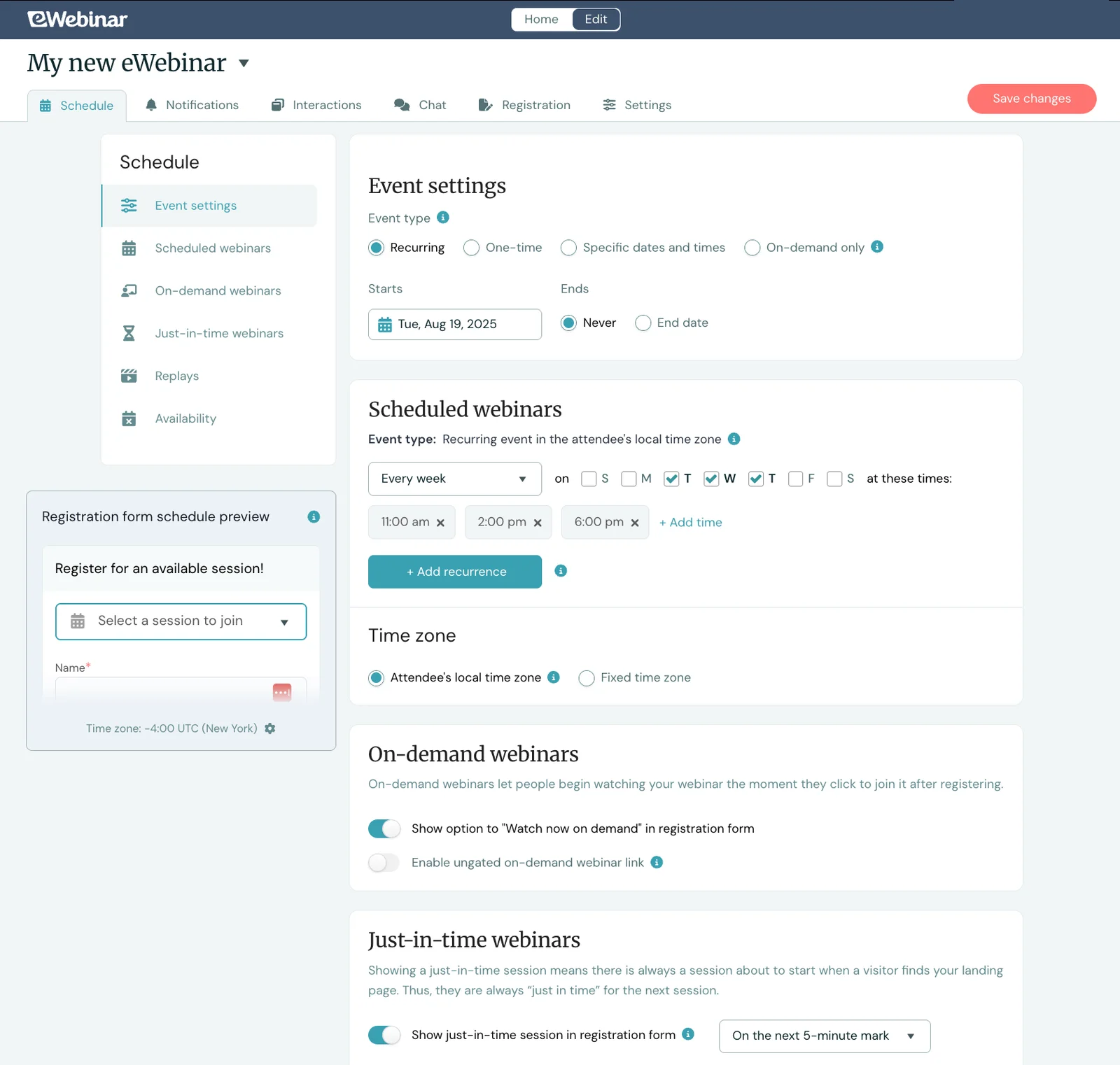
Our platform automatically adjusts webinar schedules for attendees' time zones. If you schedule sessions for 11 am, 2 pm, and 6 pm, your webinars run at those local times for all attendees, no matter where they’re located. This means you can serve global audiences without hosting webinars in the middle of the night.
This flexible scheduling is a major advantage over traditional live webinars, which lock you into specific days and times. With live sessions, attendees have to hope their schedule aligns with yours and remember to show up later. With automation, you meet attendees at their peak moment of interest — right when they're exploring your product or looking for a solution.
Webinar Series
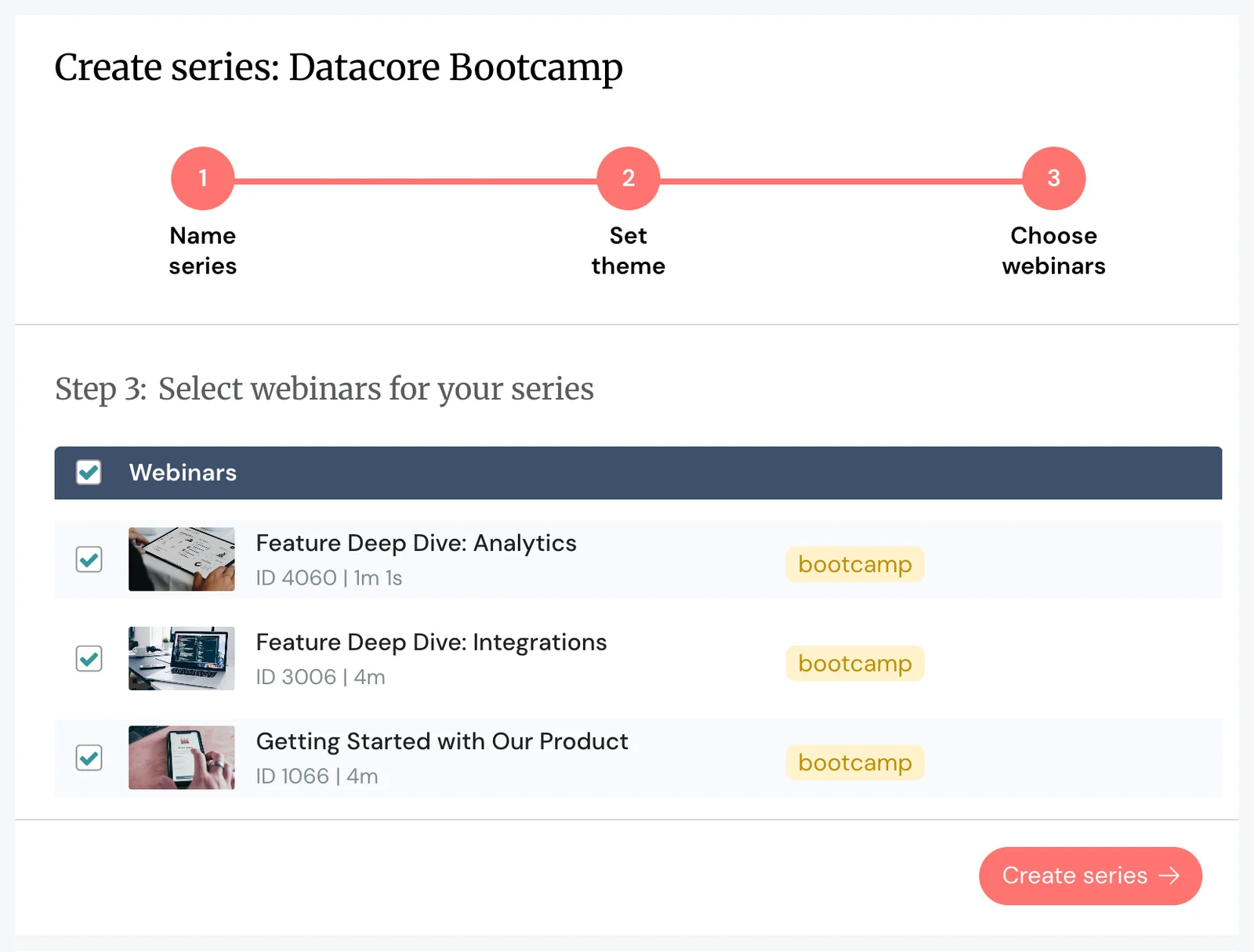
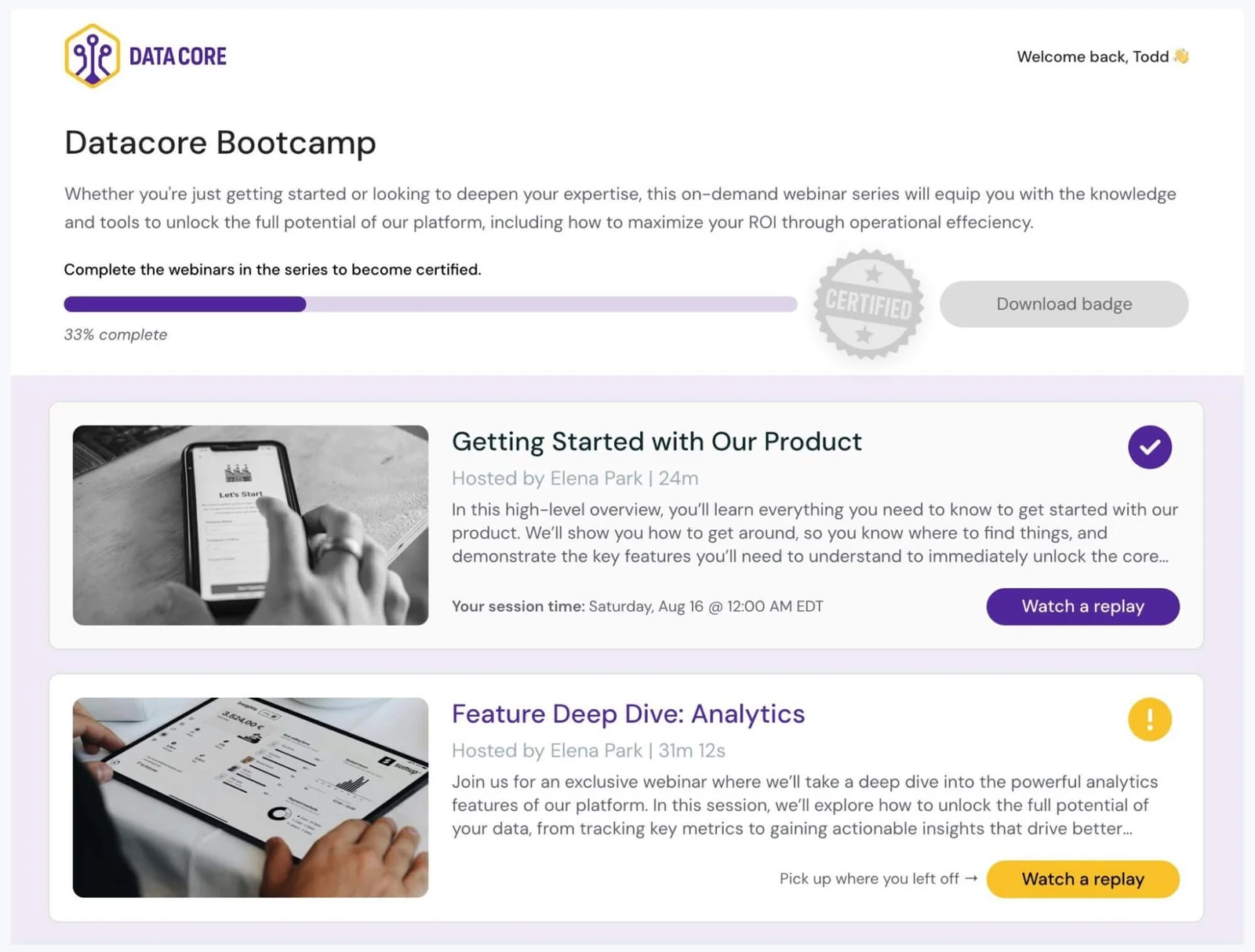
Our Webinar Series tool is also totally unique to eWebinar. This feature allows teams to create cohesive multi-webinar experiences — popular for online educators offering courses, onboarding teams training new customers or employees, and training teams helping employees build new skills or level up existing ones.
To create a series, you pull in webinars from your existing library (by tag, or manually) and arrange them in the most logical order for the learning experience.
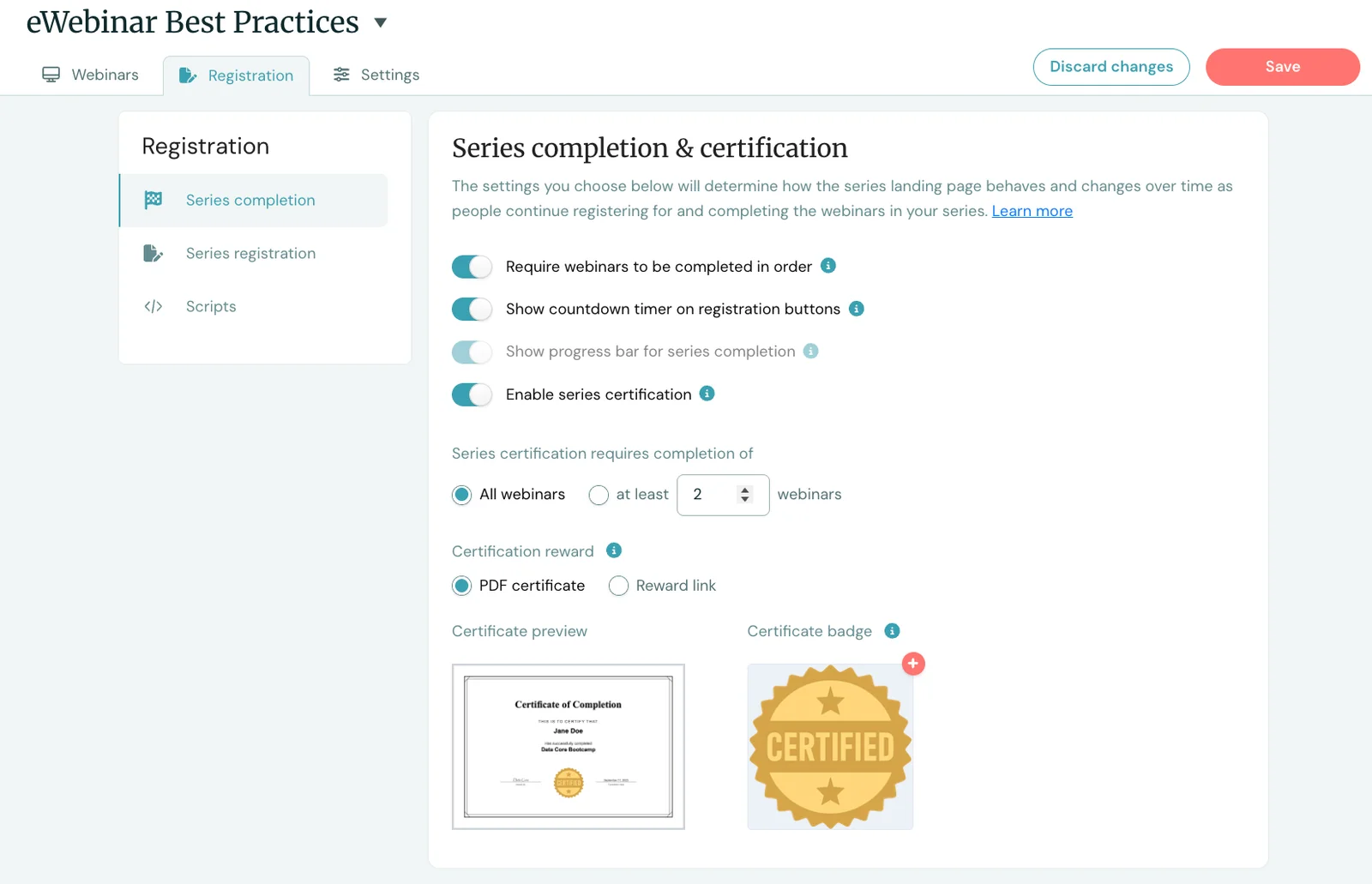
Our system lets you add completion requirements to control how users progress through the series:
- Require users to watch in order or allow them to jump around
- Set a minimum number of webinars that users must complete
- Add minimum watch times before advancing to the next webinar
- Include quizzes (with passing score requirements, if you wish) between webinars
Then you can offer completion certificates or other rewards (such as gift cards or discount codes) for users to receive upon completing the course. These also help to gamify the experience and give attendees extra motivation to cross the finish line, creating a sense of competitiveness or FOMO among those who haven’t finished up yet.
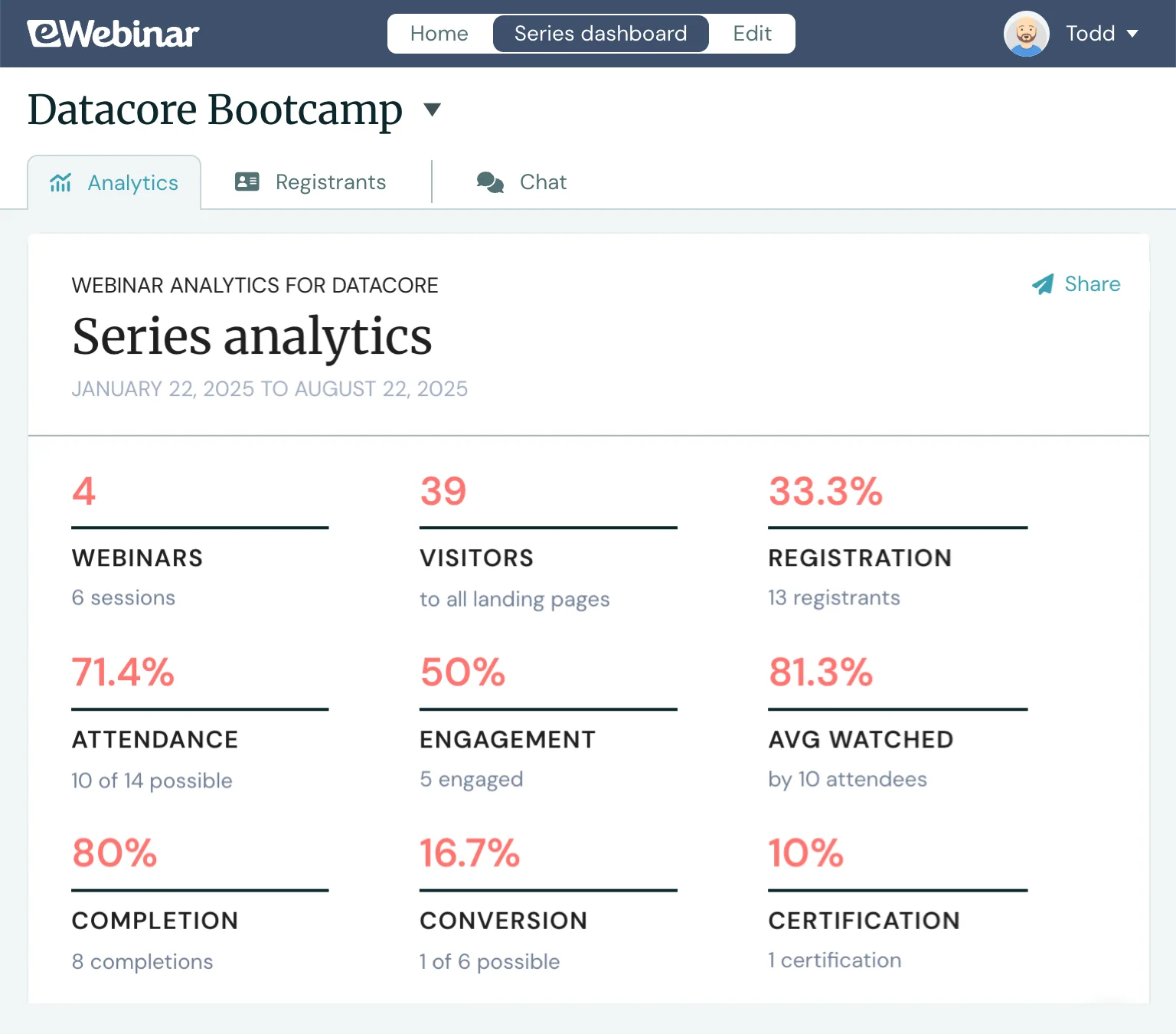
eWebinar provides detailed analytics (in the Universal Dashboard) for webinar creators to monitor the effectiveness of courses and the progress of attendees. The dashboard provides a breakdown of:
- Registration rates
- Attendance rates
- Engagement rates
- Completion and certification rates
- Average watch times per webinar
- Conversion rates (if you've set conversion goals)
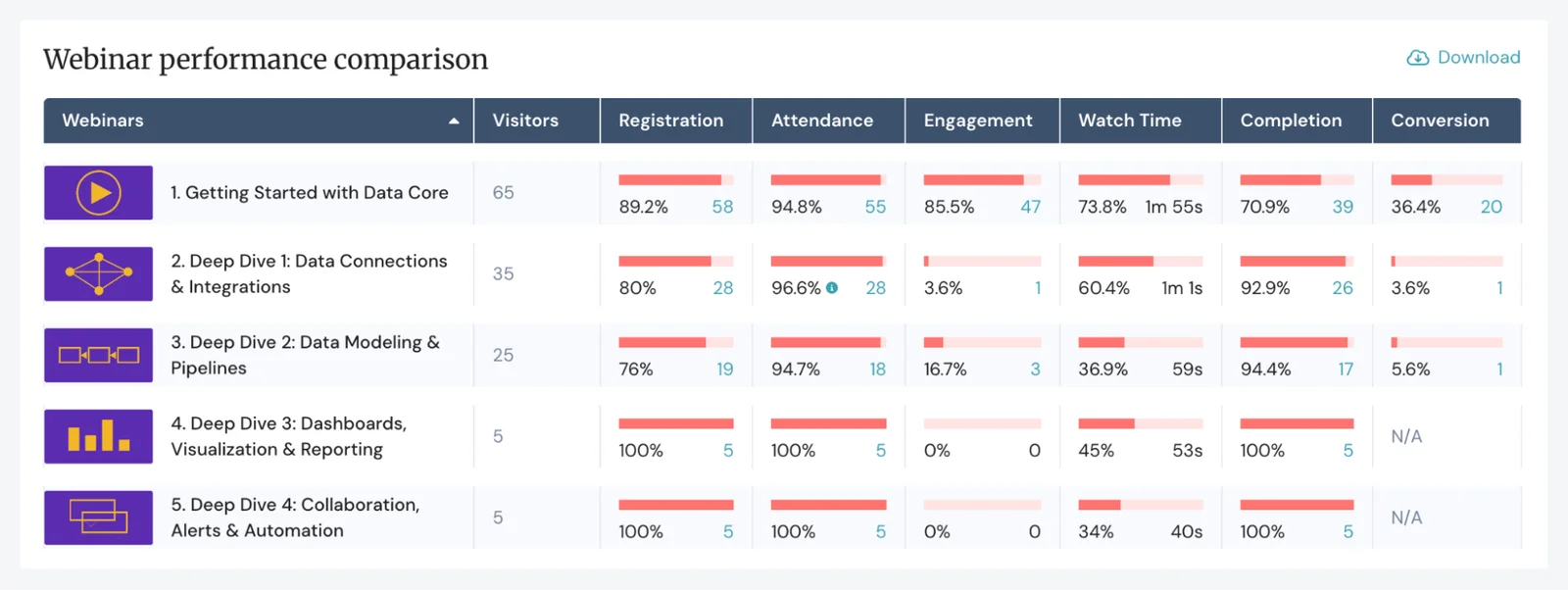
You can also dig into individual session performance to see which lessons resonate most with your audience — how long users watch each one, which drive the most engagement, and where you win conversions. On the flip side, you can identify lessons that aren't landing and need improvement.
The system also lets you track individual user performance, so you can see exactly where each person is in the series and how engaged they are. This helps you spot top performers and identify who might need extra support.
We also support attendees’ experiences with personalized Series pages. They can see all webinars in the course, access replays, monitor their progress, and access completion certificates or rewards.
Read more: What’s the Best Webinar Series Platform? & 10 Steps to Create a High-Quality Webinar Course
Registration page builders
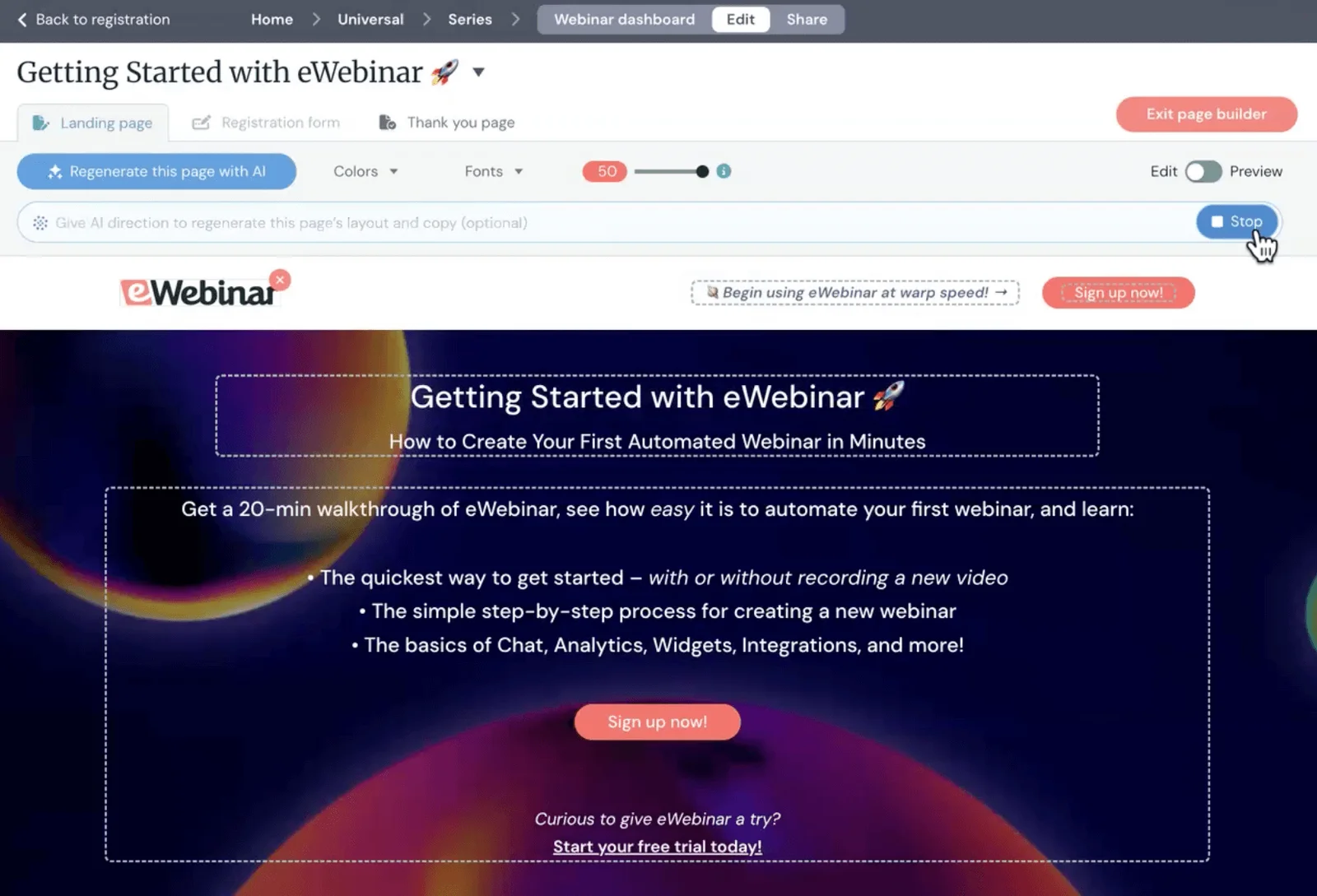
Our system’s AI-powered tools also handle the hard part of creating registration pages for webinars — turning what can be an hours-long task into just a few minutes.
Our AI builds registration pages for you, handling the full page design and copy, so you just have to review them. Most pages are ready to publish as-is, though you can tweak them or ask AI to generate new copy if needed.
We also offer a variety of registration widgets you can place across your website or on other online platforms (such as your company intranet or SaaS products), so users can find and join your webinars easily, any time.
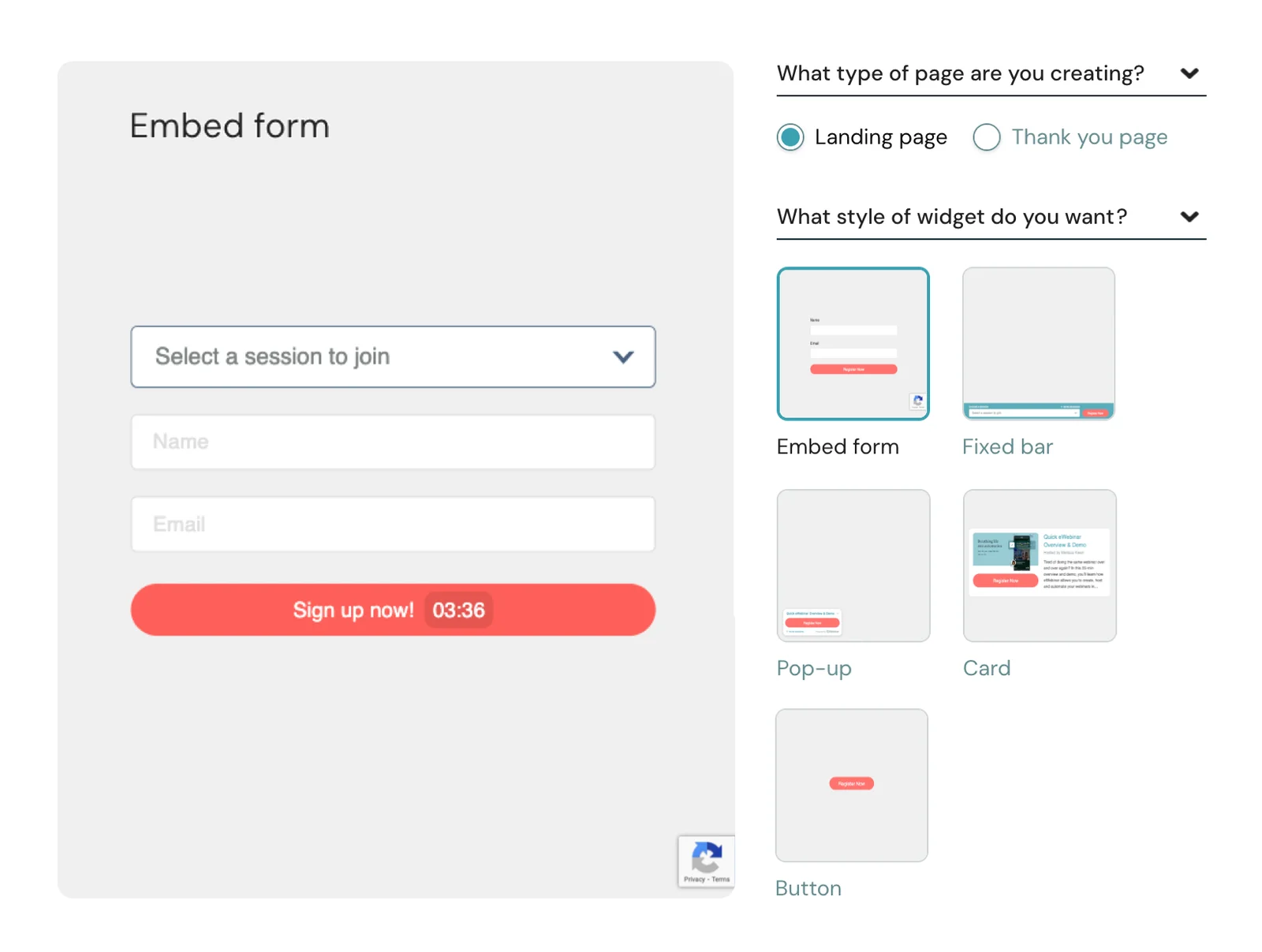
You can also customize the registration forms that appear on landing pages and in widgets, modifying the fields to collect the most important information from registrants.
While you can add as many fields as you like, we recommend keeping forms brief — you don't want to bombard people with a dozen questions just to join a webinar. Collect what you need upfront, and gather additional information or feedback through in-webinar interactions instead.
Automated reminders & follow-ups
eWebinar handles all your pre- and post-webinar communications automatically, so you don't have to manually send emails or worry about attendees forgetting to show up.
The platform comes with pre-set email schedules — reminders go out 1 day and 1 hour before webinars start, and follow-ups send 5 minutes and 1 day after webinars end. You can adjust this timing or add more emails to the queue if needed.
We also provide email templates with pre-written copy for each touchpoint, though you can customize these however you like to match your brand voice and messaging.
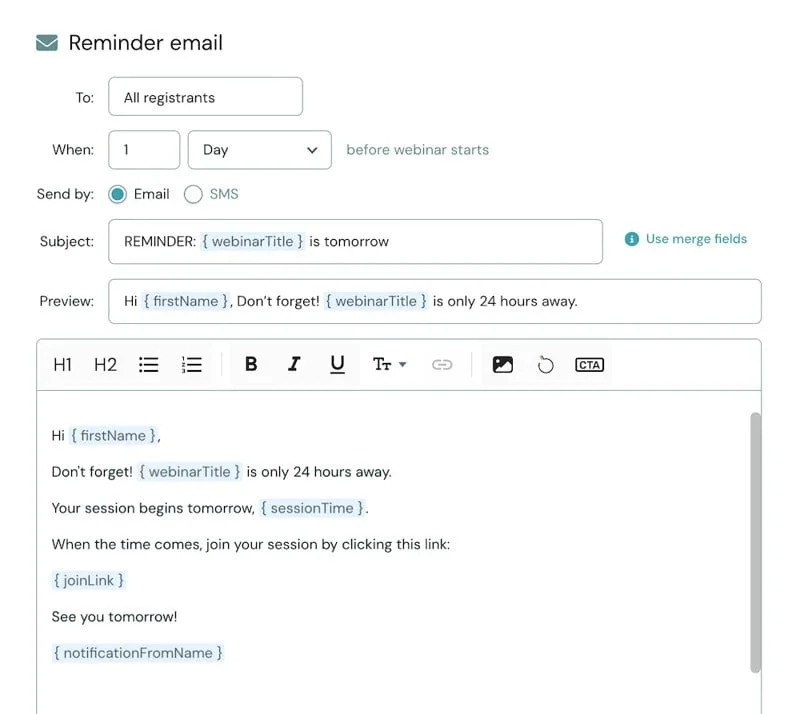
- Reminders help improve your registration-to-attendance rates by keeping your webinars top of mind for people who've signed up.
- Follow-ups reinforce your webinar's call-to-action and guide attendees to the next step — whether that's booking a demo, starting a trial, downloading resources, or moving on to the next webinar in a series. You can also share replay links here for anyone who wants to rewatch or catch what they missed.
eWebinar integrates with major CRM platforms such as HubSpot, Salesforce, and ActiveCampaign, so you can push registrant details and engagement data directly into your existing marketing tools. This makes it easy to segment leads based on how they interacted with your webinar and build targeted follow-up campaigns from there.
Detailed analytics dashboards & heatmaps
eWebinar's analytics tools give you complete visibility into how your webinars perform — so you know what's working, what's not, and where you can improve.
Our dashboards track:
- Total visitors to registration pages
- Registration rates
- Attendance rates
- Registration-to-attendance conversion
- How attendees accessed webinars (scheduled session, on-demand, or replay link)
- Engagement metrics — average watch time, completion rates, and total interactions
- Individual interaction responses — see exactly how attendees answered polls, quizzes, and feedback requests
- Conversion rates — how many attendees completed your webinar's goal
Beyond these high-level metrics, our webinar heatmaps show you exactly when attendees engage with your content. You can see when people join or leave, when they react, and when they send chats — so you know precisely what your webinar was covering during those moments.
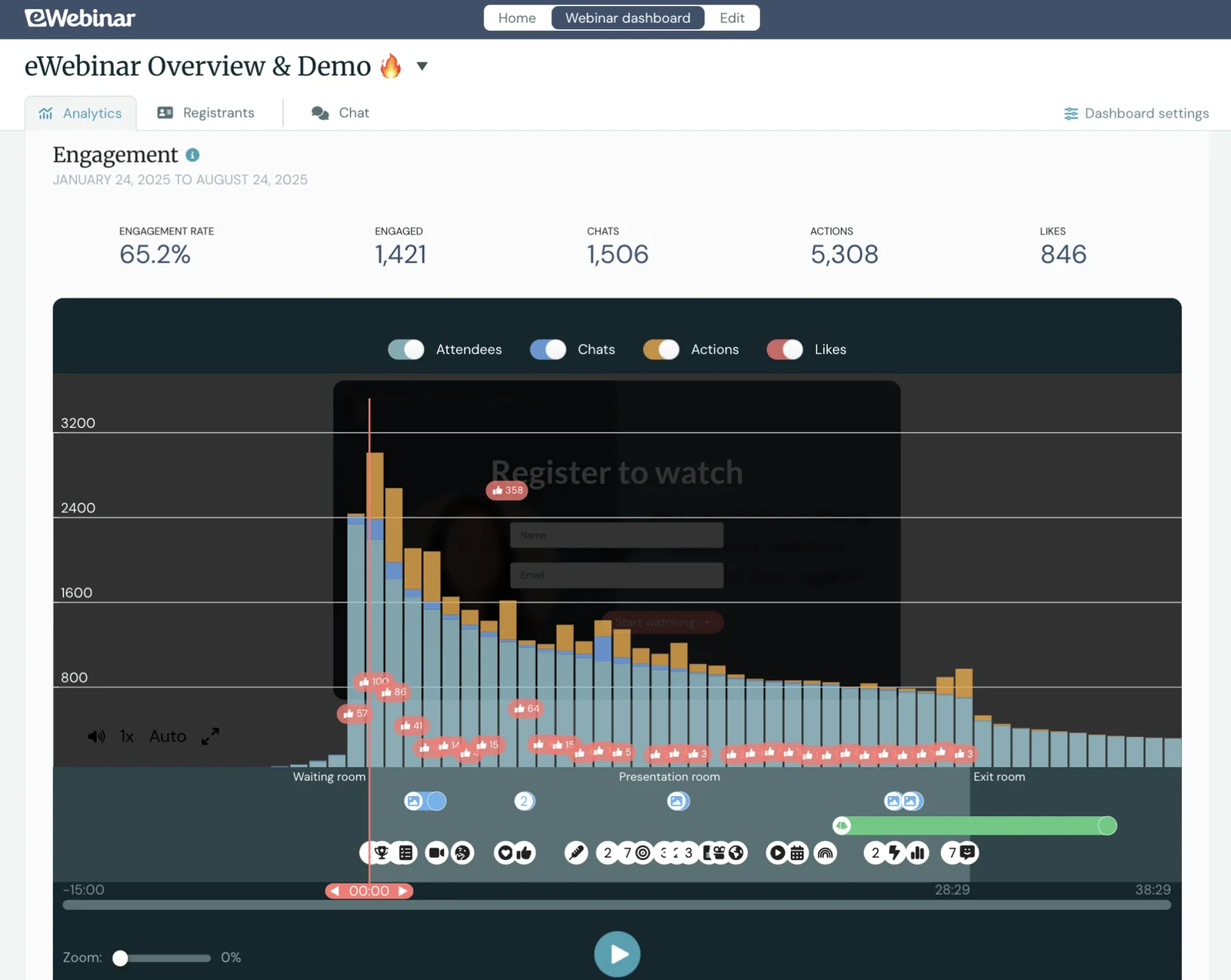
This lets you dig deeper than surface-level stats and understand how your content actually resonates. You'll spot which topics keep people engaged and which sections cause drop-offs, so you can refine your webinars and create even stronger content going forward.
Packages & getting started
We offer a 14-day free trial so you can test the platform before starting a paid plan.
Then, packages are simple — all packages include all features. You choose plans based on the number of webinars you plan to run and attendee seats you need.
- Level 1 ($99/month) supports one active webinar and 3k registrants per month
- Level 2 ($199/month) supports five active webinars and 6k registrants per month
- Level 3 ($299/month) supports 15 active webinars and 12k registrants per month
You can also build upon packages to accommodate more attendees — you can add increments of 1k attendees for $49/month.
Join our full demo to see why eWebinar is the most top-rated automated webinar software!

2. Cvent
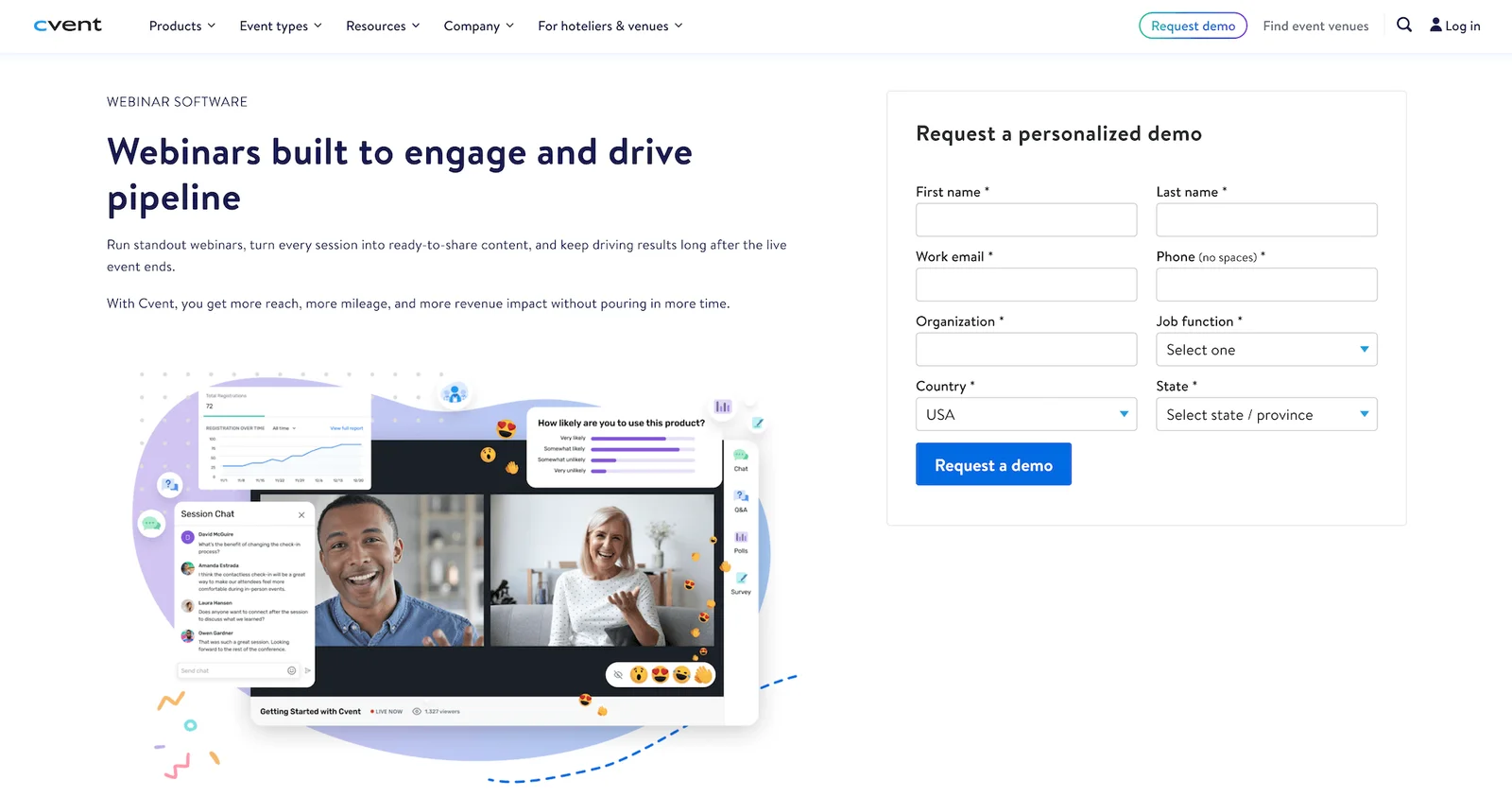
Cvent is the company that recently acquired ON24, so many ON24 users will naturally want to understand what they're being folded into and whether Cvent's platform could serve as their new webinar home.
Cvent is a comprehensive event management platform that handles everything from in-person conferences and trade shows to virtual events and webinars. The company launched its dedicated Cvent Webinar platform in 2023, positioning it as a user-friendly solution for teams running webinars, virtual training sessions, and online events.
Cvent Webinar supports three presentation types: Studio broadcast (one-way professional presentations), Collaborative (two-way presentations where attendees can join on screen), and Simulive (automated playback of pre-recorded content). This flexibility lets you choose the right format for each webinar based on your goals and audience.
The platform is popular for its ease of use — most users report building their first webinar in under an hour. It offers solid engagement tools like live chat, Q&A with upvoting, polls, surveys, emoji reactions, and resource downloads.
The customization options let you brand webinars with your logos, colors, and custom backgrounds, and the platform includes production tools like lower thirds and layout switching to make webinars look polished.
Cvent also integrates directly with the broader Cvent event platform. If you're already using Cvent for other events, you can manage everything in one place with consistent registration, attendee data, and event analytics across your entire program. For teams not already in the Cvent ecosystem, the webinar platform integrates with HubSpot, Salesforce, Marketo, and other CRMs via Zapier.
However, there are some notable limitations. While Cvent markets Simulive as "automated webinars," they're not fully automated like eWebinar webinars — you can schedule pre-recorded content to play at specific times, but the engagement features aren't as robust for automated sessions. The platform is really built for live or semi-live experiences rather than true webinar automation.
Users also report that while Cvent is easy to get started with, the platform can be clunky for certain tasks, requiring multiple steps to accomplish what should be simple actions. And while many users praise Cvent's customer support, others report mixed experiences with response times and the depth of technical assistance.
Features
- Live, simulive (semi-automated), and on-demand webinar hosting
- Three presentation types: Studio broadcast, Collaborative, and Simulive
- Custom branding — registration pages, email templates, webinar room customization, backgrounds, and lower thirds
- Production tools — layout switching, custom backgrounds, lower thirds for professional presentations
- Engagement tools — chat, Q&A with upvoting, polls, surveys, emoji reactions, and resource downloads
- Automated feedback surveys sent after webinars
- Screen sharing and multi-presenter support
- Recording and replay capabilities with video trimming for on-demand content
- Customizable registration forms
- Automated email sequences — registration confirmations, reminders, and follow-ups
- Analytics dashboards tracking registration, attendance, duration, and engagement
- Integrations with CRM and marketing platforms (HubSpot, Salesforce, Marketo via Zapier)
- Integration with the broader Cvent event platform for unified event management
- Security features and GDPR compliance
Pricing
Cvent offers two plans — Webinar Pro and Webinar Premium — but does not disclose pricing for either package on its site. You must contact Cvent for a quote.
3. Splash (by Cvent)
Splash is another Cvent product — the company acquired Splash in September 2024, just months before acquiring ON24. While Cvent and Splash are now under the same umbrella, they target different event types and audiences. Where Cvent handles large-scale enterprise events and conferences, Splash is built for smaller, repeatable marketing events — think field marketing activations, regional meetups, and product launches.
Splash positions itself as an event-led growth platform, designed specifically for marketers who need to execute branded, measurable event programs at scale. The platform serves over 500 organizations (including 60+ Fortune 1000 companies) and emphasizes three core strengths: brand-forward design, workflow simplification, and data-driven insights.
The platform makes it easy to build branded event pages, registration forms, and email campaigns using customizable templates and a drag-and-drop editor — no coding required. Splash's design-first approach ensures every touchpoint in the attendee journey reflects your brand, which can be especially valuable for marketing teams running dozens of events per quarter and need consistency across all of them.
Splash also offers RSVP management, check-in tools, badge printing, automated email sequences, and analytics dashboards that track registration, attendance, engagement, and conversion metrics.
Splash integrates with CRMs and marketing automation platforms like Salesforce, HubSpot, Marketo, and Slack, so event data flows directly into your existing workflows. This lets marketers track ROI, attribute pipeline to specific events, and build targeted follow-up campaigns based on attendee behavior.
Users appreciate Splash for its intuitive interface — once they get the hang of it. Many mention the initial setup and learning curve can be steeper than expected.
In addition to a steep learning curve, there are some recurring complaints worth noting here.
- Several users report that the website builder can feel limiting — particularly when trying to include a lot of content, such as venue details, agendas, speakers, and FAQs, which are all stacked into one long scrolling page rather than organized across multiple sections.
- You can’t really customize the platform too deeply without coding knowledge, and some users mention that the design editor can be slow to load. And integration issues — particularly with Salesforce and Zoom — have frustrated users; however, Splash's support team typically works to resolve these.
- Customer support is another mixed area. While some users praise Splash's team, others report slow response times (sometimes taking weeks or months to resolve issues), which can be problematic when you're dealing with a live event.
Find more Splash reviews here.
Features
- Live, virtual, and hybrid event hosting
- Branded event pages and registration forms with a drag-and-drop editor
- Customizable email campaigns and automated sequences
- RSVP management and guest list tracking with custom fields
- Check-in app and self-service kiosk mode
- Custom badge printing
- Session selection and capacity management
- Analytics dashboards tracking registration, attendance, engagement, and ROI
- Integrations with CRM and marketing automation platforms (Salesforce, HubSpot, Marketo, Slack, Zapier)
- Live streaming integration with YouTube and Vimeo
- Custom workflows and API for automation
- GDPR and CCPA compliance
Pricing
Like Cvent above, Splash doesn’t disclose pricing online. They offer two packages — Pro and Enterprise — but you have to contact their team for a quote.
4. Bizzabo
Bizzabo is an all-in-one event management platform that's been around since 2011, primarily serving B2B organizations running conferences, trade shows, summits, and corporate events. The platform is called "Event Experience OS" and positioned as an enterprise-grade solution for teams managing complex, multi-format event programs.
What sets Bizzabo apart is its focus on in-person and hybrid events with immersive attendee experiences. The platform is recognized as a leader in the space because of its comprehensive feature set, strong customer support, and innovative wearable technology (Klik SmartBadge™) that enables tap-to-connect networking and real-time engagement tracking. The platform also integrates with over 2.5k outside systems, including Salesforce, HubSpot, Marketo, Mailchimp, and Slack.
Bizzabo handles the full event lifecycle: customizable registration flows, dynamic event websites, multi-track agendas, mobile event apps, email marketing automation, live streaming for virtual/hybrid sessions, and detailed analytics dashboards. The platform supports AI-powered attendee matchmaking to facilitate meaningful connections, live polling and Q&A, breakout rooms, sponsor management tools, and lead retrieval for exhibitors.
For teams leaving ON24, Bizzabo could be appealing if you need a more unified platform that handles both virtual and in-person experiences.
Bizzabo's virtual capabilities include studio-quality broadcasting, audience engagement tools (reactions, applause, chat), and on-demand content hosting — though some users note that the virtual event features aren't as advanced as dedicated virtual-only platforms.
Where Bizzabo really shines is the onsite experience. The platform offers check-in tools, badge printing, lead scanning, and those SmartBadges that turn networking into a seamless experience. Event organizers love the real-time heatmaps showing foot traffic and engagement patterns across their events.
Users consistently praise Bizzabo's intuitive interface and strong customer support — the onboarding team provides tailored training, and most customers get their events up and running within two months.
However, Bizzabo is super expensive — base pricing starts around $18k per year, and many essential features (integrations, sponsor portals, virtual production suite, advanced branding) are premium add-ons that significantly increase costs. So it’s pretty much out of budget for smaller teams with tighter budgets.
In addition to the steep pricing, some users report occasional technical issues, such as check-in systems running slowly during peak times and integration troubles (particularly with Marketo). And customer support, while generally praised, can be slow during busy periods; some users mention having to work through multiple team members to resolve issues.
Find more Bizzabo reviews here.
Features
- In-person, virtual, and hybrid event hosting
- Customizable registration flows and multi-track agendas
- Dynamic event websites with SEO optimization
- Mobile event app with networking, engagement, and personalization features
- AI-powered attendee matchmaking
- Klik SmartBadges for tap-to-connect networking and real-time analytics
- Check-in tools, badge printing, and lead scanning
- Live streaming with studio-quality video production
- Engagement tools — live polls, Q&A, chat, breakout rooms, reactions, virtual applause
- Speaker portal with task management and automated reminders
- Sponsor and exhibitor management with lead retrieval tools
- Email marketing automation with personalization and smart lists
- Real-time heatmaps for attendee foot traffic and engagement
- Analytics dashboards tracking registration, attendance, engagement, and ROI
- Integrations with 2.5k+ platforms, including Salesforce, HubSpot, Marketo, Slack, and Zapier
- Enterprise-grade security (SOC 2, ISO27001, GDPR, CCPA, ADA compliance)
Pricing
Bizzabo doesn’t disclose all pricing details online.
We can see the Event Experience OS package costs $499/user/month and is billed annually. However, the platform's entry price is $17,999 per year.
There are no pricing details for the Klik SmartBadge™ package.
If you’re interested in Bizzabo, we suggest contacting their team for more information on packages.
5. Virtual PRO (formerly Hubilo)
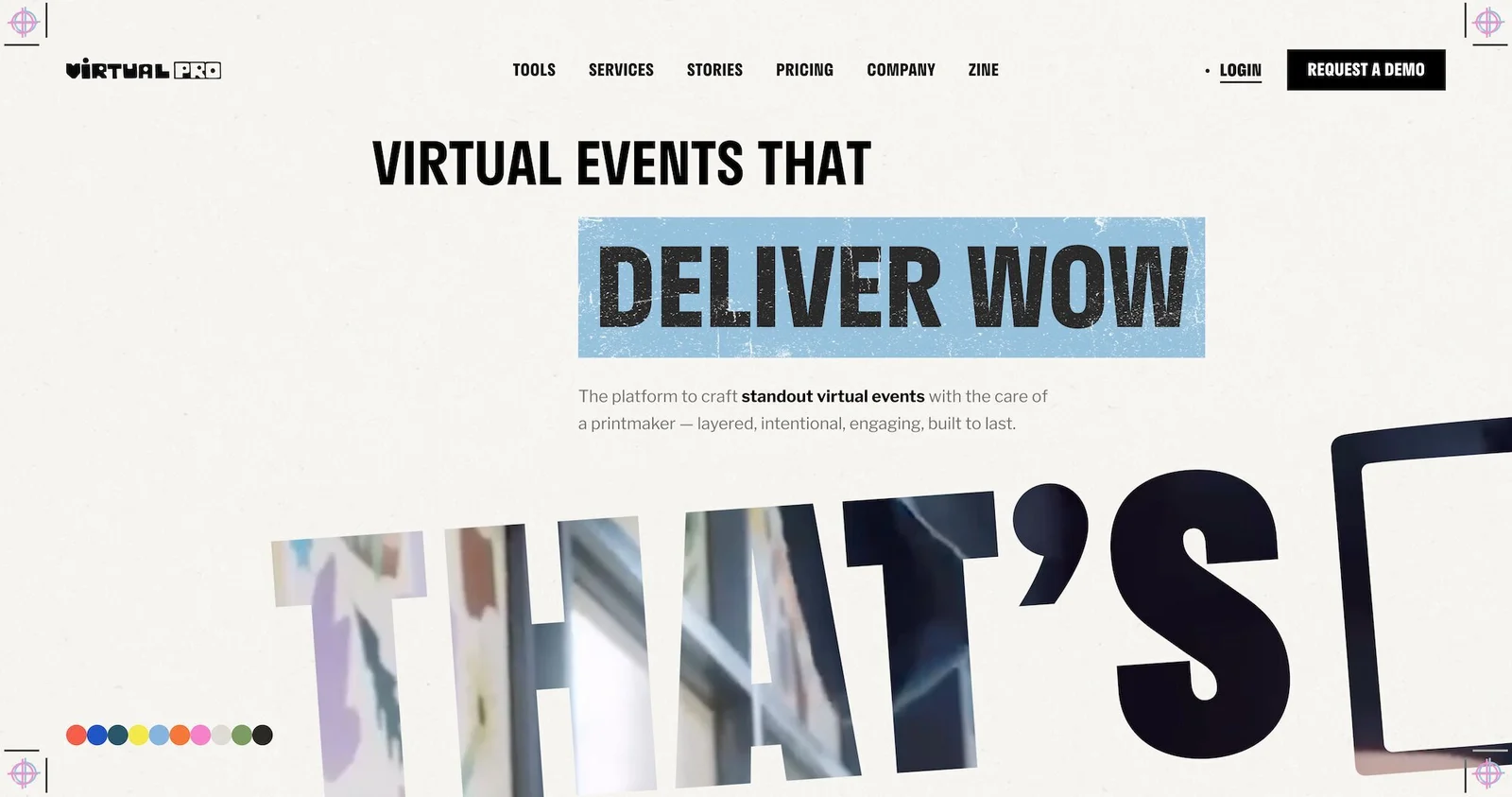
Virtual PRO (formerly Hubilo) positions itself as a virtual events platform designed to craft experiences "with the care of a printmaker — layered, intentional, engaging, built to last." The platform takes a production-first approach, emphasizing that webinars shouldn't be boring slides on Zoom — they should feel more like the high-quality video content people watch on Netflix, YouTube, and TikTok.
The company has powered major virtual events for organizations like Cognizant (live streaming 5 stages and 20 watch parties to audiences across 50 countries for their 2025 Impact Awards), Public (high-end virtual conference uniting top voices across business, tech, politics, and culture), and Amazon (annual Conflux design symposium bringing together the global design community).
Virtual PRO offers end-to-end production support — handling everything from concept and creative through cameras, crew, and broadcast. The team manages theming, segment planning, scripting, direction, on-site execution, segment timing, motion graphics, transitions, and visual pacing to keep events polished and engaging.
The platform emphasizes branded, frictionless attendee experiences. You can craft custom registration pages, personalized emails, and immersive event environments that reflect your brand from the first interaction. Features like one-click access, SSO, and automated calendar blocks streamline the attendee journey and boost registration and attendance.
Engagement tools include Q&A, polls, quizzes, leaderboards, and networking rooms designed to keep attendees actively participating, rather than passively watching. The platform tracks every attendee action — from booth visits to emoji reactions — and offers real-time CRM integrations with HubSpot, Salesforce, and Marketo. This data enriches lead profiles, prioritizes hot accounts, and gives sales and marketing teams conversion-ready insights. And Virtual PRO handles global audiences with HD streaming, adaptive bitrates, and multilingual captions.
For teams coming from ON24, Virtual PRO offers a shift toward production quality and creative execution. The platform is less about enterprise-scale webcasting and more about creating memorable, dynamic events that feel polished and intentional.
Most available reviews are still under the Hubilo name, so it's harder to assess how the platform performs post-rebrand or whether there have been changes to the user experience or support.
We don’t see reviews for Virtual PRO yet, but you can find Hubilo reviews here.
Features
- Virtual, hybrid, and in-person event hosting
- Virtual PRO Broadcasting Studio with backstage controls and speaker management
- HD streaming with adaptive bitrates and multilingual captions
- Custom branding — registration pages, emails, event rooms, booths
- Engagement tools — live polls, Q&A, quizzes, leaderboards, gamification, chat, networking rooms
- AI-powered matchmaking and 1:1 speed networking
- Interactive sponsor booths with lead capture
- Multi-track sessions with concurrent streaming
- Breakout rooms and networking lounges
- Mobile event app with chat, polls, and gamification
- QR code check-in and custom badge design
- Automated email campaigns with personalization
- Real-time analytics tracking registration, attendance, engagement, and conversions
- Integrations with HubSpot, Salesforce, Marketo, and other CRM/marketing platforms
- Multi-streaming to LinkedIn, YouTube, Facebook
- 24/7 customer support with dedicated success managers
Pricing
Virtual PRO offers four plans:
- PRO 1 ($15k/year) supports unlimited events, 1k attendees per event, 1 admin seat, and 1 channel. It comes with standard support. Virtual PRO recommends this to solo creators hosting simple, small-scale events.
- PRO 4 ($50k/year) supports unlimited events, 4k attendees per event, 4 admin seats, and 1 channel. It comes with premium support. Virtual PRO recommends this to growing teams running regular events with larger audiences.
- PRO 10 ($125k/year) supports unlimited events, 10k attendees per event, 10 admin seats, and 1 channel. It comes with premium support. Virtual PRO recommends this for professional teams producing high-volume events at scale.
- PRO MAX (custom quote) supports unlimited events, 40k attendees per event, unlimited admin seats, and 3 channels. It comes with premium support. Virtual PRO recommends this for enterprises delivering large-scale, multi-channel live experiences.
6. Riverside Webinars
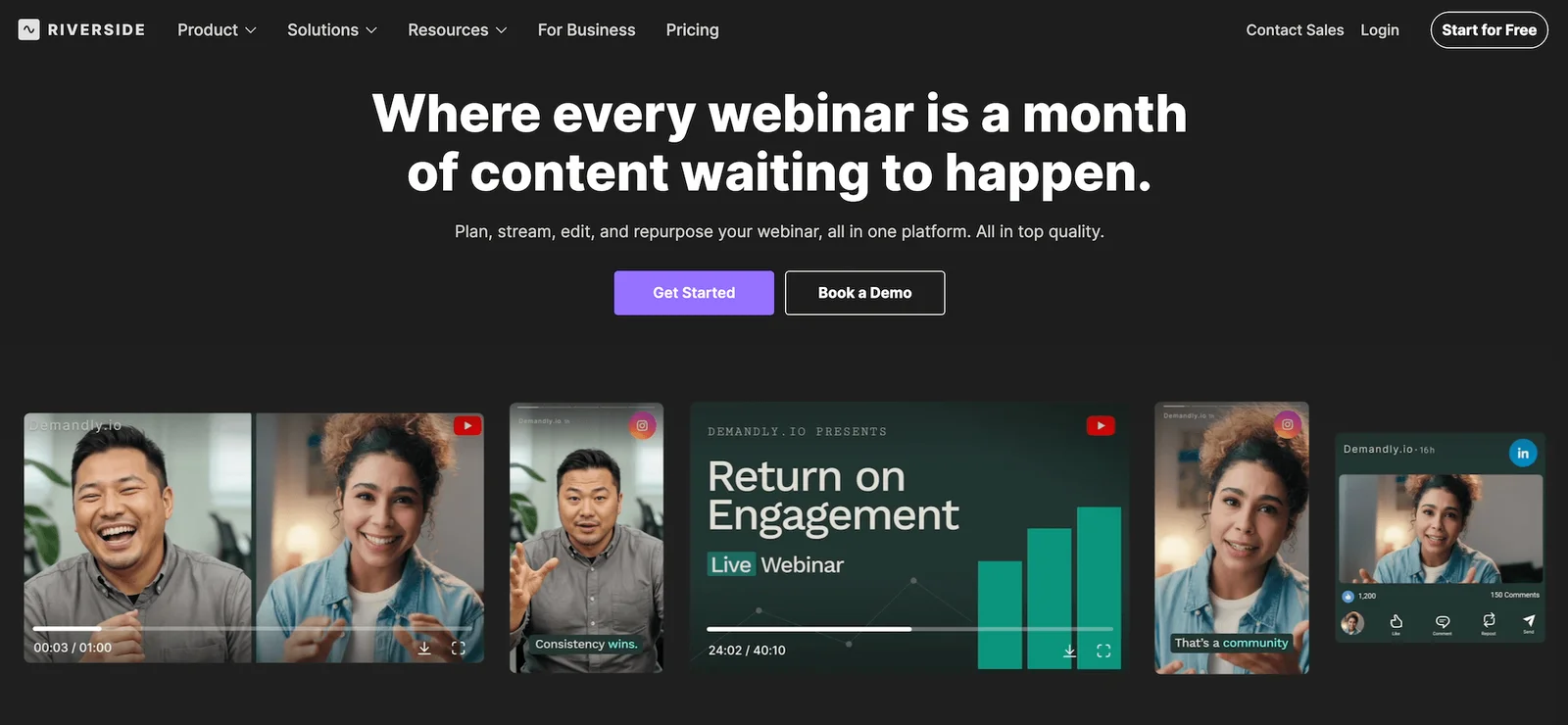
Riverside started as a podcasting and remote recording platform and has since expanded into webinars. It's built around one core promise: studio-quality recording. The platform records up to 4K video and uncompressed 48kHz audio locally on each participant's device, then uploads to the cloud — meaning internet connection issues won't tank your recording quality.
Riverside is appealing if you're prioritizing content quality and repurposing over traditional webinar infrastructure. The platform is designed for teams who want to host a webinar, capture flawless recordings, and then turn that content into clips, social posts, follow-up videos, and more.
Riverside supports live webinars with up to 10,000 audience members (or unlimited if you multistream to YouTube, LinkedIn, Facebook, or other platforms via RTMP). Attendees can participate through live chat, Q&A, polls, and even request call-ins. When granted, call-ins are recorded separately and do not count toward your track limits, giving you clean, individual recordings of everyone who speaks.
The built-in editor is a major differentiator here. It's text-based, so you can edit your webinar by simply editing the transcript — removing filler words, cutting awkward pauses, trimming sections. You can also add captions, overlays, branded elements, and animations directly in the editor without exporting to another platform. Then Riverside's AI tool (Magic Clips) automatically identifies highlights and turns them into short social clips.
For teams coming from ON24 or other traditional webinar platforms, there's an important caveat: Riverside wasn't originally built for webinars. It doesn't have registration pages, automated email reminders, calendar invites, or CRM integrations out of the box. Some users work around this by connecting Airtable, Zapier, and other tools to build registration workflows, but it requires extra setup.
Riverside does now offer built-in registration with automated reminders and HubSpot syncing for lead tracking, but the webinar-specific features are still catching up to dedicated platforms.
Where Riverside excels is ease of use, recording quality, and content repurposing. Users consistently praise the platform's intuitive design — there's essentially no learning curve. Hit record, wait a bit, and you get studio-quality output. The separate audio and video tracks for each participant make editing incredibly flexible. And pricing is transparent and affordable compared to most webinar platforms (especially the ON24 competitors we’ve discussed above).
Downsides include occasional upload complaints, and customer support can be hit-or-miss. Some users rave about quick, helpful responses, while others report frustratingly slow support. The platform only works on Google Chrome, which has been a frequent issue for guests who need to download the browser first. And the mobile app is limited — you can't set up future recordings or send guest invites from it.
Find more Riverside reviews here.
Features
- Live webinars with up to 10,000 audience members
- Up to 10 guest speakers with separate local recording (4K video, uncompressed audio)
- Multistreaming to YouTube, LinkedIn, Facebook, Twitch, and RTMP platforms
- Live chat, Q&A, polls, and audience call-ins
- Text-based editor with AI-powered tools (Magic Clips, filler word removal, pause detection)
- Automated transcription in 100+ languages
- Captions, overlays, branded elements, and animations
- Built-in teleprompter
- Screen sharing and media board for playing audio/video clips
- Custom branding (logos, backgrounds, styled captions)
- Built-in registration pages with automated email reminders
- HubSpot integration for lead tracking (registrant details synced as contact properties)
- Hosting for on-demand webinar replays
- Mac app and mobile apps (iOS, Android)
- Unlimited recordings, storage, and events (no per-event or per-attendee fees)
Pricing
Riverside Webinars offers a 14-day free trial and four paid plans — but only the Webinar plan supports webinar features.
- The Pro plan ($29/month) supports 4K video quality and 48kHz audio quality, 15 hours of multi-track recordings, unlimited text-based editing, AI tools like Magic Audio, the AI editing and repurposing agent, and publishing to YouTube & podcast directories.
- The Live plan ($39/month) includes everything in the Pro plan plus live streaming in full HD, the ability to stream to YouTube, Facebook, LinkedIn, Instagram, X & Twitch at once, omnichat, live stream chat, and backstage speaker management.
- The Webinar plan ($99/month) includes everything in Live plus webinar hosting for up to 100 registrants, pre-recorded and live sessions, unlimited scheduled sessions, engagement tools (Q&A, live call-ins, polls, reactions), lead capture tools, branded registration form, automated email reminders and follow-ups, and webinar analytics.
- The Business plan (custom quote) includes everything in Webinars plus webinar hosting for up to 10k registrants, unlimited multi-track recording, custom branding, unlimited storage, podcast hosting for unlimited shows, producer mode, production workspaces, collaborative editing, Salesforce integration, API, SSO, SOC2 type II, and ISO27001 compliance, custom onboarding, and a dedicated account manager.
7. Webex Webinars (by Cisco)
Webex Webinars is part of Cisco's massive Webex Suite and was recently named the #1 best webinar software for 2025 by G2. It's built for scale — you can host webinars with up to 100k attendees — and it's trusted by 95% of the Fortune 500. Companies like T-Mobile, AT&T, Nasdaq, and Paychex use Webex across their organizations.
The platform shines in security and accessibility. It includes end-to-end encryption and role-based access controls, making it a solid choice for enterprises with strict data privacy requirements. Real-time translations in 100+ languages and support for live interpreters make it genuinely accessible for global audiences. AI-powered noise cancellation ensures clean audio even in less-than-ideal environments.
Webex offers rehearsal mode and stage manager features that let you control exactly what your audience sees before, during, and after the event. You can design branded registration pages and customize the entire interface with your company's themes and colors. Engagement features include breakout sessions, live polling and Q&A, gesture recognition, and interactive tools that encourage attendees to participate rather than just watch.
The platform integrates with Salesforce, Eloqua, and other CRMs, though some users report that the integrations provide adequate data but fall short in terms of quality.
Webex also integrates well with Microsoft Outlook, which users appreciate for efficiently organizing and managing meetings. It's reliable, stable, and suitable for businesses that prioritize security and can afford enterprise pricing.
In addition, Webex offers an API for tech-savvy teams who want more flexibility in automating their webinar strategy.
For ON24 users, Webex is a logical alternative if you're operating at enterprise scale and need rock-solid reliability. However, it comes with trade-offs: the interface feels outdated and clunky compared to newer platforms. Users consistently mention a steep learning curve — it's not intuitive for newcomers and takes significant time and effort to use effectively. The platform has been around since 1995, and it looks like it hasn’t been updated since.
Feature development seems slow. If you look through Webex's release notes, you'll see that standard features competitors have had for years are only just now being implemented. For example, the ability to call someone using their extension was announced in December 2023, delayed in January 2024, and then went silent. The platform works fine for basic video conferencing and webinars, but it's falling behind more innovative solutions in terms of ease of use and cutting-edge technology.
Pricing is license-based, which can become problematic if you have a large team running webinars, as it impacts your ability to scale. Many powerful features (call recordings, live streaming, voicemail-to-email, developer tools) are reserved for enterprise plans with custom pricing. Even on the most expensive plans, things like workforce management and translations cost extra.
Check out more Webex Webinar reviews here.
Features
- Live, automated, on-demand, simulive, and hybrid webinar hosting
- Multi-presenter support with video and screen sharing
- Restreaming to social media platforms and RTMP destinations
- Custom branding — registration pages, email templates, event room customization, and virtual backgrounds
- Engagement tools — chat, live polling (native and Slido), Q&A, hand raising, emoji reactions, event games, and gesture recognition
- Breakout rooms
- Scheduling — one-time, recurring, just-in-time, and on-demand events
- Automated email sequences — registration confirmations, reminders, and follow-ups
- Analytics dashboards
- Integrations with CRM, marketing, and workflow tools (Salesforce, Eloqua, Webex Meetings)
- Security features — FedRAMP, SOC 2 Type II, TLS encryption, GDPR compliance, HIPAA/BAA, and role-based access controls
- Multi-language support, real-time translation, closed captioning, screen reader, high contrast modes, and dial-in options
- Webex Assistant — AI-powered transcription, notes, and highlights for post-event workflows
- Webcast mode for large-scale broadcast-style events
- (Some) advanced production controls — practice sessions, speaker pages, custom stage layouts
Pricing
Webex offers two packages: Webex Webinars (for automated webinars) and Webex Events (for in-person, virtual/live, or hybrid events).
Packages are by attendee capacity. The entry-level tier supports up to 1,000 attendees, but you can upgrade as needed to support over 10k attendees. Pricing starts at $275 per user per month.
8. Zoom Webinars
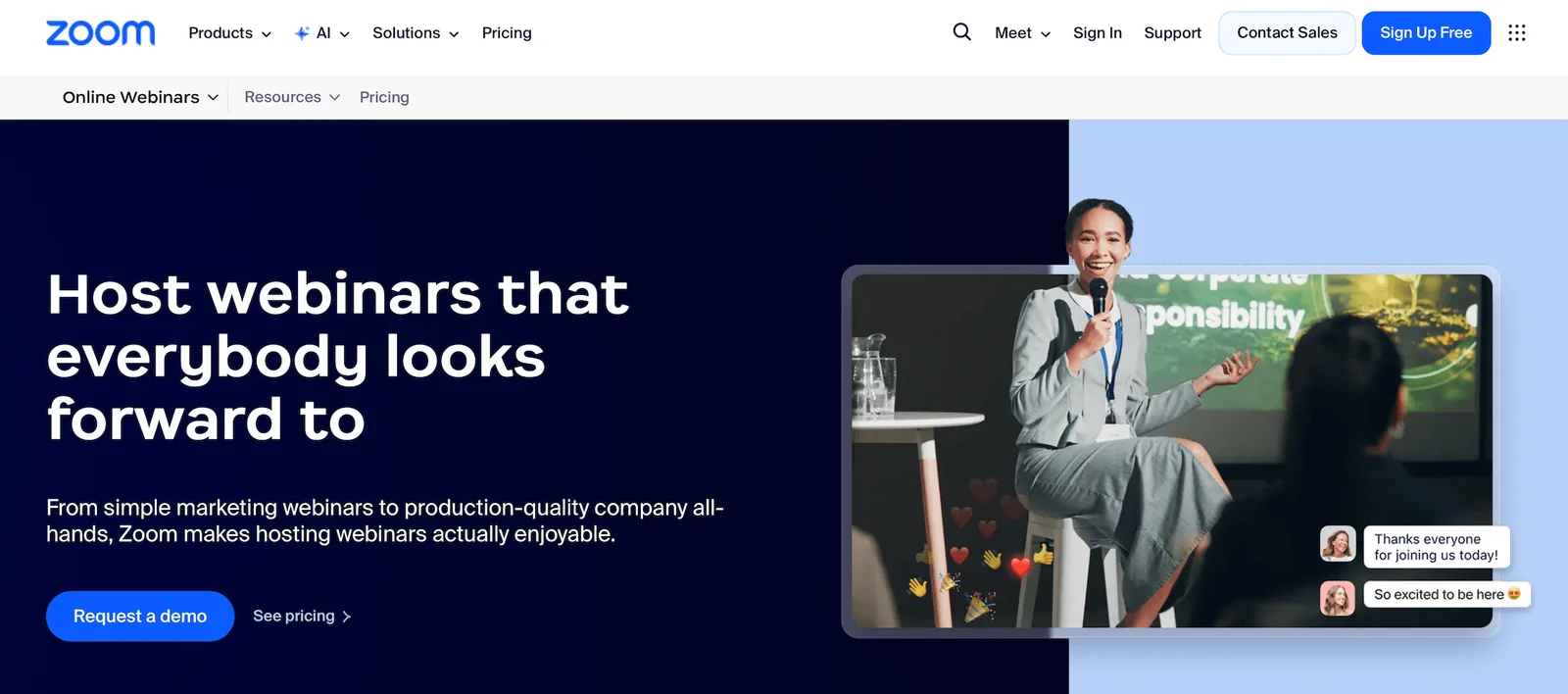
Zoom Webinars is an obvious choice if you're already using Zoom for online meetings and want to expand into webinars. It's familiar, widely adopted, and scales up to 1 million attendees — if you're willing to pay for it. Most people know how to use Zoom, which makes it a simple solution for both hosts and attendees.
The platform offers four webinar modes: Standard webinars for up to 1k attendees (scalable to much higher), Simulive (pre-recorded content broadcast at scheduled times with live host participation), Zoom Events for managing multi-session conferences with ticketing and branding, and Zoom Sessions for hosting interactive breakout sessions within larger events. You can also broadcast webinars directly to YouTube, Facebook, and custom streaming platforms.
Engagement features include live polls, Q&A with moderation and upvoting, chat (public or private), emoji reactions, and the ability to bring attendees “to the stage” mid-webinar. And Zoom's backstage area lets panelists prep without attendees seeing or hearing them.
Registration is flexible — you can require it, make it optional, or skip it entirely — and automated email reminders keep attendance rates high.
Zoom's analytics track registration, attendance, Q&A activity, poll responses, and engagement. The platform integrates with major CRMs (Salesforce, HubSpot, Marketo) and marketing automation tools — though, like Webex, the native integrations don't always work how teams expect.
Find more Zoom Webinar reviews here.
Features
- Live webinars and Simulive (pre-recorded content broadcast at scheduled times with live host participation)
- Multi-presenter support with video and screen sharing
- Recording and replay capabilities
- Custom branding for registration pages and emails
- Engagement tools — chat, Q&A, polls, hand raising, reactions
- Breakout rooms for smaller group discussions
- Scheduled webinars with calendar integrations
- Automated email reminders for registrants
- Analytics dashboard tracking registrations, attendance, and poll engagement
- Integrations with CRM and marketing platforms via Zapier
- Security features — waiting rooms, passcodes, encryption
- Mobile apps for iOS and Android
- Multi-language support and closed captioning
Pricing
Zoom offers three packages: Webinars, Webinars Plus, and Events. You need the Webinars Plus plan to access Simulive sessions.
- The Zoom Webinars plan is $89 to $2,490 per month and supports up to 5,000 attendees. You can choose between a monthly and an annual subscription here.
- The Zoom Webinars Plus plan starts at $99/month for 100 attendees. To accommodate more viewers, you have to opt for an annual plan. These range from $82.50 to $1665.83 per month and support 100 to 3,000 attendees. They also provide options to pay per attendee.
- The Zoom Events plan starts at $149/month for 100 attendees. As with Webinars Plus above, you just choose an annual plan to unlock more seats. Annual plans range from $124.17 to $2,207.50 and support 100 to 3,000 attendees. They also offer a pay-per-attendee option here.
Read more: Zoom Alternatives for Engaging, Interactive Automated Webinars
9. Livestorm
Livestorm is a browser-based webinar platform that emphasizes ease of use and engagement. No downloads required for anyone — hosts or attendees — which removes a major source of friction. The platform was built specifically for webinars, not adapted from video conferencing software, and it shows in the user experience.
Livestorm supports live, on-demand, and automated webinars (pre-recorded content that plays on a schedule). You can host events with up to 3,000 attendees, or use simulive mode to stream pre-recorded content.
The platform's engagement tools include polls, Q&A, live chat, emoji reactions, and clickable CTAs that you can display at strategic moments during your webinar. Livestorm also offers landing page builders with templates, customizable registration forms, automated email sequences (invitations, reminders, follow-ups), and analytics dashboards that track every stage of the attendee journey.
Integration is a core strength — Livestorm connects with HubSpot, Salesforce, Pipedrive, Intercom, Slack, Zapier, and more. Webinar data flows automatically into your CRM and marketing automation tools, making follow-up simple.
Users praise Livestorm for its intuitive, modern design. The interface is clean, setup is quick, and the platform works reliably without the technical headaches common with older webinar software. However, lower-tier plans are restrictive — features like advanced branding, custom domains, and detailed analytics are reserved for higher-priced tiers.
Some users report that while Livestorm is easy to use, the functionality lacks depth in certain areas. Customization options are more limited than on platforms like Virtual PRO or Bizzabo, and advanced features for enterprise-scale events aren't as robust as those on ON24 or Webex.
Find more Livestorm reviews here.
Features
- Live, automated, on-demand, and hybrid webinar hosting
- Multi-presenter support with video and screen sharing
- Restreaming to multiple social media platforms like YouTube and Facebook
- Custom branding — registration pages, email templates, and event room customization
- Engagement tools — chat, polls, Q&A, file sharing, calls-to-action
- Breakout rooms
- Scheduling — one-time, recurring, just-in-time, and on-demand events
- Automated email sequences — registration confirmations, reminders, and follow-ups
- Analytics dashboards
- Integrations with CRM, marketing, automation tools, and Zapier
- Security features — TLS encryption, GDPR-compliance
- Multi-language support and dial-in options for global audiences
Pricing
Livestorm offers a free version and three paid plans, but the site doesn’t provide much detail on how the plans differ.
The Pro plan (their first paid tier) starts at $99/month, while Business and Enterprise plans require a custom quote.
Read more: Best Livestorm Alternatives
10. GoTo Webinar
Next on our list is GoTo Webinar, a long-standing industry name that’s been around since 2005, and remains one of the most reliable, no-frills options in the webinar space. It's designed for simplicity — you can set up and launch a webinar quickly without getting bogged down in complex features or settings.
The platform supports webinars with up to 3k attendees (or 5k on custom plans) and offers both live and on-demand formats. You can schedule recurring webinars, create automated webinar sequences, and simulcast to YouTube and Facebook to expand your reach.
GoTo's engagement tools include polls, Q&A, surveys, handouts, and the ability to promote attendees to panelists during the session. Registration pages can be customized with your branding, and GoTo provides automated email reminders and follow-ups.
The platform includes built-in analytics, tracking registration, attendance, engagement, and conversion rates. It integrates with Salesforce, HubSpot, Marketo, and other major CRMs to sync registrant data and track lead activity.
GoTo Webinar's interface is straightforward, but dated. It works well and rarely breaks, but it doesn't feel modern compared to platforms like Livestorm or Riverside. Customization is limited — you can add your logo and colors, but the overall experience still feels like GoTo Webinar, not your brand.
For teams leaving ON24, GoTo Webinar is the stable, predictable alternative. It's been around forever, it works well, and its pricing is more accessible than that of enterprise platforms. But it's not innovative, and if you're looking for cutting-edge engagement tools or a truly branded experience, you'll want to look elsewhere.
Read more GoTo Webinar reviews here.
Features
- Live, automated, on-demand, and hybrid webinar hosting
- Unlimited cloud recordings and automatic replays
- GoToStage for post-event on-demand webinar hosting
- Custom branding and registration page customization
- Engagement tools — chat, public/private Q&A, polls, handouts, automatic surveys, and attendee participation (raise hand, emoji reactions)
- Breakout rooms
- Multi-presenter support (up to 6 presenters/video feeds)
- Scheduling — one-time events, recurring series, and on-demand webinars
- Analytics dashboards
- Source tracking links for campaign attribution
- Integrations with CRM, marketing, and workflow tools (including Salesforce, HubSpot, Marketo)
- Robust security — end-to-end encryption, GDPR compliance, SSO options
- Mobile apps for iOS & Android (hosting & participation)
Pricing
GoTo Webinar offers four plans based on webinar room capacities:
- The Lite plan ($59 per organizer per month) supports up to 250 participants.
- The Standard plan ($129 per organizer per month) supports up to 500 participants.
- The Pro plan ($249 per organizer per month) supports up to 1k participants.
- The Enterprise plan ($499 per organizer per month) supports up to 3k participants.
11. BigMarker
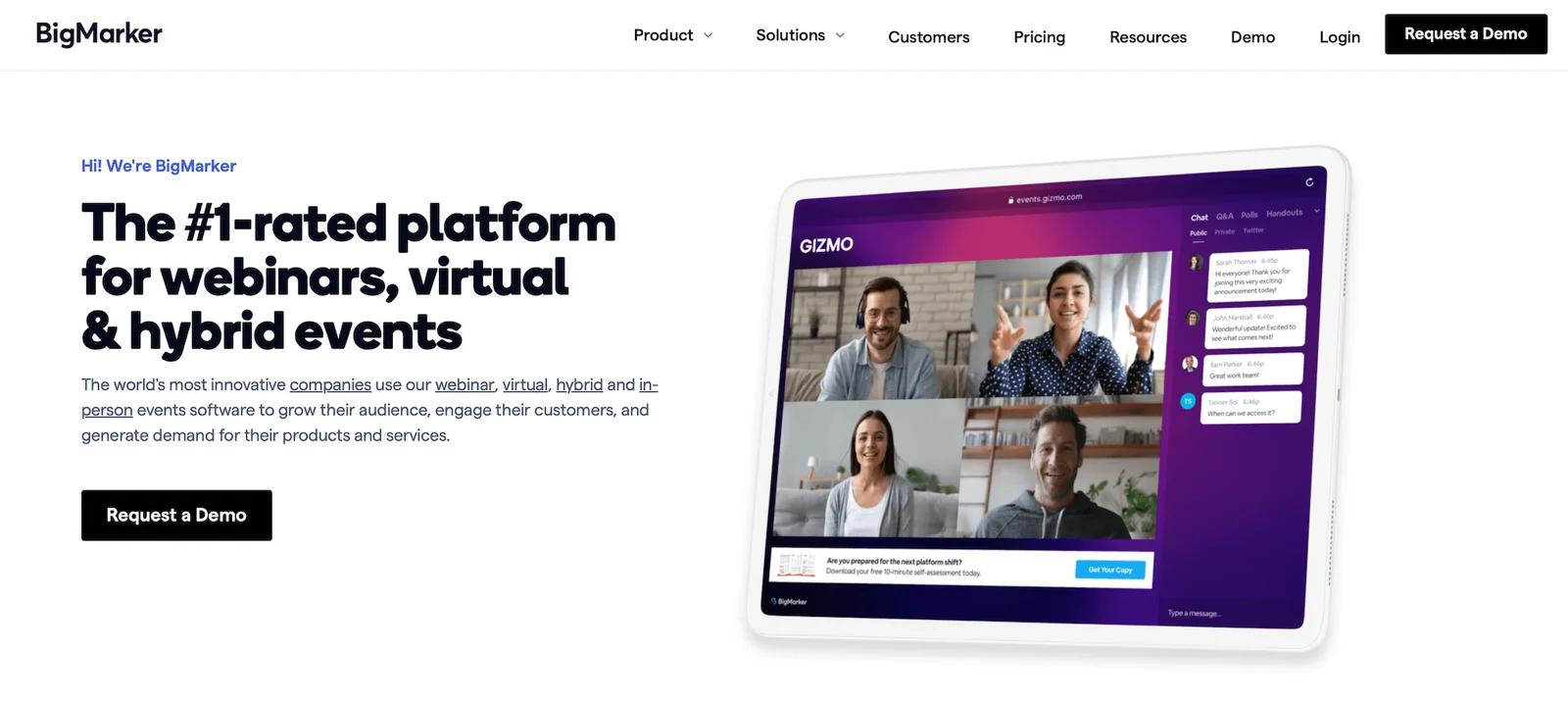
BigMarker is a comprehensive platform for webinars, virtual conferences, and online summits. It's designed for marketers who want to generate leads, nurture prospects, and create content that drives revenue. The platform supports both live and on-demand webinars, automated webinar funnels, and multi-session virtual events, and it can handle up to 10k attendees.
The platform includes a full suite of engagement tools: polls, Q&A, surveys, handouts, offers, live chat, emoji reactions, and interactive whiteboards. You can also enable breakout rooms for smaller group discussions.
Registration pages are highly customizable with drag-and-drop builders. BigMarker provides advanced marketing automation features, including email sequences, SMS reminders, and integration with major CRMs (Salesforce, HubSpot, Marketo, ActiveCampaign).
The platform tracks detailed analytics on registration, attendance, engagement, replay views, and conversions.
One of BigMarker's standout features is its monetization capabilities — you can charge for webinar access, create paid membership sites, and sell webinar replays or series. This makes it appealing for course creators, consultants, and businesses building recurring revenue from webinar content.
Users appreciate BigMarker's flexibility and feature depth, but the platform has a somewhat steep learning curve. The interface isn't as intuitive as Livestorm or eWebinar, and setup takes more time upfront. Pricing is also more expensive.
For ON24 users who want robust marketing automation and monetization options, BigMarker is worth considering. But if you need something simpler or more affordable, BigMarker isn’t your best solution.
Read more BigMarker user reviews here.
Features
- Live, automated, on-demand, and hybrid webinar hosting
- Multi-presenter support with video and screen sharing
- Restreaming to multiple social media platforms like YouTube and Facebook
- Custom branding — registration pages, email templates, event room customization, and virtual backgrounds
- Engagement tools — chat, polls, Q&A, offers, handouts, surveys, and file sharing
- Breakout rooms and roundtables
- Scheduling — one-time, recurring, just-in-time, on-demand
- Automated email sequences — registration confirmations, reminders, and follow-ups
- Analytics dashboards with detailed reporting on attendance, engagement, and conversion funnels
- Integrations with CRM, marketing, automation tools, Zapier, and API access
- Ticketing and payment processing for paid webinars
- Security features — SOC 2 Type 2 certification, TLS encryption, GDPR-compliance, role-based permissions
- Multi-language support, dial-in options, and AI-powered networking tools
Pricing
BigMarker offers a variety of plans and packages under the Webcast, Event Packages, and Media Hub umbrellas. All pricing requires a custom quote.
Read more: Best BigMarker Alternatives
12. Demio
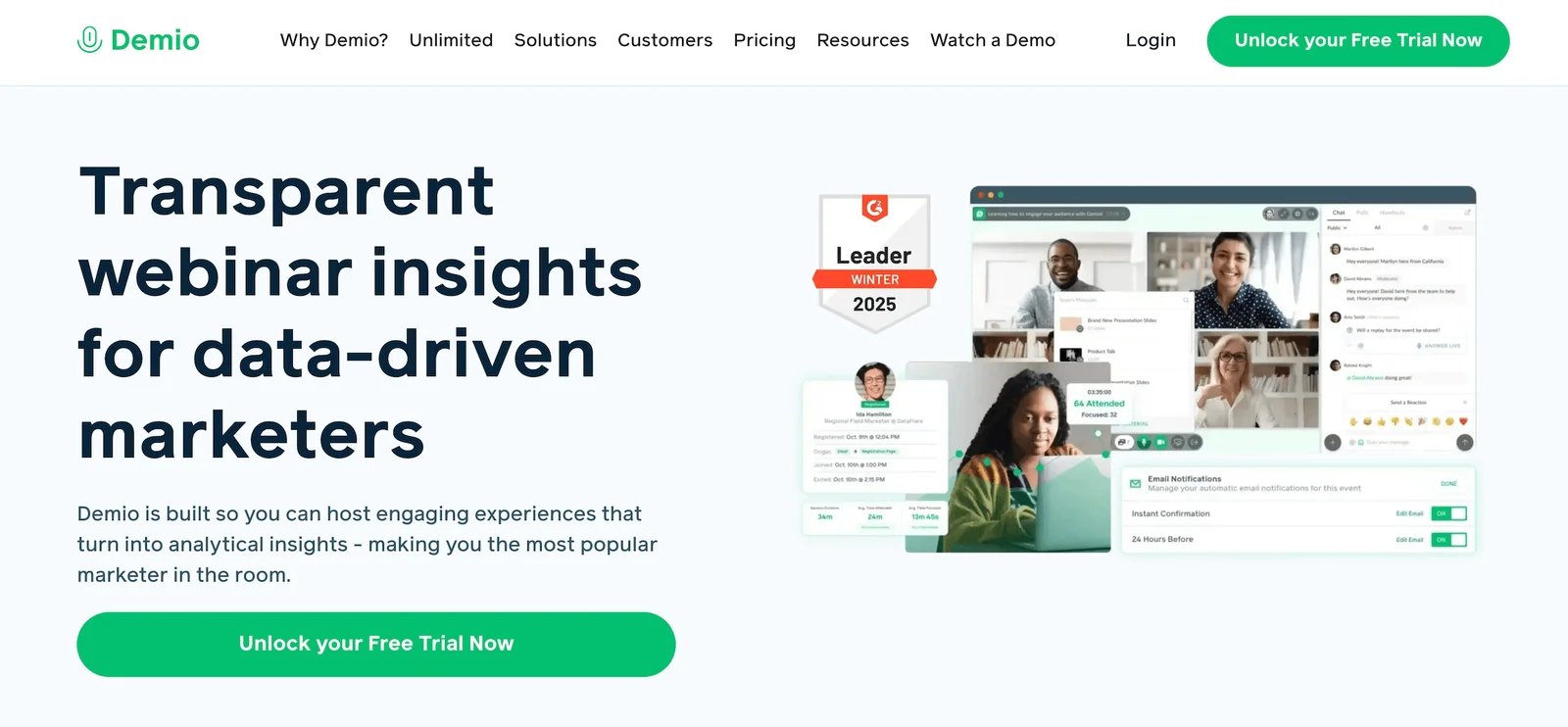
Demio is a no-download webinar platform built specifically for marketers. It's designed to be dead simple: create a webinar, send the link, and people join from their browsers. No software to install, no plugins, no hassle.
The platform supports live webinars, automated webinars, and hybrid webinars (where you mix live and pre-recorded elements). You can host up to 1k attendees, and Demio offers engagement tools like polls, handouts, CTAs, and Q&A.
Demio's registration pages are clean and customizable, and the platform includes automated email reminders and follow-ups. Analytics track registration, attendance, engagement, and conversion metrics. And it integrates with major marketing tools (HubSpot, Salesforce, Mailchimp, ActiveCampaign, Zapier) to sync registrant data and automate follow-up campaigns.
The standout benefit is simplicity. Demio is incredibly easy to use — you can set up your first webinar in minutes without watching tutorials or reading a bunch of help docs. The interface is modern and intuitive, and the webinar experience for attendees is smooth and professional.
However, Demio is more limited than platforms like BigMarker or Webex. You can't host massive events, customization options are basic, and advanced features like breakout rooms or multi-track conferences aren't available.
For teams transitioning from ON24, Demio is a great fit for simple, affordable, smaller webinars. But if you need enterprise-scale capacity or advanced features, you'll outgrow it quickly.
Features
- Live, automated, and on-demand webinars
- Replays and recordings
- Customization options and branding tools
- Interactions — chat (public/private), Q&A, polls, offers, links, CTAs, and attendee participation (where they can use mics and cameras to interact with webinar moderators)
- Scheduling tools (single or recurring events, time zone adjustments)
- Marketing tools like automated email reminders
- Analytics dashboards
- Integrations with marketing and CRM software
- Mobile apps (for iOS and Android)
Pricing
Demio offers a 14-day free trial and three packages (differentiated mainly by attendee room capacities):
- The Starter plan ($63/month) supports a single host and 50 attendees. This plan is recommended for small businesses and solo entrepreneurs.
- The Growth plan ($117 to $855 per host per month) supports multiple hosts and up to 3k attendees. This is the most popular package.
- The Premium plan (starts at $196 per host per month) also supports multiple hosts and up to 3k attendees, and comes with dedicated account support
Read more: Best Demio Alternatives
13. Joinlive
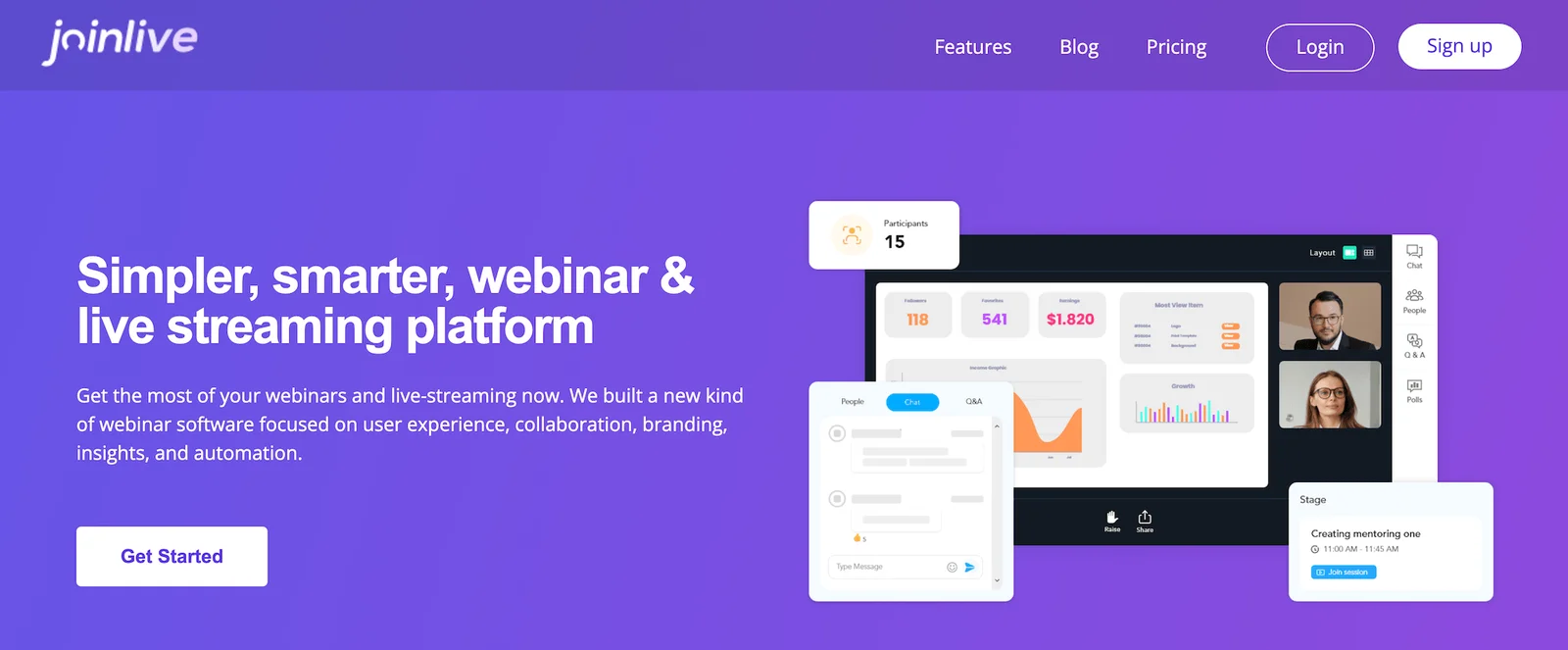
Joinlive advertises itself as "the most affordable yet comprehensive webinar platform" and backs that up with what they call the industry's most generous free plan. Created by Team Eventzilla, it's browser-based webinar software that doesn't require downloads, making it accessible from any device.
The platform supports three presentation formats: Studio broadcast for one-way professional presentations with up to 5 on-screen panelists, Collaborative meetings for interactive sessions with up to 50 participants on-screen, and Pre-recorded (evergreen) webinars. Joinlive also offers HD recording and the ability to replay webinars as on-demand content for lead generation long after the live event.
Joinlive's strength is customization at every touchpoint. You can build branded landing pages, customize registration forms with additional fields, design the webinar studio with your colors and logos, and personalize all participant engagement points. You can also schedule automated reminder emails to registrants.
The platform supports interactive features such as chat, emojis, reactions, Q&A with upvotes, polls, and surveys to keep audiences engaged, and it tracks registration, attendance, engagement, and performance metrics.
The platform supports webinars with up to 10k attendees and includes multistreaming capabilities, allowing you to simultaneously broadcast to Facebook Live, YouTube Live, LinkedIn Live, and other social platforms to expand your reach beyond the webinar room.
For teams moving from ON24, Joinlive represents a significant shift — it's simpler, more affordable, but with fewer enterprise features. The platform integrates seamlessly with Eventzilla's broader event management ecosystem, which is helpful if you're running both webinars and in-person events.
However, Joinlive doesn’t have any verified reviews yet, so there’s limited information about customer experiences and potential drawbacks, which makes it harder to assess how the platform really performs.
Joinlive does not yet have any verified reviews.
Features
- Live, pre-recorded (simulive), and on-demand webinars
- Up to 10,000 live attendees (higher capacity available)
- Three presentation formats: Studio broadcast, Collaborative (up to 50 on-screen), Pre-recorded
- Browser-based (no downloads required)
- Custom-branded landing pages and registration forms
- Customizable webinar studio (colors, logos, backgrounds)
- Engagement tools: chat, emojis, reactions, Q&A with upvoting, polls, surveys
- HD video recording and replay
- Screen sharing and multiple presenters
- Multistreaming to Facebook Live, YouTube Live, LinkedIn Live
- Automated email reminders
- Analytics and reporting dashboards
- Integration with the Eventzilla event management platform
- Embed webinars on your website
Pricing
Joinlive’s free plan supports 1 live webinar at a time (up to 40 minutes), 25 participants per webinar, interactive meetings for up to 20 participants, live event chat, Q&A, and polls, native broadcast studio, collaborative and pre-recorded presentations, and email support.
You can choose between paid plans based on the number of attendee seats you need per webinar.
- 50 participants for $11.99/month
- 100 participants for $24.99/month
- 250 participants for $34.99/month
- 500 participants for $44.99/month
- 1k participants for $54.99/month
All paid plans include unlimited (concurrent) live webinars (up to 8 hours), interactive meetings for up to 50 participants, live event chat, Q&A, and polls, native broadcast studio, collaborative and pre-recorded presentations, and phone, live chat, and email support.
Getting Started with Your Best Solution
There's no shortage of ON24 alternatives for teams needing to make the switch.
Platforms like Webex, Bizzabo, and Virtual PRO work well for large-scale enterprise events where production quality and capacity matter most. eWebinar, Livestorm, GoTo Webinar, and Demio offer straightforward webinar software without enterprise complexity. And Riverside delivers studio-grade recording quality that makes repurposing content easy.
If you're running repeat webinars — product demos, training sessions, customer onboarding — eWebinar takes a totally different approach. Record webinars once, program interactions throughout, and let them run 24/7 while attendees join on their schedule.
No more burning out your team by presenting the same content over and over again. Just automated webinars that engage, convert, and scale without the grind.
Start your 14-day free trial or watch our demo to see how it works.