Quick Summary
Passive video doesn't fail because the content is bad. It fails because nothing stops the viewer from drifting to another tab to Instagram on their phone. Interactive training software solves that by programming engagement directly into the experience, encouraging participation rather than hoping for it.
The recording tool you choose makes or breaks the finished session. If you're still picking one, compare the best training video software first.
Our top three picks:
| # | Platform | Best For |
| 1 | eWebinar | Customer onboarding & on-demand training |
| 2 | Mentimeter | Live presentation polling |
| 3 | Articulate 360 | Custom enterprise course design |
Why Passive Video Underperforms
The biggest competitor to your training program isn't another software tool. It's the Slack notification that just came in, the email in the next tab, or the TikTok algorithm one swipe away. Passive video hands that battle to distraction every single time, and at some point your most important content is playing to no one.
The problem runs deeper than attention spans. Three things break down once a viewer hits play on a passive recording:
- No mechanism to pull attention back. Passive video has no mechanism to pull a drifting viewer back. Once someone opens a second tab, the session is effectively over, even if the video keeps playing.
- No accountability for finishing. Without a presenter, a deadline, or a reason to stay, completion rates collapse. People intend to watch the full session and abandon it halfway through, only taking part of the value with them.
- No way to ask a question. A confused viewer in a passive recording has two options: open a support ticket in another tab, or give up. Most pick the second one, and you never hear from them again.
These are delivery model problems. The platforms below solve them by building interaction directly into the experience, so passive watching stops being an option.
Interactive Training Software as the Solution
Interactive training requires the viewer to lean forward and make decisions such as answering a poll, downloading a resource, or responding to a prompt exactly when their attention would otherwise drift.
But that level of focus doesn't happen by accident. The best platforms don't hope for engagement, they engineer it. They allow you to program those interactions to trigger at the precise moments in the timeline when passive watching is most likely to collapse.
For any team delivering onboarding or product education to an external audience, building that active participation is not a nice-to-have. If your audience doesn't genuinely engage with your content, they won't absorb the value they came for, and if the value doesn't land, the content might as well not exist, regardless of how good it actually is.
Why Listen to Us?
We built eWebinar because traditional webinars and videos are boring. Attendees drift, attention drops, and even great content gets lost in the delivery. We designed eWebinar to be interactive and engaging from the ground up, so attendees actually stay locked in.
Today, we run our entire onboarding and training motion on our own platform. Across our customer base, on-demand sessions average 83% attendance.
Here's what one of our customers says about us:
"Our eWebinars are so much more engaging than our old webinars were."
— Meghan Porter, Director of Agent Success, Follow Up Boss
We know exactly what keeps a user locked into a training session, and that knowledge shaped this piece.
Our Top 8 Interactive Training Software: 2026 Comparison Table
| # | Tool | Best For | Real Async Chat? | Interactivity Level | Capterra Rating | Starting Price |
| 1 | eWebinar | Customer onboarding & on-demand training | Yes (Native 2-way) | Very High (25+ types) | ⭐ 4.9 | From $99/mo |
| 2 | Mentimeter | Live presentation polling | No | Medium (Live word clouds & polls) | ⭐ 4.4 | Free tier, Paid from $11.99/mo |
| 3 | Articulate 360 | Custom enterprise course design | No | High (Custom-coded SCORM) | ⭐ 4.7 | $1499/user/year |
| 4 | Trainual | Growing small business SOPs | No | Low (Standard text & basic quizzes) | ⭐ 4.8 | From $250/mo |
| 5 | Lessonly | Internal sales enablement | No | Medium (Mock pitch recordings) | ⭐ 4.7 | Custom ($10k+ annually) |
| 6 | Docebo | Enterprise corporate compliance | No | Low (Standard LMS assessments) | ⭐ 4.4 | Custom enterprise pricing |
| 7 | Kahoot! | Classroom and team building | No | High (Gamified competitive quizzes) | ⭐ 4.7 | Free tier Paid from $17/mo |
| 8 | Thinkific | Monetizing digital courses | No | Low (Basic quizzes & comments) | ⭐ 4.4 | Free tier Paid from $49/mo |
1. eWebinar
Best for: Teams who need customers to actively engage and participate, not passively watch.
If you want to guarantee your audience fails to engage with their training, onboarding, or product demo, send them a 45-minute screen recording and hope for the best. Without active participation, you are not delivering training. You are giving them something to half-watch while answering Slack messages on their second monitor.
We engineered eWebinar specifically around this problem. You aren't losing your audience to better software. You're losing them to incoming Slack messages, looming inbox replies, and Instagram.
Everything we build is designed to win that battle.
Key Features:
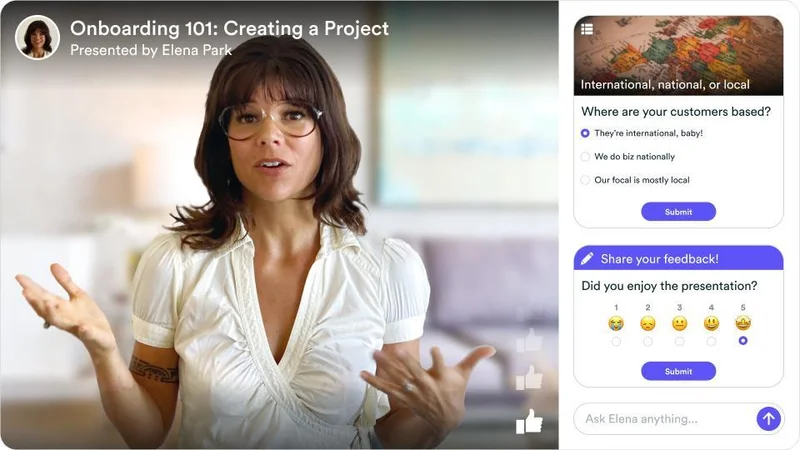
- A session room built for attention. Not a video player wrapped in a landing page. The eWebinar session room is designed to feel inviting and fresh, with UI elements borrowed from social platforms (including a floating Like button) so attendees lean in instead of checking out.
- 25+ interactions programmed into the timeline. Polls, quizzes, tips, open-ended questions, and conditional follow-ups that change based on previous answers. Smart Pause halts the video until the viewer engages, making passive watching structurally impossible.
- Personalized responses that feel human. Program a private message with the attendee's name that triggers at a specific point in time, "Hi John, what do you think so far?" That level of personalization makes an on-demand session feel genuinely human.
- Two-way chat that works like texting. When a learner gets stuck mid-session, they can ask a question right there in the player instead of opening a support ticket or giving up. You're notified via Slack, email, and desktop notification and can answer from your phone whenever you see it.
- Interaction data goes straight to your CRM. Every interaction response routes into your CRM automatically, telling you exactly what your customers care about most so you can follow up with the context already in hand.
Pros:
- Audiences engage more because the experience demands participation, not just passive viewing
- Every attendee gets a personalized experience regardless of when they join
- Zero-party data from every interaction flows directly into your CRM automatically
- Chat keeps the human connection alive without requiring anyone to be live
- Sessions run simultaneously at scale without any additional headcount
Cons:
- Not the right tool for gamified classroom entertainment or competitive leaderboard mechanics
Capterra Rating
⭐ 4.9
Pricing
Starts at $99/month
Experience our interactive training firsthand by joining our on-demand demo.
2. Mentimeter
Best for: Live presentation polling and waking up dead Zoom rooms.
If you are presenting to a grid of muted microphones on a live Zoom call, you are already losing your audience. Mentimeter is the perfect shock to the system for those live, real-time presentations.
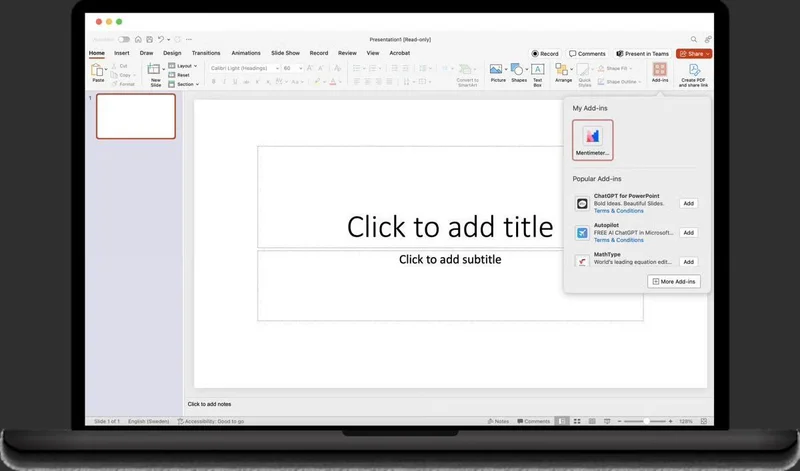
It does not replace your core training curriculum. Instead, it layers directly over your live slide deck to force immediate audience participation, turning a boring monologue into an active data-gathering session.
Key Features:
- Real-time word clouds that build dynamically as the audience types
- Anonymous Q&A to bypass the fear of speaking up in a group
- Live quiz leaderboards to gamify standard slide presentations
- Direct integration into PowerPoint and Zoom workflows
Pros:
- Instantly re-engages a disengaged live audience with minimal setup
- Anonymous Q&A generates more honest participation than open formats
- Works within tools teams already use, reducing adoption friction
Cons:
- Strictly synchronous, with all engagement disappearing when the session ends
- No mechanism for delivering content to audiences on different schedules
Capterra Rating
⭐ 4.4
Pricing
Free tier. Paid starts at $11.99/month
3. Articulate 360

Best for: Custom enterprise course design and SCORM-compliant HR modules.
Articulate 360 is built for designers tasked with turning rigid compliance requirements into custom interactive courses. It's the corporate training equivalent of Adobe Creative Cloud: powerful, flexible, and built for specialists.
Key Features:
- Complex branching scenarios that adapt based on user choices
- Full SCORM compliance for enterprise LMS environments
- Large built-in asset library of templates, images, and characters
- Interactive software simulations mirroring actual product environments
Pros:
- Deep customisation for teams with dedicated instructional designers
- Industry-recognized standard that integrates with most large platforms
- Strong accessibility controls for standardized corporate compliance
Cons:
- Requires specialist design skills most lean teams don't have
- Every product update becomes a full production project to revise
Capterra Rating
⭐ 4.7
Pricing
$1,499/user/year
4. Trainual
Best for: Growing small business SOPs and internal playbooks.
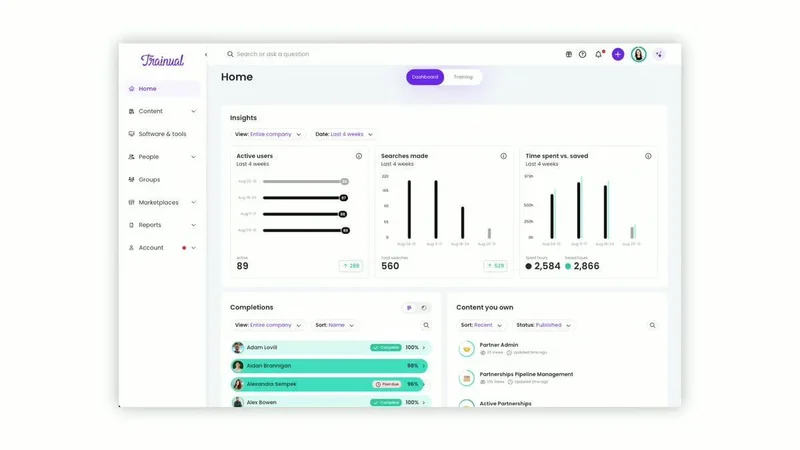
Trainual is the go-to tool if you need to standardize how your internal team operates. It acts as a digital playbook, replacing fragmented Google Docs with a clean, trackable system for your company policies and standard operating procedures.
Key Features:
- Embeddable process documentation for internal workflows
- Comprehension quizzes to verify employees read the material
- Automated organizational charts and assigned team roles
- Trackable read receipts for mandatory compliance updates
Pros:
- Excellent for codifying repeatable internal processes across growing teams
- Clean interface makes it easy for non-technical managers to build and update content
- Trackable completion gives leadership visibility on team compliance
Cons:
- Text-heavy internal wiki format that external audiences won't engage with
- No two-way communication for real-time audience interaction
Capterra Rating
⭐ 4.8
Pricing
From $250/month
5. Lessonly (Seismic Learning)
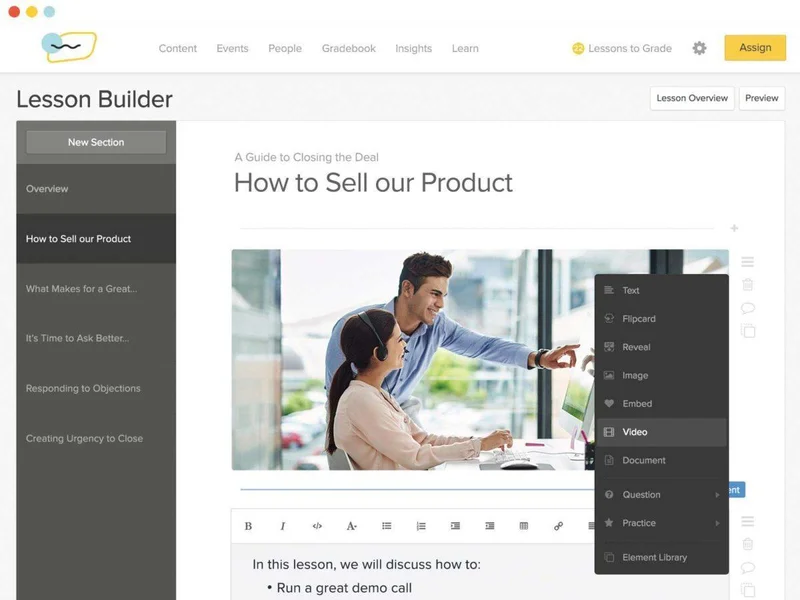
Best for: Internal sales enablement and mock-pitch recording.
Lessonly (now bundled into the Seismic enablement suite) is strictly an internal coaching platform. It was built to help growing sales teams refine their cold calling scripts and perfect their live product demos before they ever jump on a call with a real prospect.
Key Features:
- Interactive webcam recording for practicing mock sales pitches
- Direct peer-to-peer feedback loops on recorded video submissions
- Deep integration with the broader Seismic enterprise sales suite
- Simple, linear lesson builders for pushing quick internal updates
Pros:
- Strong practice mechanics that measurably improve rep messaging consistency
- Private coaching environment encourages honest practice without performance pressure
- Tight Seismic integration suits teams already in that ecosystem
Cons:
- Strictly internal, with no tools for external-facing audiences
- Annual contracts typically start in the five-figure range
Capterra Rating
⭐ 4.7
Pricing
Custom ($10k+ annually)
6. Docebo
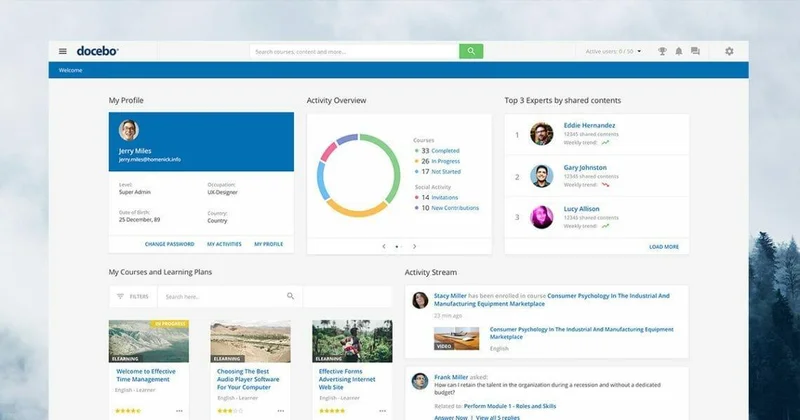
Best for: Enterprise corporate compliance and global workforces.
Docebo is a heavy enterprise Learning Management System. If you have ten thousand employees and need a centralized hub to track mandatory HR compliance training across multiple languages, this platform has the infrastructure to handle it.
Key Features:
- AI-driven learning paths for personalized employee development
- Custom user roles and deep organizational hierarchies
- Granular, automated reporting on employee course completion
- Integrations with enterprise HRIS and CRM platforms
Pros:
- Built to manage mandatory compliance across thousands of employees simultaneously
- Strong AI features reduce administrative workload for large HR teams
- Robust integrations suit complex enterprise HR and reporting workflows
Cons:
- Built for administrators, not frictionless end-user experiences
- Implementations are notoriously slow and resource-intensive
Capterra Rating
⭐ 4.4
Pricing
Custom pricing. Annual contracts routinely start in the five-figure range.
7. Kahoot!
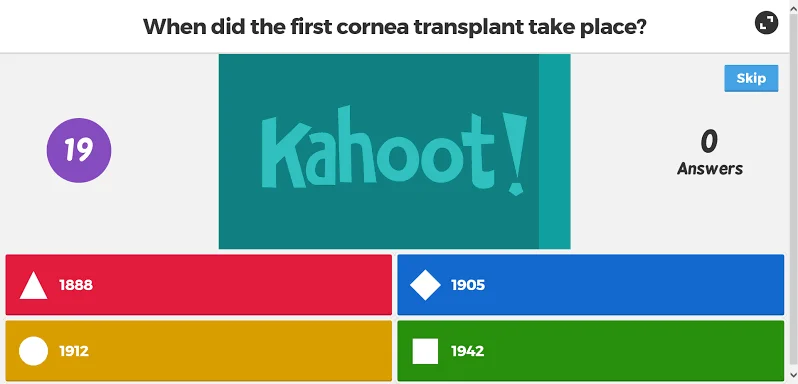
Best for: Classroom education and gamified team building.
You have almost certainly used Kahoot! at an internal company offsite, or seen it used in a middle school classroom. It is built entirely around live, competitive gamification, using bright colors and timed buzzer mechanics to turn standard quizzes into multiplayer games.
Key Features:
- Gamified, competitive quizzes with live leaderboards
- Bright, colorful interface designed for rapid mobile engagement
- Simple pin-code access for instantly joining live sessions
Pros:
- Instantly energizes a live group with zero setup required
- Accessible format works across age groups and technical skill levels
- Free tier covers most casual team-building use cases
Cons:
- Lighthearted format undermines authority for serious professional training
- Engagement only exists inside a live session
Capterra Rating
⭐ 4.7
Pricing
Free tier, Paid from $17/mo
8. Thinkific
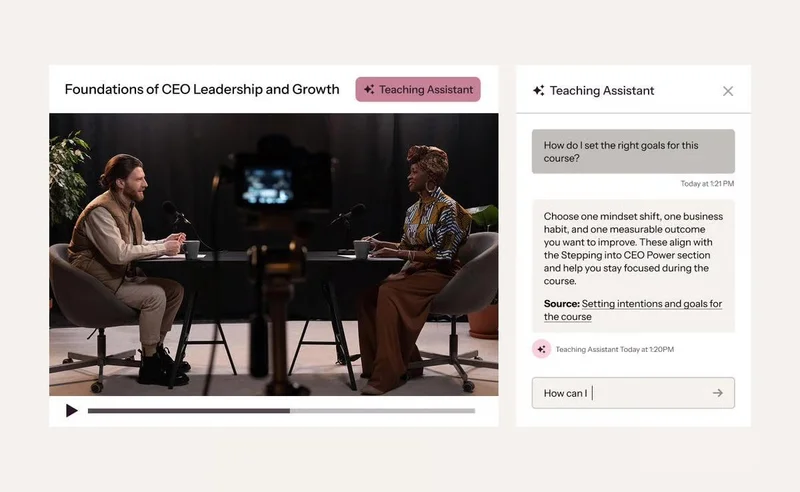
Best for: Monetizing digital courses and building online academies.
Thinkific is fundamentally an e-commerce platform built for solo creators and digital entrepreneurs. If your primary goal is to film a masterclass, put a premium price tag on it, and sell it directly to consumers, Thinkific provides the storefront to process those payments.
Key Features:
- Built-in storefronts and landing pages for selling digital products
- Integrated payment gateways with custom subscriptions and payment plans
- Drag-and-drop course builders for standard text and video hosting
- Native affiliate marketing tools to incentivize external promoters
Pros:
- Strong ecommerce tools for knowledge creators selling courses
- Flexible free tier for testing ideas before committing to a paid plan
- Strong community and discussion features for student cohort engagement
Cons:
- Wrong business model for companies training external audiences
- No native two-way chat for guiding participants through complex content
Capterra Rating
⭐ 4.4
Pricing
Free tier. Paid starts at $49/month
How We Evaluated the Best Interactive Training Software
The term "interactive" has become a broad buzzword in the software space. In many cases, what is marketed as an interactive experience is actually just a traditional video player with a basic survey bolted onto the end.
We ignored tools that treat engagement as an afterthought and judged the market based on these three core mechanics:
- Forced Timeline Engagement: If a viewer can minimize the window and let the session play in the background, the platform fails. We looked for software that physically demands attention by injecting mandatory interactions at the moments where attention is most likely to collapse.
- Native Asynchronous Chat: Real interactivity goes both ways. If a viewer gets confused mid-session, they shouldn't need to open a support ticket in a separate tab. We scored platforms significantly higher when they allowed genuine conversation inside the experience itself.
- The Barrier to Entry: You can't capture attention if the viewer gives up before the content loads. We disqualified platforms that force external audiences through login portals or dashboard navigation before they reach the content.
How to Choose the Right Platform
Making your final decision comes down to one honest question: how hard do you have to fight for the viewer's attention?
- If you are training internal employees: Go with Trainual or Docebo. Your staff is required to complete the training, so portal friction won't kill adoption.
- If you are trying to wake up a live audience: Use Mentimeter or Kahoot!. When you are presenting in real-time and need to instantly jolt a sleepy Zoom grid back to life, you need synchronous tools like live word clouds or gamified leaderboards.
- If you are onboarding paying B2B software customers: Choose eWebinar. Your audience has unpredictable schedules, no obligation to show up, and a second monitor full of distractions. You need a platform that reaches them on their timeline, holds their attention through built-in interaction, and keeps the conversation alive through real two-way chat.
Some other considerations: For clinical teams, start with the top LMS picks for medical staff training and build interactivity on top. If your goal is winning deals, look at interactive demo tools built for sales. If you need to give demos instead of trainings, interactive product demo software is the category to explore.
Stop Losing Your Audience and Engineer Engagement With eWebinar
Every training program has a moment where attention breaks, and your most important content plays to no one. eWebinar removes that moment with precision-timed interactions, two-way chat, and on-demand scheduling that reaches 83% of your audience instead of 40%.
Join an on-demand demo of eWebinar today, and see firsthand how precision-timed interactions keep your audience locked in from start to finish.
FAQs
Will my audience accept on-demand content if they're used to live sessions?
Yes, consistently. Inside Real Estate, Cloze, and Follow Up Boss all had this concern before switching. None received a single complaint. Audiences care about content quality and getting questions answered, not whether a presenter is live.
Who monitors the chat if no one is presenting live?
Nobody monitors it constantly. It works like texting: attendees send a question, get an auto-reply, and your team responds when available. Every question gets answered without anyone glued to a screen.
How is eWebinar different from just adding a quiz to a video?
A quiz at the end arrives after you've already lost the viewer. eWebinar has 25+ interactions you program throughout the timeline at the exact moments attention is most likely to drift, making passive watching structurally impossible.
Do I need to replace my existing LMS to use eWebinar?
No. eWebinar works alongside your LMS and handles what LMS platforms do poorly: two-way communication and frictionless access. Cloze built Cloze University on top of their eWebinar library without replacing anything. In fact, their success team was able to build Cloze University because of the time they reclaimed from implementing eWebinar!
Curious to see how eWebinar can help run your demos, onboarding, and training sessions on autopilot?
Watch a one-minute explainer video for a quick overview of the eWebinar platform. Or, better yet, join our on-demand demo to learn more!