Customer onboarding is where new users learn to navigate your product, and where you really prove its value. Done right, onboarding doesn’t stop after initial adoption. Secondary flows introduce advanced features that deepen engagement and make your product indispensable.
Nailing the customer onboarding process is the most critical objective for any customer success team. It lets them:
- Understand customer goals and current pain points so users see the most value from your product
- Make the absolute best first impression that sets the tone for the entire relationship
- Set customers up for success with in-depth training
- Boost customer engagement and keep users coming back
- Prevent customer churn from day one
- Drive business growth by retaining more sign-ups, improving customer lifetime value, and generating positive reviews
That said, it’s also undoubtedly the most time-consuming part of their job. Your CS team spends hours sending welcome emails, running repetitive training, and answering the same questions over and over. Slow onboarding quietly kills retention. If you’re looking to speed things up, start with these five ways to onboard customers faster.
Customer onboarding automation ties it all together, streamlining the transition from prospect to power user and freeing your team from repetitive work. The result is a smoother user experience, higher CSAT scores, and a CS team that can focus on building high-quality customer relationships. This guide shows you how to automate onboarding while maintaining the personal touch.
Best Practices to Automate Customer Onboarding
1. Define your goals for automating customer onboarding
The first step in the process is to determine your actual goals. Will you attempt to automate your onboarding process from start to finish, or only automate an isolated onboarding flow?
In addition to the scope of automation, define the target outcomes and the metrics to measure them. Are you looking to drive product adoption, reduce time to value, or improve customer satisfaction scores? Perhaps you want to automate repetitive manual processes that eat up all of your customer success managers’ time.
Knowing the scope, outcomes, and metrics in advance will help you automate accordingly.
2. Map your customer journey and key touchpoints
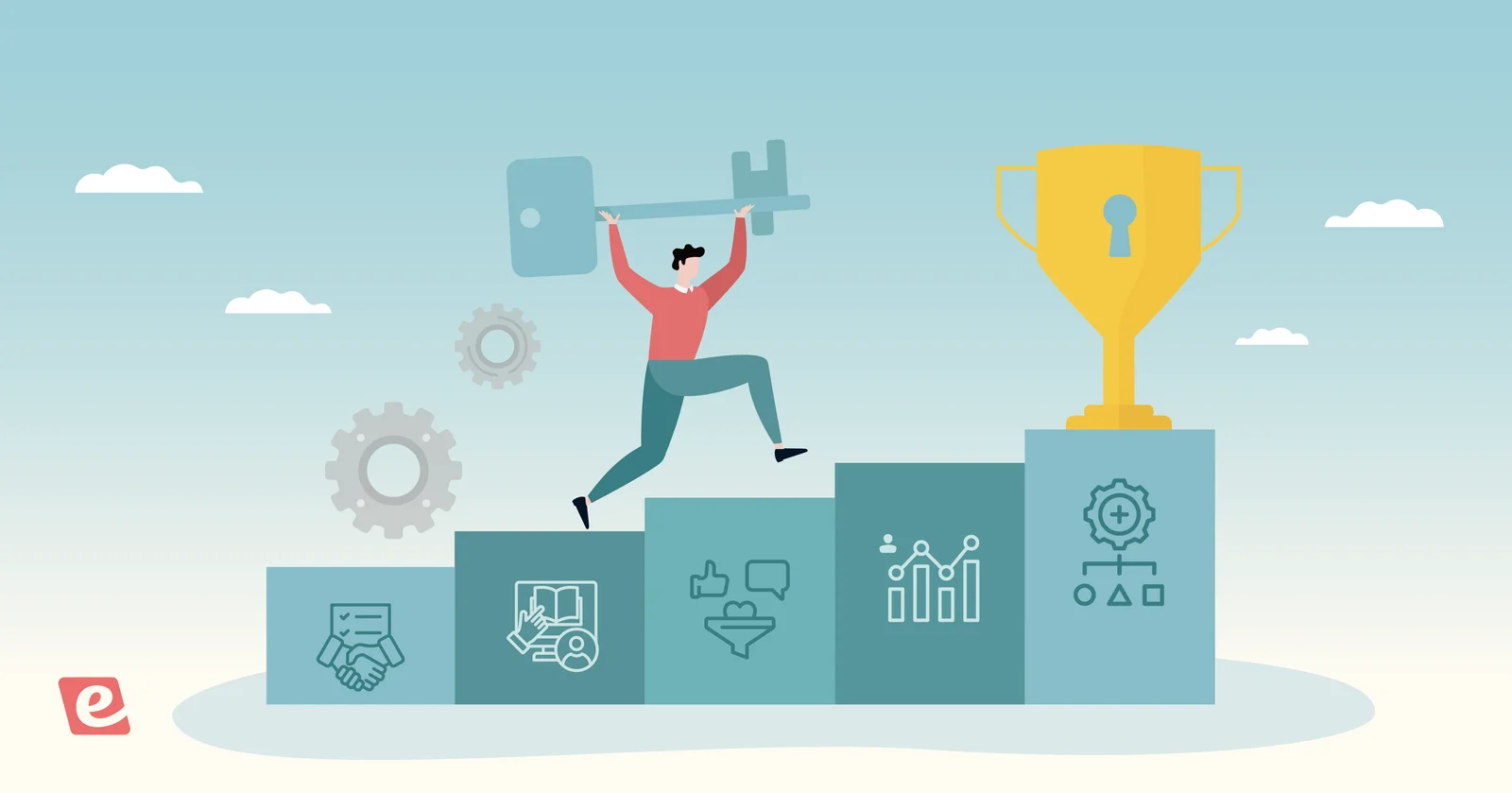
Next, identify the specific stages in your existing user onboarding process. This should cover everything from the moment they first sign up to their activation point, which is when they finally experience the core value that your product provides. The typical steps for onboarding include:
- Customer sign-up & the initial login
- Sending welcome emails & kickoff
- Product setup
- Product tours & trainings
- Continuous support
Break these stages into key tasks new users must complete, and identify specific touchpoints you can automate. Visualizing the customer journey with a flowchart can help you quickly spot automation opportunities.
Because different customer segments may take different paths to reach the same destination, it can also help to create separate flowcharts for each segment. This will help you tailor the automated workflows to the specific needs of each user persona.
3. Identify areas for customer onboarding automation, without sacrificing personalization
Once you have a clear overview of your current onboarding processes, it’s time to focus on repetitive tasks you can automate. You’ll want to choose how each step is handled, and where you can automate without sacrificing the personal, human element of the onboarding experience.
For example, you could fully automate customer sign-up and welcome emails but still want human intervention during setup, product walkthroughs, training, and ongoing support. It’s essential to be transparent about how you’ll handle the onboarding process and where customers can expect to find someone available for assistance.
A great place to set those expectations is in your welcome email. Below is more detail on how to set that up.
Mapped against the five onboarding stages, the automate-versus-human split usually breaks down like this:
- Sign-up and account setup: Automate almost entirely. A short form, confirmation email, and self-serve checklist can cover most new users without getting your team involved.
- Welcome messaging and the first onboarding checklist: Automate the delivery, but keep the tone personal. Triggered emails and in-app prompts handle the sending, while a person writes the messages and steps in if a customer stalls.
- Product setup and configuration: Automate the simple parts, like default settings and guided checklists. Keep a person or recorded walkthrough for branding, integrations, or setups involving multiple stakeholders. These are common points where customers get stuck.
- Feature training and product tours: Automate delivery through on-demand video with chat or in-app tours, but route questions to someone on your team. This is where automation can save the most time because the same training repeats for every new customer.
- Ongoing support and check-ins: Keep this mostly human. Automation can trigger check-ins and collect feedback, but customers who are struggling months in often want to talk to someone, not watch another recording.
For most B2B onboarding programs, the goal isn’t to automate every touchpoint. Automate the repeatable instruction and administrative work, but keep human support where customers need guidance, troubleshooting, or decisions specific to their setup.
4. Determine who will manage onboarding workflows
Now, determine who will manage each part of the onboarding process. In many cases, customer success teams or account managers provide this support. In smaller organizations, you might have one dedicated person onboarding all new clients.
You should also clarify who is responsible for creating onboarding materials. For example, you may want account managers to draft the email templates that welcome customers to the platform. Meanwhile, your customer support lead is better suited to provide setup tutorials and product training; they know the product inside and out and understand common user questions.
5. Choose the right automation tools for the job
Next, it’s time to find the software that will help you get the job done. Which automation tools you select will ultimately depend on what you’re trying to automate. Many teams use a combination of:
- Email templates and CRM software, like HubSpot, Zendesk, or Salesforce, to create email sequences. Some teams also use email automation platforms such as Mailchimp, MailerLite, or ActiveCampaign.
- Chatbots are often built into CRM software, specifically the names mentioned above. Quidget and Tidio are also popular solutions in this realm.
- Product tour software, like Storylane, Navattic, and Walnut, to offer in-app walkthroughs that show users how to navigate the system and use features. These work well for straightforward SaaS products with intuitive interfaces and minimal setup requirements. Basically, software where users can explore and learn through doing.
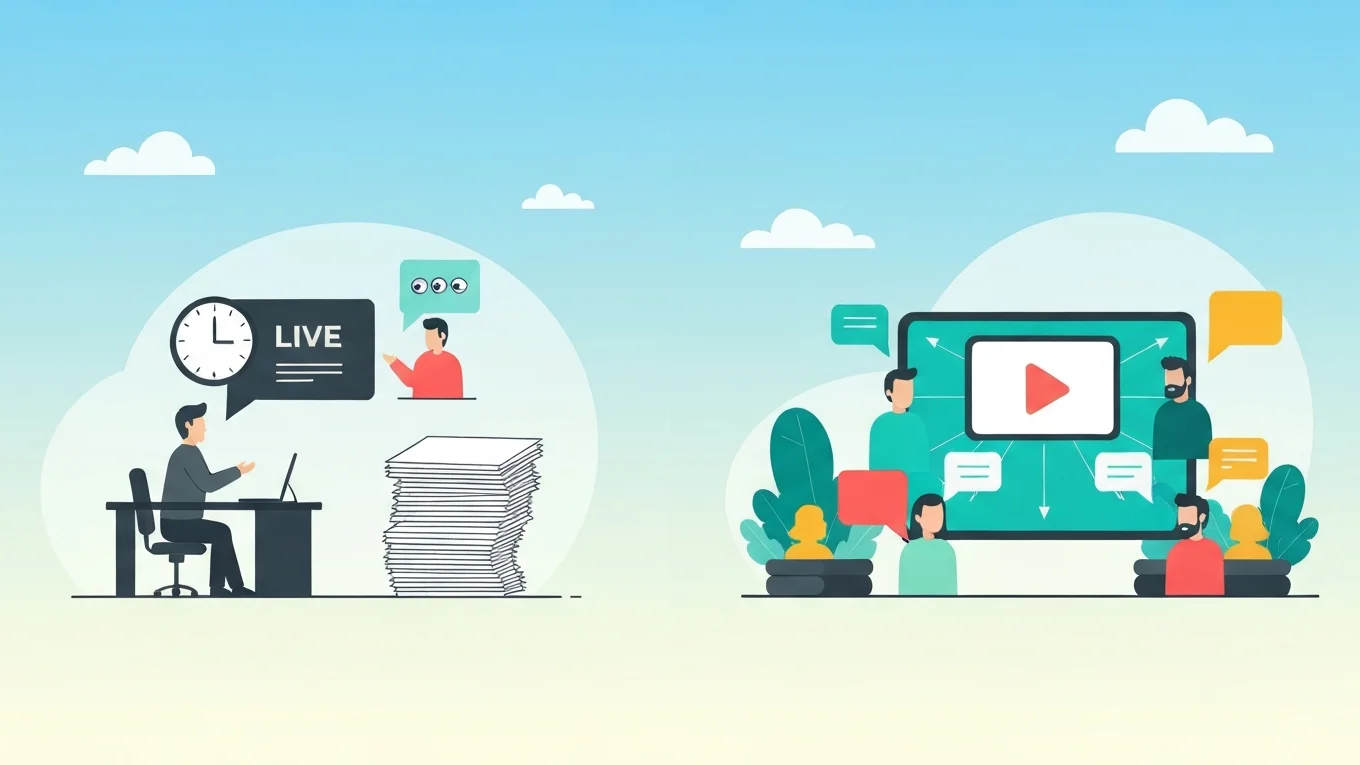
- Automated webinar software, like eWebinar, to escape the endless cycle of hosting live onboarding training sessions. This kind of software is ideal for complex systems with extensive feature sets and workflows that need explaining – for products where users need structured guidance and context before they can be successful.
Of course, other factors help you determine which tool is the right pick.
- Budget: In addition to determining whether the entry-level plan for a particular tool is within your budget, see if the provider offers a cost-effective pricing model. This will ensure you can upgrade to higher tiers as needed without incurring excessive costs.
- Scalability: Can the tool grow with your business and customer base to onboard users at scale? For instance, eWebinar’s platform enables you to automate onboarding sessions for more than 12,000 registrants per month.
- Integrations: How easily can you integrate this new automation tool into your existing tech stack? eWebinar offers native integrations with over 20 tools. You can forward registrant data to your preferred CRM or respond to attendee questions directly within your Slack workspace.
Failing to choose the right systems can leave you stuck with software that can’t continue scaling as your audience grows. Not sure which platform to build your automated onboarding on? Start with our roundup of the best onboarding platforms.
Most onboarding stacks combine two or three of these tools, and the trick is matching each tool to the right stage.
CRM email sequences are good for sending the right message at the right time, but they can’t teach someone how to configure an integration. Chatbots can answer quick questions, but fall short when a customer needs a 15-minute walkthrough of a multi-step workflow.
That’s where a platform like eWebinar fits. Your team records the training once and add interactions to keep customers engaged. New customers get to it whenever they’re ready. The email sequence gets them there, and the training teaches them what to do.
6. Create automated workflows
Once you’ve chosen the best tool(s) for the job, it's time to start creating automated workflows to streamline your onboarding processes. What this looks like will depend heavily on what you’re trying to automate and which tool you’re using.
For example, when automating onboarding email sequences, you’ll need to write copy for email templates and configure triggers to send them automatically to new users. You’ll also want to utilize segmentation features to personalize each flow for a specific customer use case.
Customer success teams integrating chatbots will need to set custom routing rules. That means ensuring users who are struggling with onboarding are routed to a CSM, while other customers or prospects are sent to support or sales. And those using automated training sessions will need to create a series that guides new customers through each stage of the journey. We’ll discuss that further below.
7. Provide self-serve resources
Another way to automate onboarding and reduce the number of tickets your team fields is by creating a knowledge base of support resources. You can create FAQ guides with answers to the most common questions your team receives. Feature guides, integration guides and setup walkthroughs are helpful too.
Automated training sessions are another great self-serve resource, since customers can tune in as needed and gather what they need. You can publish these resources where they're easily accessible. For example, create an intranet for your customers, or just add a "Resources" or "Help Center" section to your website. It requires some upfront effort, but the payoff can be well worth it.
8. Test, evaluate, and optimize automated workflows
Successfully automating customer onboarding workflows will take some trial and error. It's challenging to get everything perfect the first time around. Before rolling out any automation, conduct a round of tests with your internal teams to gauge the experience and identify issues from the outset. Once you feel confident in your process, you can get customers on board.
Then, of course, you should get their take on the journey. Examining quantitative metrics such as NPS, CES, and CSAT scores can be helpful, but they don't tell the whole story. We recommend that you also gather qualitative onboarding feedback from your users for deeper insights into how your automations impact UX. S
Start by inserting onboarding surveys in your training sessions, email sequences, and chatbots. Responses to open-ended questions will provide context for why a particular user provided a specific score. This combination of quantitative metrics and qualitative feedback will help you continuously improve.
9. Track onboarding success metrics
In addition to gathering feedback, you also need to measure how many users actually complete onboarding and how long they stay.
If users drop off at setup or during training, you know there's an issue with the experience. If they abandon your product shortly after completing onboarding, it could be the product itself. Put measures in place to monitor customers through the process and see exactly where you lose people.
You should also meet with customers or send surveys after onboarding to learn more about what they like and don't like; follow through on adjusting what they don't like. Customers appreciate feeling included in product changes and the overall evolution. Even more so, they appreciate it when their feedback leads to tangible changes.
This process allows you to improve customer retention even if they aren't 100% satisfied at first. Feeling like feedback is genuinely listened to is one of the things customers commonly mention in positive reviews.
5 Steps of Customer Onboarding
Now, let's get into the typical stages of customer onboarding, and how to build your own automation plan. For each stage, we’ll cover what to automate, what to keep human, and which tools can help.
1. Sign up & the initial log-in
Your primary goal here is to make the signup process as simple as possible. There are two nearly effortless ways to approach this:
- Allow customers to sign up for your product through an account they already use, like their Gmail, Apple, Facebook, or Slack account
- Only require their name, email address, and password for manual sign-ups
If you want to learn more about your customers during sign-up, you can provide a short form for them to complete before they access the product. But emphasis on SHORT. Don't hit customers with a dozen Q&As before they can even explore your product. Stick to the essentials.
Then, brainstorm ways to gather other information at a later time. For example, you can sprinkle forms throughout the onboarding journey, send surveys after they complete onboarding, or schedule a one-on-one call with your team.
2. Sending welcome emails
Schedule a welcome email to send as soon as customers sign up for your product. This email should include:
- A warm, genuine thank you. You should configure templates to include customers' names for a more personal touch.
- Steps on what to expect during the onboarding process. Provide a quick onboarding checklist of everything they'll need to get started.
- Links to the help center so customers know exactly where to go if they have questions. Include contact information so they can reach out to your team directly.
At the end of this email, encourage customers to take the first steps in your onboarding program. Reinforce that your team is always available to help when needed.
3. Managing product setup
Now, the complexity of this depends on your product. In some cases, customers just need to adjust a few settings, and they're off to the races. In others, customers will need to configure settings, import branding elements, set up integrations, or add team members to the platform.
Regardless of the number of steps involved, you should always include guides to manage each to-do along the way. You can achieve this with setup modals that show users what to click and how to make adjustments. Alternatively, your team can record training sessions that walk users through the setup process.
This preserves some of the human element of onboarding. These sessions are far more effective for complex product setup, as users can follow along as they watch. Platforms such as eWebinar also offer convenient chat features that enable customers to contact you easily along the way.
This is also where a repeatable session pays off fastest. Build the setup walkthrough once, and every new customer gets the same clear instructions.
4. Product tours & trainings, including feature walkthroughs
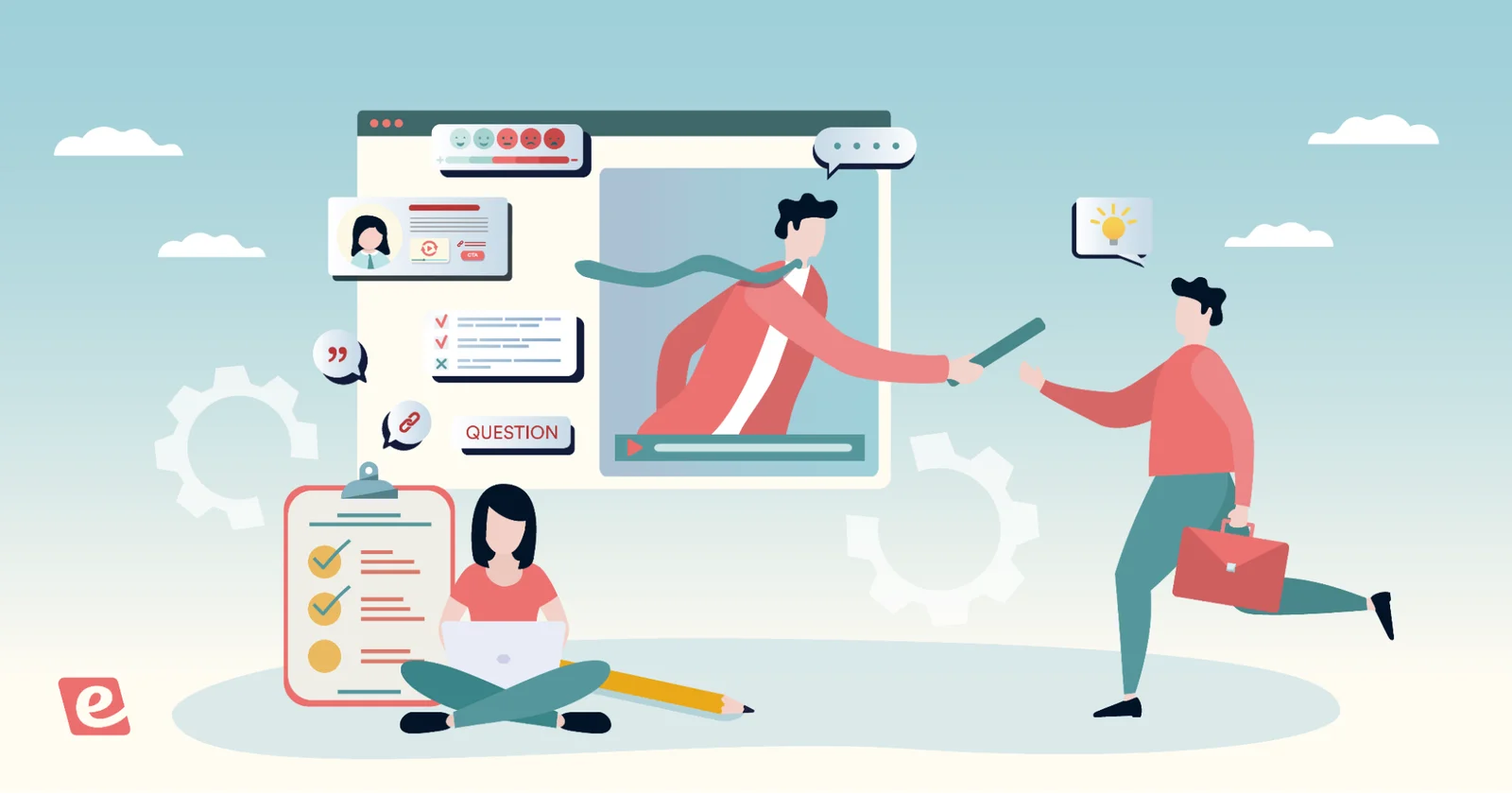
Here, you'll want to provide training sessions that discuss each feature, explain how to use it, and outline its benefits. This is the most reliable way to ensure users genuinely understand how to use your product to its fullest potential.
Within these sessions, you can include helpful interactions that keep customers engaged and gather more information. For example, you can include:
- Polls that allow you to gauge how meaningful each feature is to customers
- Feedback requests asking how they intend to use features
- Action items at the end of each session that prompt them to use the feature before moving on to the next tutorial
You can even provide conditional interactions that change up questions based on customer feedback.
For example, if customers reply to the initial poll indicating the feature isn't meaningful to them, you could ask why and skip the remaining questions so they don’t sit through something they aren't interested in. It also lets you personalize training to customer needs. These sessions also include a chat function so customers can message your team if they want to learn more or need help.
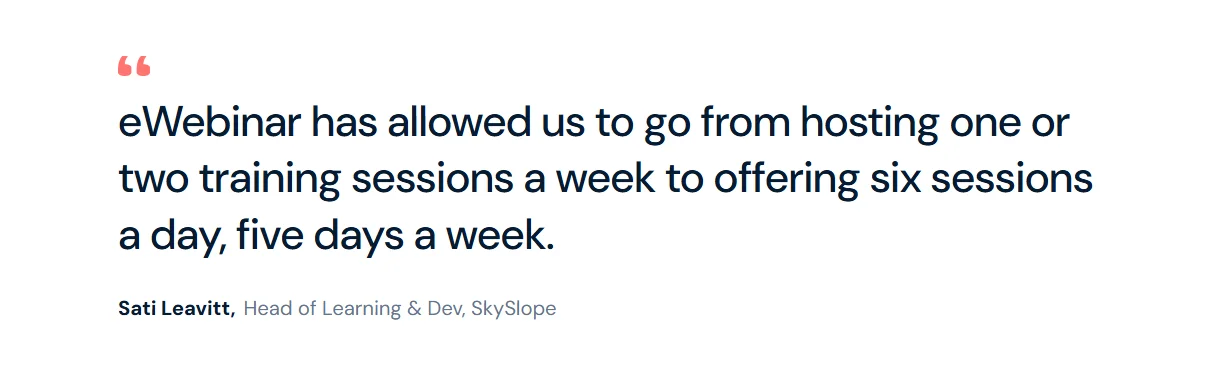
Teams that move this stage onto a repeatable platform tend to see it show up directly in their capacity. At SkySlope, they used to run the same training over and over. After switching to eWebinar, they were able to add more courses because they no longer needed live sessions, and their eWebinar attendance rates have gone up.
5. Continuous support
You shouldn’t go AWOL after onboarding, since that’s one surefire way to lose customer engagement and loyalty. Customers want to know your team is with them for the long haul. This is where you’ll want to maintain more of the human element, though you can still use automation to simplify support and save time.
After customers complete onboarding, send a follow-up email or host a training session to congratulate them on getting started. Here, you can gather feedback on the onboarding journey and include testimonials from other customers who’ve seen success. You can even mention other features they might be interested in, as long as you keep it helpful and never push a hard sell.
Then, the self-serve resources you created earlier will support long-term customer support. But you can also:
- Provide AI-powered chatbots that can answer simple customer questions and submit tickets when they need more help
- Provide phone or email support to assist customers when they need you
- Schedule periodic check-in calls to discuss customer needs in more detail
Showing customers you’re on the same team improves satisfaction, builds trust, and strengthens their faith in your brand. Even if they run into hiccups or have complaints, you can listen, address issues, and keep them from leaving.
Bonus: Updates on new functionality or changing features
Periodic updates and changes to your platform are necessary to keep pace with the industry. However, customers tend to dislike changes that come out of nowhere, with no warning or guidance on how to navigate them.
Always consider the customer experience when implementing changes. We suggest:
- Sending an email to let customers know an update or change is on the horizon, and when they can expect it
- Recording a session explaining the change and walking customers through new features or updates
- Providing additional resources on the changes, with simple ways for customers to get in contact with you
How eWebinar Supports Customer Onboarding Automation
eWebinar is one of the most highly rated automated training platforms, with a solid 4.9-star rating on Capterra. It provides all the features you need to deliver in-depth training and truly automate your onboarding efforts, and the platform is extremely easy to use.
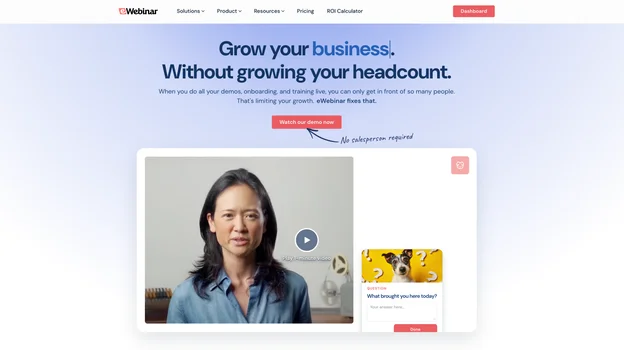
Webinar Series is designed for customer success teams to streamline the customer journey, reduce manual onboarding, and save time hosting repetitive trainings. It includes:
- An intuitive builder that lets you upload previous training videos or create new sessions, from scratch or with templates
- Flexible scheduling options so you can make sessions available on demand and provide replays
- The most extensive gallery of interactions, so you can include quizzes, polls, feedback requests, testimonials, action items, and more
- AI-powered features to design welcome messages, custom interactions, and registration pages
- Branding options to include your logo and custom colors within sessions, registration pages, and viewer rooms
- Asynchronous chat that allows your support team to respond to customers in real time or later on
- A dedicated hub for each registrant to access sessions, watch replays, review chats with your team, and monitor their onboarding progress
You can also add certifications and reward links to congratulate customers for completing onboarding. Plus, integrations with CRM systems let you plug sessions into welcome messages and other onboarding emails.
How to Use eWebinar’s Webinar Series
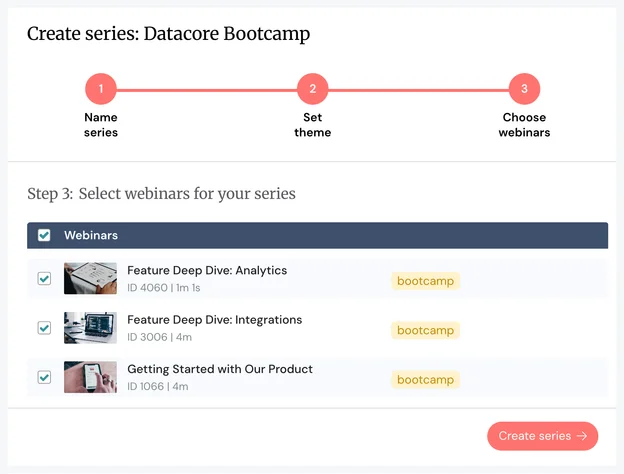
Create your Series
First, you’ll create a Webinar Series tailored to your specific onboarding needs. Your product complexity and customer segments will shape how you structure it. Some common approaches include:
- Product-based series: If you offer multiple products or a suite of tools, create separate series for each one. A marketing platform might have one series for email automation, another for social media management, and a third for analytics.
- Segment-based series: Build different series for beginner versus advanced users. Or create white-labeled training series for enterprise customers who need branded content specific to their organization.
- Product area series: For complex products with extensive functionality, break training into series that focus on specific product areas. A project management tool might have one series on task management, another on team collaboration, and a third on reporting.
- Role-based series: Create series tailored to different user roles within your customer’s organization. Admin training might cover setup and permissions, while end-user training focuses on day-to-day workflows.
- Comprehensive learning paths: Structure series that move users from basic setup through advanced features. Start with a foundational onboarding series that covers essential setup and core features. Then offer an advanced series once users are comfortable with the basics.
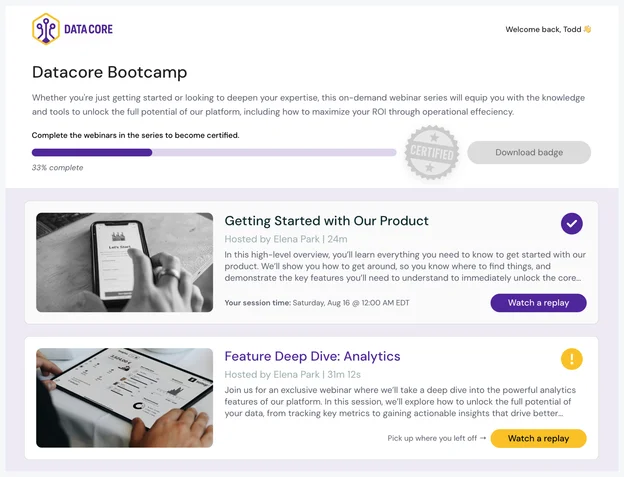
Each series includes multiple sessions that guide customers through the complete learning journey. That gives you flexibility to structure training in whatever way makes sense for your product and your users.
Place interactions & set controls
You’ll insert customizable interactions within each session to create an engaging, personalized experience for customers. You can include interactions to learn more about customer needs and create conditional interactions so customers get what they need.
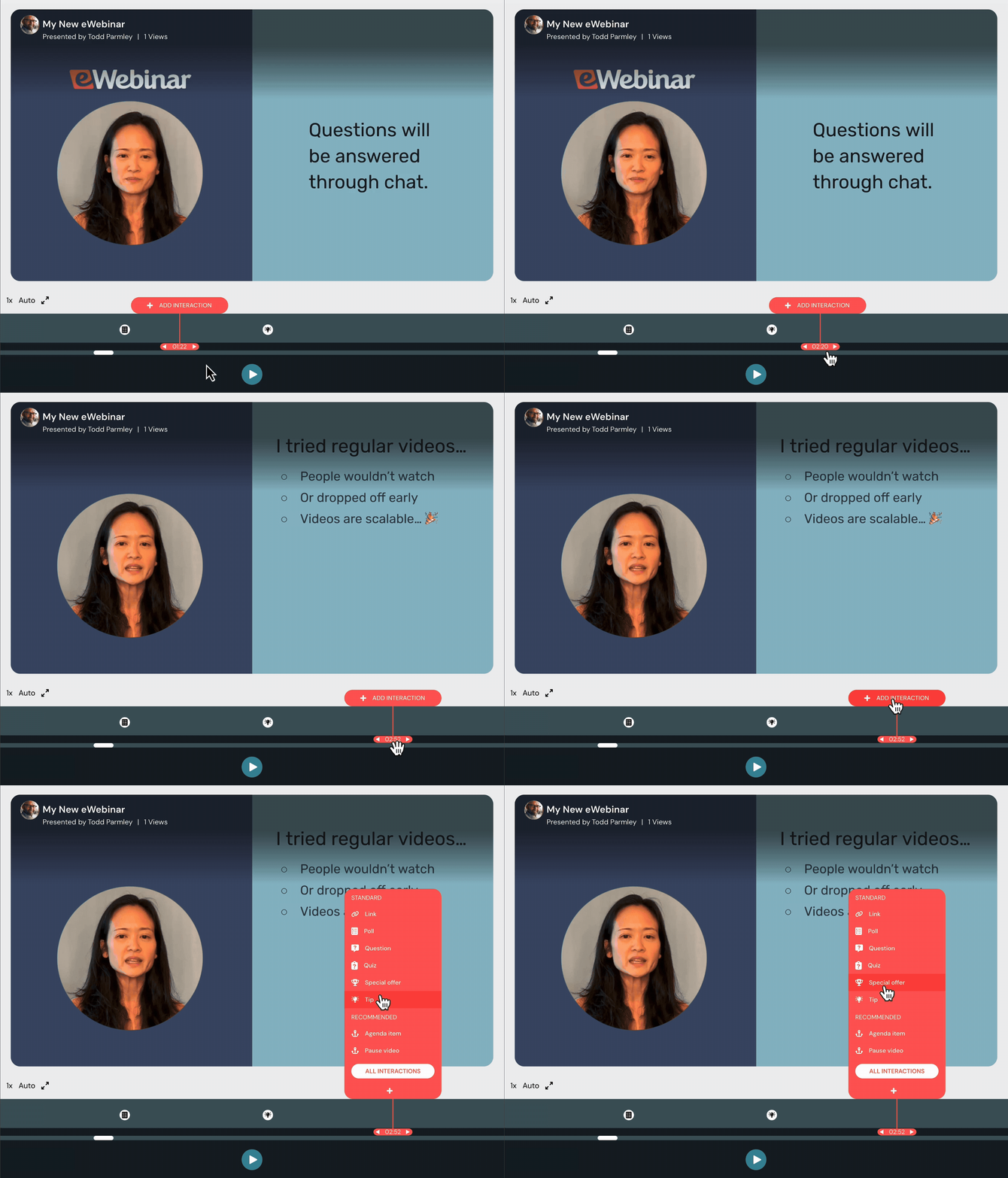
Placing interactions is simple. Just select the one you want and specify when it should appear, previewing as you build. You can also define what attendees must do to complete your sessions. You can require customers to:
- Reach a particular watch time before proceeding to the next session, or allow them to skip ahead
- Complete quizzes or answer a specific percentage correctly
- Take specific actions, like using a product feature, before advancing
Leverage asynchronous chat & add moderators
Then enable asynchronous chat within sessions so customers can easily reach your team. You can add multiple moderators so your entire customer support team can join conversations.
This asynchronous chat is what really lets you automate onboarding training. You don’t need to be available around the clock to respond. You can see all messages and get back to customers when you’re available, or reply when you're online.
If you respond after a session ends, the message is sent to the customer’s email. All chat history is saved in each customer’s Webinar Series hub so they can reference conversations anytime. You can respond through the eWebinar dashboard (which is mobile-friendly) or via Slack.
Provide on-demand viewing & instant replays
Set schedules for each session within your Series. Most teams enable on-demand viewing, allowing customers to watch at their leisure, with replays available afterward. Some teams also create a recurring schedule for customers to register for session times.
You can even combine rules to set a recurring schedule and offer on-demand viewing together.
Create a high-converting registration page
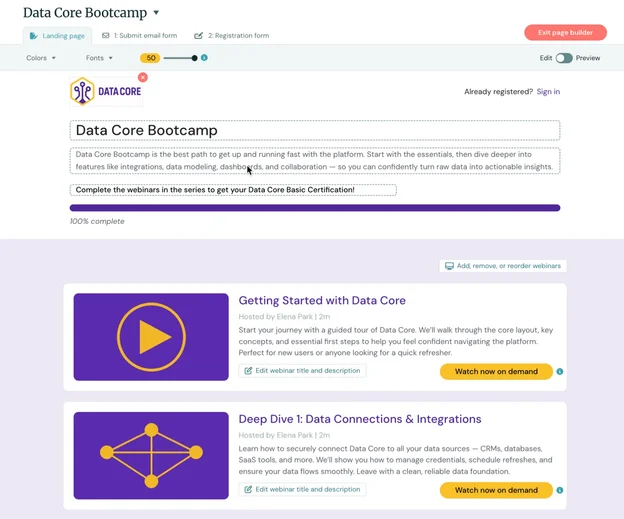
Use the AI-powered registration page builder to create professional, branded registration pages for new customers to enroll. They register once and get access to your complete Series.
Share your Webinar Series with customers
Share your Series via email or within your product, or both, so customers can access it easily. After customers register, they’re automatically directed to their dedicated hub. From there, they can access all of your sessions, replays, and chat conversations. They can see a clear progress bar showing where they’re at in the onboarding journey and when they’ve hit certain milestones.
Your team can also monitor each customer’s progress and gauge how quickly they move through setup and training.
Webinar Series analytics
You also get detailed analytics dashboards so you can monitor:
- Number of registrants
- Number of attendees per session and registrant-to-attendee rates
- Percentage watch times for each session
- Engagement rates
- Completion rates
- Conversion rates
- Certification rates
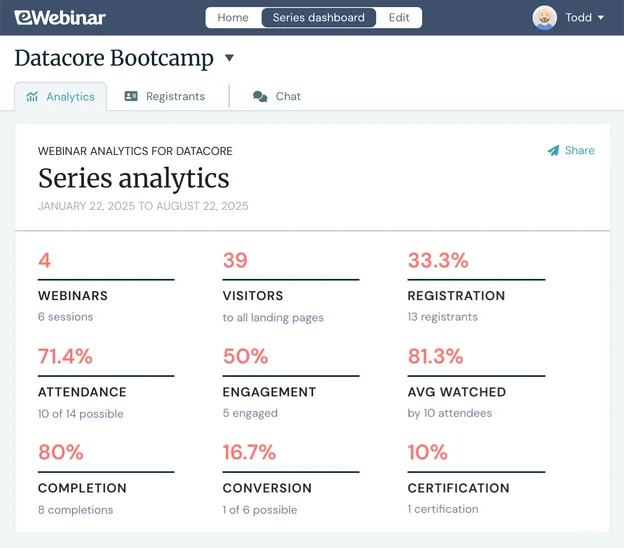
This lets you gather feedback on how helpful your Series actually is. If customers aren’t watching sessions to the end, or are dropping off the Series entirely, you can hone in on the cause and improve. You can also compare how sessions in a series are performing relative to each other.
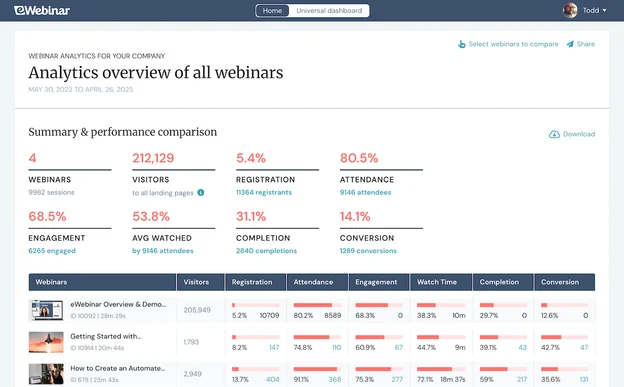
You can also edit your Series at any time. You can modify existing sessions, delete sessions, add new ones, whatever you need. The builder guides you through changes, and support is available whenever you need it.
Getting Started with eWebinar
Creating an automated customer onboarding process can save your CS team countless hours while eliminating inefficiencies and bottlenecks for users. If you define clear goals, map the customer journey, identify opportunities, and choose the right tools, you’re already halfway there.
eWebinar has already helped customer success teams from Gem, Later, BombBomb, SkySlope, ActivePipe, HighNote.io, and numerous other SaaS companies automate their onboarding sessions. Their CSMs have redirected the time spent hosting live sessions toward engaging users and building customer loyalty.
See how eWebinar can automate your onboarding process by watching the free demo. You can also try a free 14-day trial to test the Webinar Series feature and see how it supports your workflows.
FAQs
What is customer onboarding automation?
Customer onboarding automation uses software and workflows to move new customers from sign-up to product adoption with less manual effort from your team. It covers automated welcome emails, self-serve setup guides, on-demand training sessions, and triggered check-ins. The goal is to give every customer a consistent, high-quality onboarding experience without your team repeating the same steps for each new account.
Which parts of onboarding should stay human?
Anything repeatable and consistent across customers is a strong candidate for automation. Welcome emails, product tours, and standard training sessions all fall into that bucket. Steps that require reading the room or adapting to a specific account should stay human. Think complex integrations, multi-stakeholder rollouts, and relationship-building check-ins after the first 90 days.
A good test is whether your team gives the same answer every time. If so, automate it. If the answer changes per customer, keep a person on it.
How long does it take to set up automated onboarding?
A simple email sequence and a recorded walkthrough can be set up in a few days. A full multi-session training series with interactions, chat, and CRM integrations typically takes a few weeks to plan, record, and configure. The upfront effort pays off quickly, since everything you build runs on its own after that.
Can you automate onboarding without losing the personal touch?
Yes. The key is choosing which steps to automate and which to keep human. Automate the repeatable, low-stakes steps like sign-up confirmation, welcome emails, and product tours. Keep a person available for the steps that need judgment, like complex setup or account-specific questions.
Platforms like eWebinar also let customers ask questions through chat during automated sessions, so they're never stuck without a way to reach your team.
Related reads:
- Best Practices & Software Tools to Automate Client Onboarding
- 9 Best Demo Automation Software for Small Businesses
- 12 Best Automated Webinar Software (& How They Differ)
Curious to see how eWebinar can help run your demos, onboarding, and training sessions on autopilot?
Watch a one-minute explainer video for a quick overview of the eWebinar platform. Or, better yet, join our on-demand demo to learn more!