Quick Summary
Good customer onboarding is one of the best investments a B2B company can make. If the initial experience is seamless, customers hit their activation milestones faster, try new features, and stick around for the long haul. But if it’s rocky, they tend to quietly drop off within the first three months without ever telling you why.
We compared seven B2B customer onboarding software tools across three categories, covering features, pricing, pros, cons, and how to choose. If you’re in a hurry, here are our top three picks at a glance:
# | Platform | Best For |
1 | eWebinar | Scaling complex onboarding with video, chat, and on-demand delivery |
2 | Appcues | In-app product tours and onboarding flows for mid-market SaaS |
3 | Rocketlane | Implementation project management for B2B with longer onboarding cycles |
Why Listen to Us
eWebinar has powered on-demand video onboarding for thousands of B2B SaaS companies. Our customers deliver millions of sessions across real estate tech, CRM, fintech, and enterprise software, without running the same live session on repeat. We've watched what breaks down at scale, where in-app tools fall short for complex products, and what a complete onboarding stack actually looks like. Years of that experience is what this list is built on.
What Is B2B Customer Onboarding Software?
B2B customer onboarding software helps you guide new customers from signed contracts to active, successful product use. In practice, that covers a lot of ground: first impressions, knowledge transfer, task coordination, feature adoption, and maintaining momentum across weeks or months of implementation.
"Customer onboarding software" covers a few distinct categories that many often lump together
- In-app product onboarding tools like Appcues, Userpilot, and Pendo live inside your product. They guide users through the UI with tooltips, checklists, modals, and behavioral triggers. These work well when the product is simple enough that a user can make sense of it once they're inside, with nudges in the right direction.
- Implementation project management tools like Rocketlane, Arrows, and GUIDEcx coordinate the project work that happens around the product. Multi-stakeholder task coordination, implementation timelines, shared client portals, and structured handoffs between your team and the customer.
- On-demand video onboarding like eWebinar delivers the long-form training layer that the other two categories don't handle well. When customers need to understand why the product works the way it does, not just where to click, that's not a tooltip job. It requires structured video, real two-way communication, and the ability to deliver it to every customer in every time zone without burning out the team.
Let’s dig in…
Top 7 Customer Onboarding Software: Full Comparison Table
# | Tool | Best For | Category | Onboarding Method | Async Chat | CRM Integration | Capterra Rating | Starting Price |
1 | eWebinar | Scaling customer onboarding through interactive video. | Video-Led | Video led | Yes | HubSpot, Salesforce, Mailchimp, Active Campaign | ⭐ 4.9/5 | $99/mo (Free trial available) |
2 | Appcues | Designing code-free in-app walkthroughs and tours. | In-App | Tooltip / checklist | No | HubSpot, Salesforce, Segment | ⭐ 4.8/5 | $250/mo (Free trial available) |
3 | Rocketlane | Managing complex enterprise implementation projects. | Implemen- tation Project Management Tools | Project coordination | No | Salesforce, HubSpot, Gainsight | ⭐ 4.57/5 | $19/user /mo (Free trial available) |
4 | Userpilot | Contextual product walkthroughs and behavior analytics. | In-App | Tooltip / checklist | No | HubSpot, Salesforce, Intercom | ⭐ 4.6/5 | $249/mo (Free trial available) |
5 | Pendo | Enterprise product analytics and user guidance. | In-App | Tooltip / checklist | No | Salesforce, HubSpot, Segment | ⭐ 4.5/5 | Free plan available for up to 500 MAUs. |
6 | Arrows | Streamlining collaborative checklists inside HubSpot. | Implemen- tation Project Management Tools | Project coordination | No | Native HubSpot integration | N/A | $100/mo (Free trial available) |
7 | GUIDEcx | Driving transparent client facing project implementation | Implemen- tation Project Management Tools | Project coordination | No | Salesforce, HubSpot, Gainsight | ⭐ 4.7/5 | Custom pricing (Free trial available) |
1. eWebinar

Best for: Scaling onboarding training through interactive video.
eWebinar is an on-demand video platform with two-way chat designed to take repetitive onboarding training off your plate. You:
- Simply record an onboarding session once,
- Layer in interactive elements like polls, quizzes, and CTAs,
- Put it on a 24/7 schedule.
Customers join whenever it fits their calendar, and they can ask questions in the chat as they watch. Your team can reply directly via Slack, email, or a browser—either right then and there or later on by email. The customer gets a personal, high-touch experience, but the delivery is entirely automated.
For complex B2B software products, this fixes a major gap that standard in-app tools and project management platforms miss: it builds the baseline knowledge users need before any in-app guidance can actually help them. Pop-ups and tooltips only work if a user already understands the product's underlying logic. eWebinar is what builds that understanding.
The impact on scale is massive. Take Inside Real Estate, which supports over 500,000 agents across the US and Canada. They now run hundreds of automated webinars every week across multiple departments.
As Kelly Bojarski, Director of Training Systems, put it:
"We've probably saved thousands of labor hours from these recurring webinars, and we're delivering to more people with less staffing capacity issues. We're doing so much more with less."
Plus, eWebinar integrates smoothly with the rest of your onboarding stack. If you use Appcues or Userpilot for in-app walkthroughs, eWebinar delivers the foundational training before a customer even logs in for the first time. If you use Rocketlane or GUIDEcx to track implementation tasks, eWebinar can handle the training for each milestone automatically, saving your customer success team from hosting the exact same live session over and over.
Key Features:
- On-demand and scheduled sessions: Run structured onboarding 24/7 on an automated schedule so customers in any time zone can join without waiting for a live slot.
- Two-way chat: Let customers ask questions mid-session and respond from Slack, email, or mobile on your own time.
- Webinar Series: Sequence multiple eWebinars into a structured onboarding journey with progress tracking that moves customers through the right steps in the right order.
- 25+ interaction types: Embed polls, quizzes, tips, hotspots, and CTAs throughout each session so customers actively participate rather than passively watch.
- Per-attendee analytics to your CRM: Track who watched, how long they stayed, what they asked, and where they dropped off, with all data flowing to HubSpot or Salesforce automatically.
- Consistent delivery every time: Record your best onboarding session once and deliver it with the same quality and accuracy to every customer, regardless of which CS rep is on that day.
Teams building onboarding academies or certification programs may also find our guide to choosing an automated webinar series platform helpful.
Pros:
- Only tool on this list with async chat built into the onboarding session
- Scales complex onboarding to every customer without adding CS headcount
- 83% average on-demand attendance rate versus the 30 to 40% typical of live webinars
- Consistent delivery means every customer gets the same quality first impression
Cons:
- Not an in-app guidance tool, so it does not replace tooltips or product tours
- Not a project management tool, so implementation coordination still needs a dedicated platform
Capterra Rating
⭐ 4.9
Pricing
Plans start at $99/month and scale to $299+/month depending on the number of webinars and features needed. A free trial is available.
2. Appcues
Best for: Designing code-free in-app walkthroughs and tours.
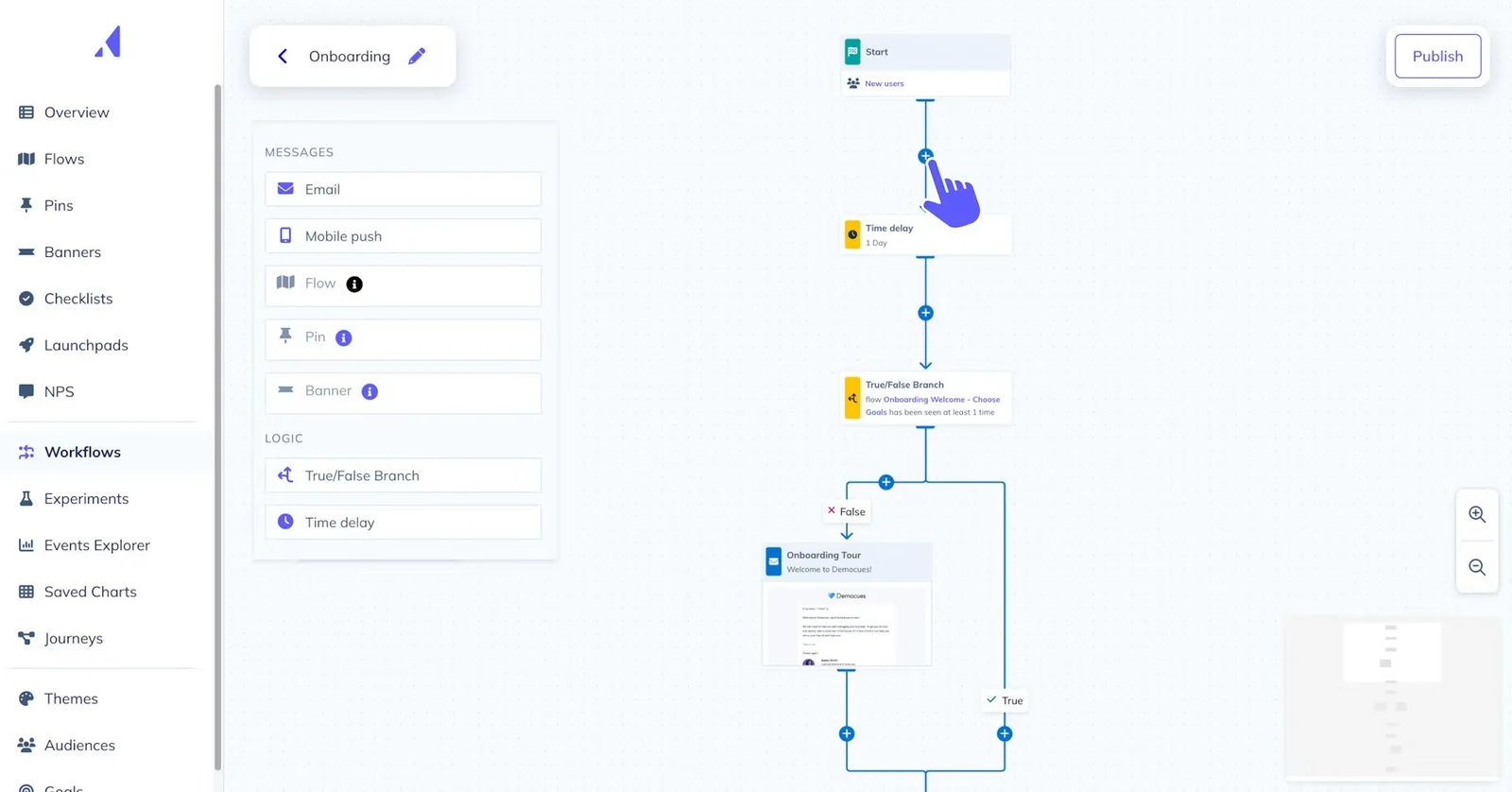
Appcues gives product and CS teams a no-code builder to create tooltips, modals, checklists, and product tours directly on top of the product UI. It deploys fast, the interface is intuitive enough that non-technical teams manage it independently, and cross-channel capabilities extend onboarding beyond the product into email and mobile.
Key Features:
- No-code flow builder. Build and publish modals, tooltips, checklists, and banners using a Chrome extension directly on your live product.
- Audience targeting. Trigger different onboarding flows based on user attributes, plan type, role, or in-app behavior.
- In-app NPS and surveys. Collect customer feedback at specific moments in the product experience without a separate email campaign.
- Resource center. An in-product help widget that customers can open at any time to access guides, walkthroughs, and documentation.
Pros:
- Fast deployment without engineering involvement
- Strong cross-channel onboarding capabilities
- Intuitive interface with minimal learning curve
Cons:
- Limited analytics depth compared to Pendo
- No communication layer for complex products
- Pricing jumps steeply at higher tiers
Capterra Rating
⭐ 4.8
Pricing
Essentials plan starts at $250/month. Growth and Enterprise plans are custom-priced. A free trial is available.
3. Rocketlane
Best for: Managing complex enterprise implementation projects.
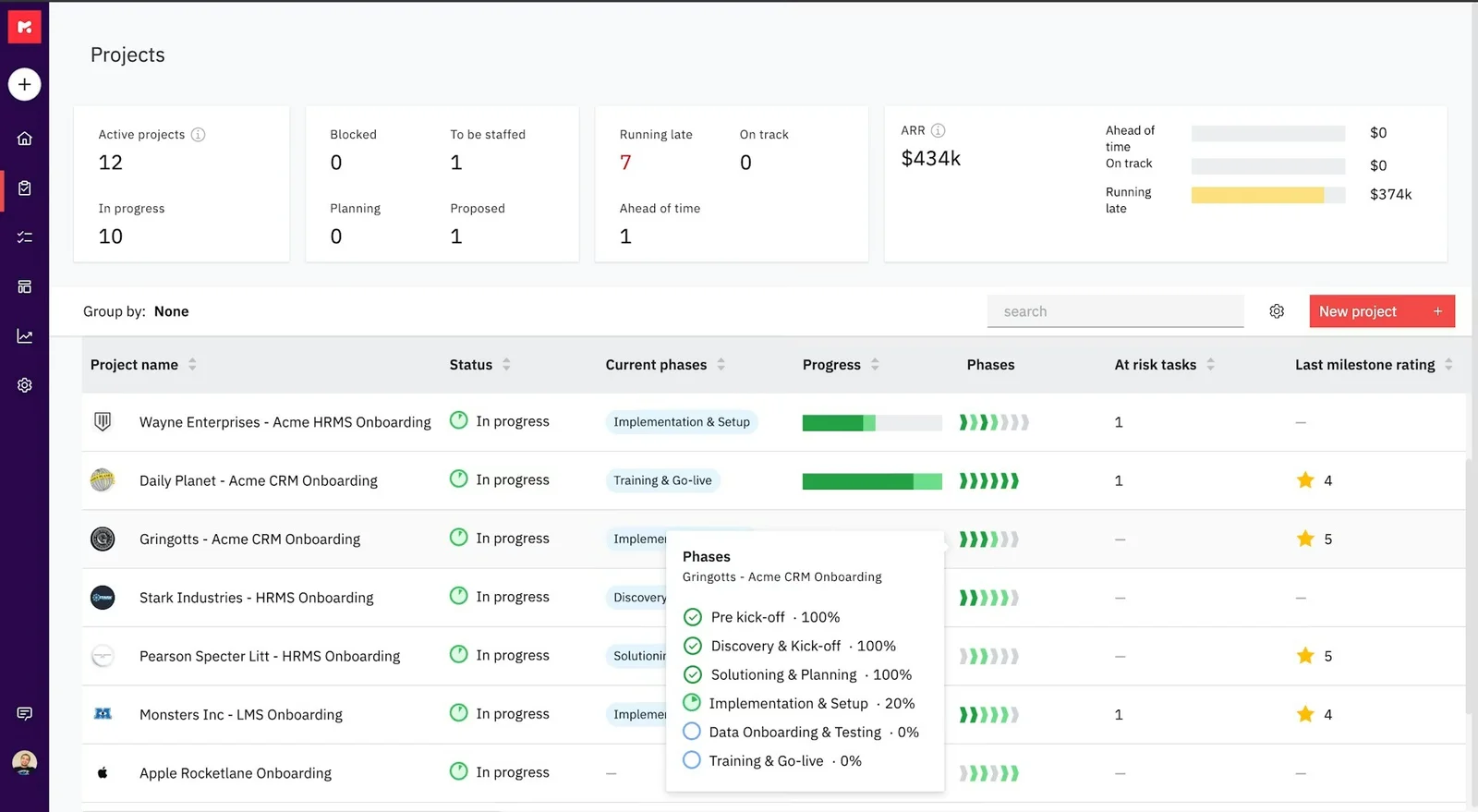
Rocketlane brings the customer and the CS team into a shared portal where tasks, milestones, timelines, and documents live in one place. For implementations running four to twelve weeks across multiple stakeholders, it removes the spreadsheet chaos and keeps both sides accountable without constant manual follow-up.
Key Features:
- Shared customer portal: Give customers a branded project workspace where both sides can see tasks, milestones, and timelines in one place.
- CRM integrations: Sync onboarding project status with HubSpot and Salesforce so account teams always have a current view.
- Automated status updates: Trigger stakeholder notifications automatically when milestones are hit or tasks go overdue.
- Project templates: Build repeatable onboarding plans that standardize delivery across the CS team.
Pros:
- Strongest project management depth on this list
- Shared portal keeps customers accountable without manual chasing
- Strong CRM integrations for enterprise CS teams
Cons:
- Over-engineered for teams with shorter onboarding cycles
- Per-user pricing with minimums makes it expensive for small CS teams
- No educational or communication layer built in
G2 Rating
⭐ 4.7
Pricing
Essentials plan starts at $19/member/month with a minimum of five team members billed annually. Standard and Premium plans are custom-priced.
4. Userpilot
Best for: Contextual product walkthroughs and behavior analytics.
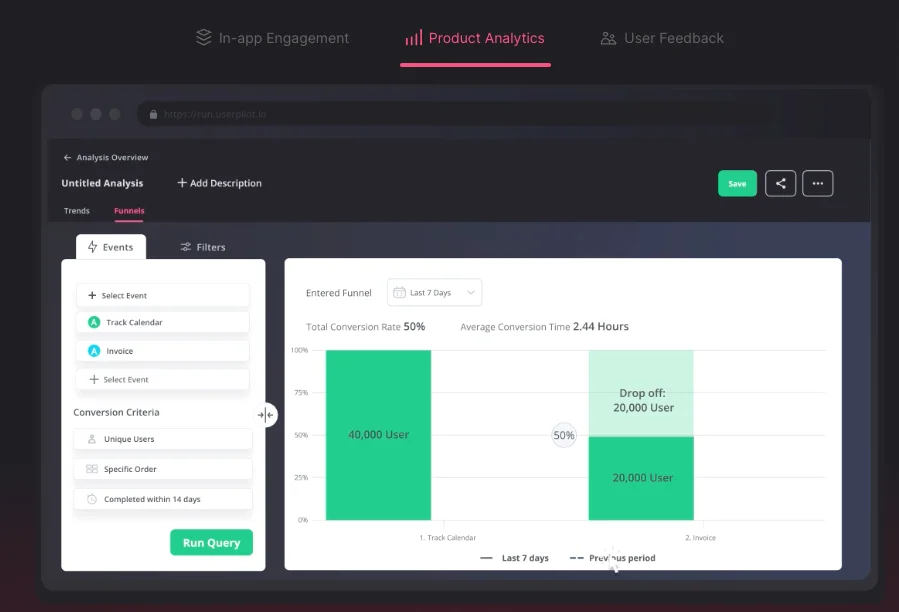
Userpilot combines in-app onboarding flows with native product analytics, giving teams both the guidance layer and the behavioral data to improve it. Its no-code builder handles tooltips, checklists, and resource centers without developer involvement, and AI localization across 32 languages makes it a strong option for teams with international user bases.
Key Features:
- In-app flow builder: Create product tours, checklists, and contextual prompts that appear at the right moment inside the product.
- Resource center: Surface help docs, videos, and support links in a contextual panel inside the product UI.
- NPS and in-app surveys: Collect user feedback at specific journey moments without redirecting users to external tools.
- AI localization: Translate in-app content automatically across 32 languages for global user bases.
Pros:
- Product analytics and guidance in one platform
- Transparent pricing below Pendo’s enterprise model
- Strong segmentation and personalization capabilities
Cons:
- Web only, no mobile app support
- No cross-channel capabilities beyond in-app
- Annual billing only, no monthly option
Capterra Rating
⭐ 4.6
Pricing
Starter plan begins at $249/month billed annually. Growth and Enterprise plans are custom-priced.
5. Pendo
Best for: Enterprise product analytics and user guidance.
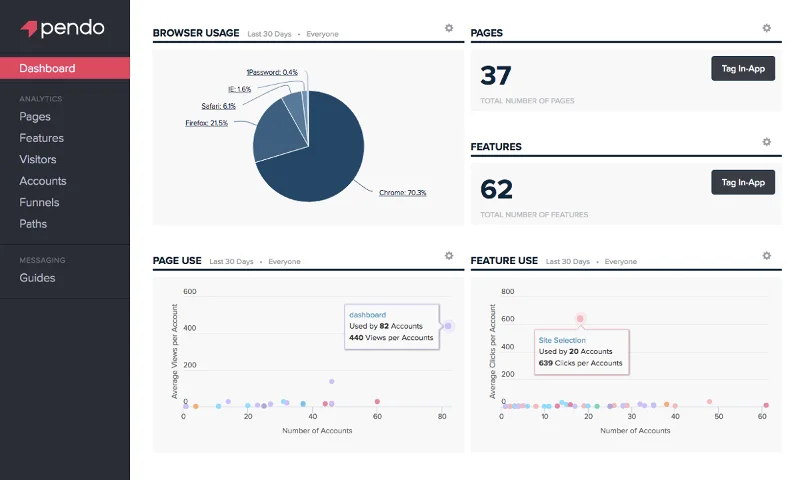
Pendo is the most analytics-heavy platform on this list. It combines in-app guides, session replay, NPS surveys, and product analytics into a single platform, giving enterprise product teams a complete picture of how users interact with the product and where they drop off. For teams running complex adoption experiments across multiple product lines, the depth of data Pendo surfaces is genuinely hard to match.
Key Features:
- In-app guides and tooltips: Build and deploy product tours and feature walkthroughs without code.
- Behavioral product analytics: Track feature usage, session behavior, and activation milestones across your entire customer base.
- NPS and in-app surveys: Collect feedback at scale and correlate it with product usage data.
- Guide A/B testing: Test different onboarding flows and measure their impact on activation and retention.
Pros:
- Deepest product analytics of any in-app tool on this list
- Strong A/B testing for optimizing onboarding flows
- Scales well across enterprise product lines
Cons:
- Pricing complexity makes budget planning difficult
- Steep learning curve for non-technical teams
- Implementation requires significant time investment
G2 Rating
⭐ 4.5
Pricing
Free plan available for up to 500 MAUs. Paid plans are custom quoted, with contracts typically ranging from $7,000 to $133,000 per year, depending on MAU volume.
6. Arrows
Best for: Streamlining collaborative checklists inside HubSpot.
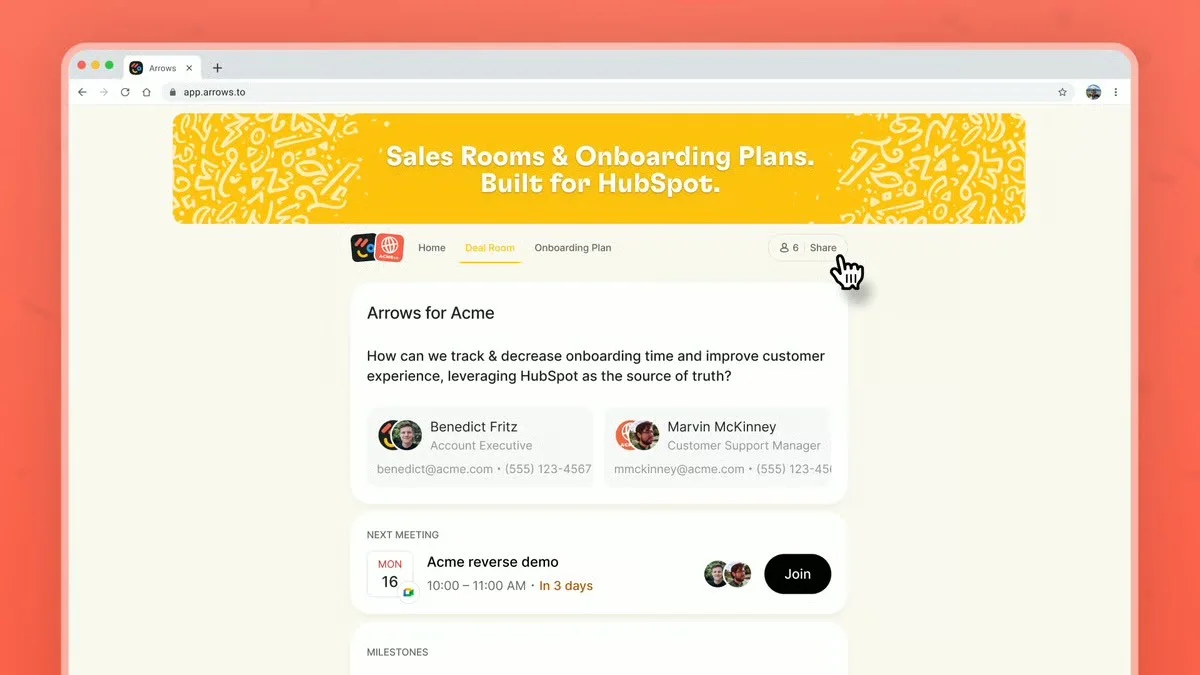
Arrows was built around a single premise: onboarding works better when it lives where your team already works. For CS teams running their entire customer motion inside HubSpot, Arrows embeds onboarding plans, task assignments, and customer-facing checklists directly into the CRM without requiring a separate portal login or tool switch.
Key Features:
- HubSpot-native onboarding plans: Build and manage customer onboarding plans directly inside HubSpot without additional integration work.
- Customer-facing task portal: Give customers a clear view of what's required from them, with due dates and resources attached.
- Automatic CRM updates: Trigger HubSpot deal stage and property updates automatically when onboarding milestones are completed.
- Onboarding templates: Build repeatable plans for different customer segments or product lines.
Pros:
- Tightest HubSpot integration of any tool on this list
- Removes the need for a separate customer portal
- Simple setup with minimal onboarding required
Cons:
- Limited value outside of HubSpot ecosystems
- Less suitable for complex multi-stakeholder implementations
- Lighter project management depth than Rocketlane or GUIDEcx
Capterra Rating
⭐ N/A
Pricing
Plans start at $500/month billed annually. Contact Arrows for enterprise pricing.
7. GUIDEcx
Best for: Driving transparent client-facing project implementations.
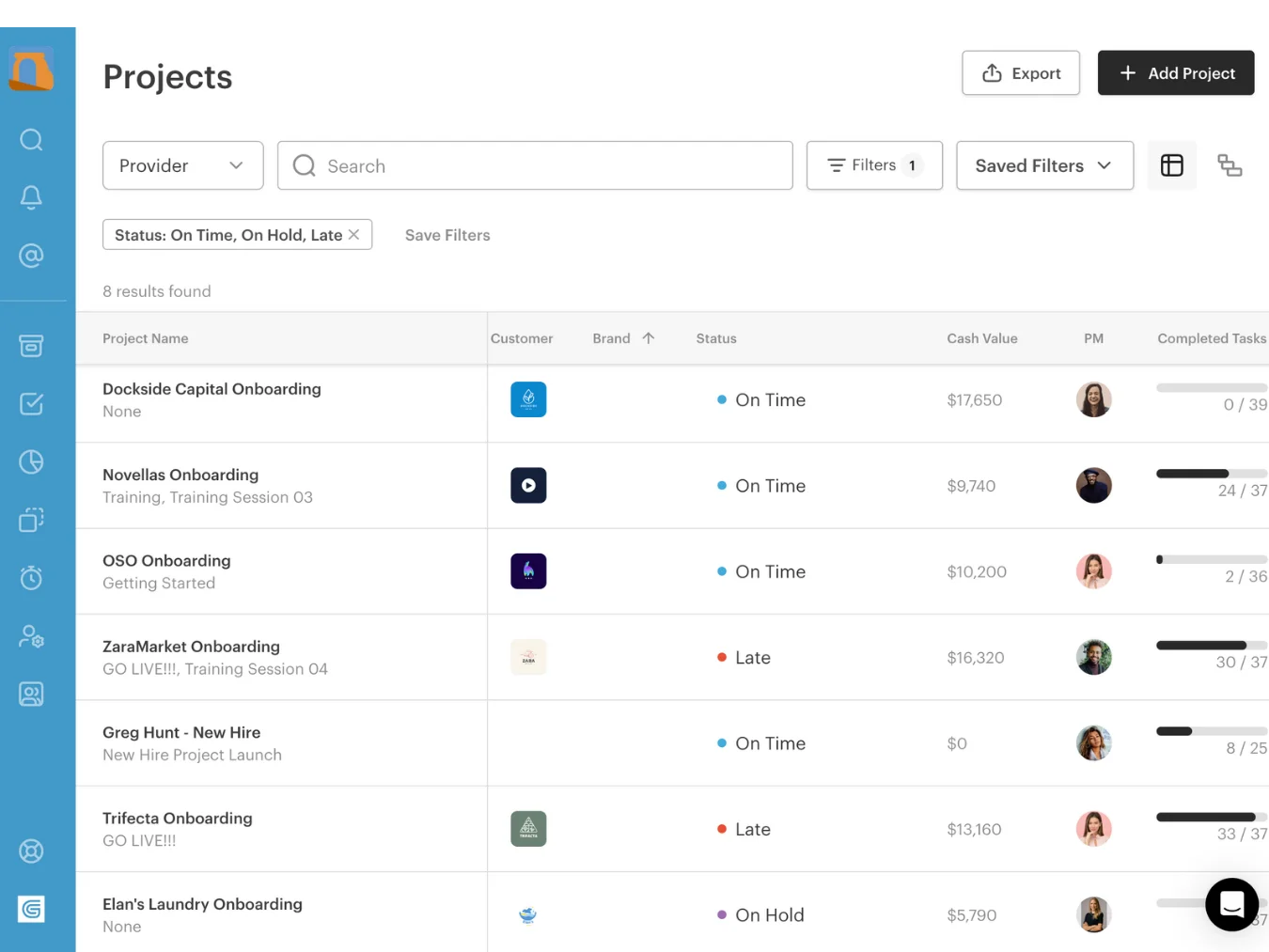
GUIDEcx is built for teams running a high volume of onboarding projects simultaneously using standardized processes. Its persona-based onboarding workflows assign tasks automatically based on the customer’s role, and AI agents identify project risks before they turn into delays.
Key Features:
- AI risk agents: Automatically identify at-risk projects based on milestone delays, stakeholder inactivity, and engagement signals.
- Persona-based workflow templates: Build tailored onboarding plans for different customer segments, use cases, or product lines.
- Customer-facing project portal: Give customers and internal teams a shared view of the implementation with tasks, timelines, and status updates.
- Automated stakeholder communication: Trigger notifications and check-ins automatically so no one falls out of the loop between meetings.
Pros:
- Best automation depth for high-volume onboarding teams
- AI risk detection surfaces at-risk projects early
- Strong reporting across large concurrent project volumes
Cons:
- Interface complexity reported by users at smaller team sizes
- Less suitable for teams with shorter or simpler onboarding cycles
- Custom pricing complicates budget planning for smaller organizations
Capterra Rating
⭐ 4.7
Pricing
Custom pricing for all tiers. Contact GUIDEcx for a quote.
How Teams Use eWebinar Alongside Other Onboarding Tools
In-app onboarding platforms and implementation management tools each solve important onboarding challenges. Tooltips, checklists, and guided tours help users navigate the product, while project management tools coordinate timelines, stakeholders, and rollout tasks.
Those capabilities are valuable, but they are not designed to deliver product education, training, and onboarding conversations at scale. That is where eWebinar fits.
eWebinar provides teams with:
- Two-way chat so questions get answered in the moment
- Consistent delivery to every customer in every time zone
- A guided narrative that explains the product, not just where to click
- Per-attendee data that flows into the CRM and flags at-risk accounts
- A scalable alternative to repeatedly running live onboarding sessions
While onboarding workflows look different across organizations, most eWebinar users ultimately map their strategy into one of three primary blueprints.
Pattern 1: eWebinar for the Foundational Session, In-App Tools for the UI Nudges
The customer joins an eWebinar first to get the story and context. Once inside the product, in-app tools handle the small prompts and tooltips. eWebinar handles the teaching, while the in-app tool handles the nudging.
Pattern 2: eWebinar Alongside Implementation Project Management
The project management tool coordinates tasks, timelines, and milestones. eWebinar delivers the knowledge customers need at each stage of the rollout. One keeps the project moving, while the other keeps customers informed.
Pattern 3: eWebinar Across the Full Onboarding and Training Lifecycle
For simpler self-serve SaaS products, eWebinar can handle both onboarding and ongoing training. Customers learn on their own schedule, ask questions in chat, and only move to live sessions when human interaction adds value.
How We Evaluated
The goal of customer onboarding is simple: help customers reach value quickly and stay engaged long enough to see results. We evaluated each tool based on how well it supports that outcome.
- Complexity fit: Whether the tool handles simple UI nudges, multi-stakeholder project coordination, or long-form video-led training
- Scalability: Whether the tool grows with the customer base without requiring proportional CS headcount
- Communication layer: Whether customers can ask questions and get real answers during onboarding
- CRM integration depth: Whether onboarding data flows into customer health scores and follow-up workflows
- Time-to-value: Whether the tool accelerates or creates friction on the path to activation
Final Word
Activation is rarely a single-tool problem. The strongest onboarding programs combine multiple approaches, using each category to solve a different challenge. The goal is not to find one platform that does everything, but to build a system that helps customers reach value faster.
Join our on-demand demo to see how it fits into that system:
FAQ
What is B2B customer onboarding software?
B2B customer onboarding software covers the tools that move new customers from sign-up to activation and ongoing success. The category includes in-app guidance tools, implementation project management platforms, and video-led onboarding solutions. Each handles a different part of the journey.
What is the difference between in-app onboarding and customer onboarding software?
In-app onboarding is one category of customer onboarding software. It focuses on guiding users inside the product with tooltips, checklists, and prompts. Customer onboarding software is a broader category that also includes implementation management and video-led onboarding tools.
How do you measure the success of customer onboarding?
The clearest indicators are time-to-value, activation rate, and early churn. Teams often supplement those metrics with onboarding attendance, training engagement, and support ticket volume to build a more complete picture of customer health.
What should B2B SaaS teams look for when choosing customer onboarding software?
Start with product complexity. Simple products often need in-app guidance to help users reach value quickly. Complex products may require implementation coordination, customer education, or both. Most teams with complex products end up combining multiple categories.
How does eWebinar complement in-app onboarding tools?
In-app onboarding tools help users navigate the product once they are inside it. eWebinar provides the context, training, and product education that often needs to happen beforehand. The two solve different problems and work best together.
Curious to see how eWebinar can help run your demos, onboarding, and training sessions on autopilot?
Watch a one-minute explainer video for a quick overview of the eWebinar platform. Or, better yet, join our on-demand demo to learn more!