
- What are ungated on-demand eWebinars and what are they meant to be used for?
- What happened to the ungated replay link?
- What's the difference between a replay and an ungated on-demand eWebinar?
- How do I use ungated sessions in my marketing?
- How are interaction responses and analytics captured in ungated sessions?
- How is registrant data captured in ungated sessions?
- How do I surface a registration form in ungated sessions?
- How does chat work in an ungated session?
- Why are ungated sessions so effective in retargeting ad campaigns?
- How can ungated sessions throw off my analytics?
- What should I watch out for when testing an ungated session?
- Why should I not use the ungated links in my follow-up emails to registrants?
Related article:
What are ungated on-demand eWebinars and what are they meant to be used for?
When you share a link to an ungated on-demand eWebinar (referred to as an "ungated session"), the recipient of the link is able to join your eWebinar with a click, without having to register for it.
Ungated sessions are meant to be used in email marketing, ad campaigns, social posts, and anywhere else you want to market them online.
Why? Because people can start watching your eWebinar right away without having to sign up!
WARNING: Regular replay links are tied to individual registrants, so they should not be shared or used for marketing in the same way.
On the flip side, you should not use ungated links in your post-eWebinar follow-up emails. More on this below.
Ungated sessions are especially effective in retargeting ad campaigns because the system is able to recognize who someone is when they click on your ad if they previously registered for your eWebinar on the same device.
What happened to the ungated replay link?
Every ungated session is now an on-demand session, so each eWebinar has one ungated link: the ungated on-demand link. The ungated replay link is no longer on the Share tab or in the Share modal.
Ungated replay links you have already shared keep working. They open your eWebinar's ungated on-demand link (with any parameters on the link), so your ads, emails, and posts still play. Wherever an eWebinar's ungated replay link was enabled, we enabled its ungated on-demand link.
In a replay, the viewer can control the video (play, pause, skip around, and control the playback speed). In an on-demand eWebinar, the viewer can only control the video to the degree you allow. For example, unless you add an Agenda to your eWebinar, viewers cannot skip around in an on-demand eWebinar like they can in a replay. To let viewers of your ungated on-demand link (including people who open an old ungated replay link) pause and skip forwards and backwards, as they can in a replay, turn on Attendees watching on-demand may fully control the video playback on the Schedule tab, under On-demand sessions.
What's the difference between a replay and an ungated on-demand eWebinar?
Regular replays are unique to individuals. Links to regular replays get created for a person when he or she registers for any session of an eWebinar, and they play that person's replay after their session. Because of this, they should not be shared with others, blasted out in email campaigns, or used in ads of any kind.
Standard replays require registration so interaction responses, chat messages, and other behavior may be captured and tracked for each individual registrant.
The ungated on-demand link is universal and does not require registration. It may be shared with anyone, including in email campaigns, social posts, and ads. Each eWebinar has only one ungated on-demand link.
How do I use ungated sessions in my marketing?
Each eWebinar has its own unique ungated on-demand link. You can enable and find it on the Share tab and in the Share modal of every eWebinar.
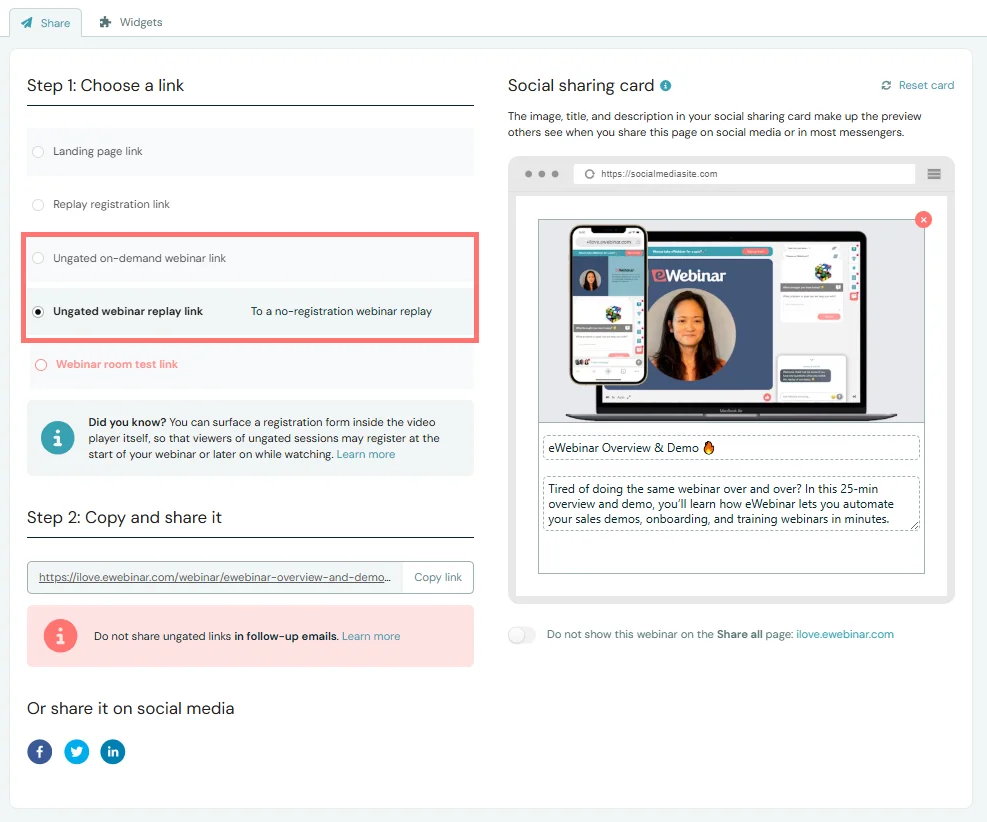
Once enabled, you can copy the link from right there and then paste it into an email campaign, social post, or use it in the CTA of an ad. It's that easy!
If you would rather have people register before they watch, share the On-demand registration link instead. It takes them to your landing page with the on-demand session already chosen, so they only fill in the form. You'll find it in the same places when your schedule offers on-demand sessions, and it also works when your registration page is your own page with an eWebinar registration widget on it.
How are interaction responses and analytics captured in ungated sessions?
Even though people don't have to register for an ungated session, you still get to collect their responses to your interactions and track their behavior for your analytics.
When someone clicks to watch an ungated session, an anonymous attendee (i.e. Attendee 12345) gets created automatically and added to the list of registrants for that eWebinar. (There is one exception, typically related to retargeting, but we'll talk about that later.) That's how and where their responses to your polls, questions, and other interactions get recorded. The same goes for tracking how long they watch the video, when they click the thumbs up, or any other behavior captured for your analytics.
Conversion events work the same way: a conversion that fires in an ungated session is recorded against that anonymous record and shows up in your analytics, but it is only tied to a named registrant once the viewer shares an email address.
How is registrant data captured in ungated sessions?
There are three ways that registrant data (at minimum the registrant's name and email) can be captured in ungated sessions.
1. In-video registration: Use the in-video registration interaction to surface a video inside the video player. See the next question below for more details.
2. Chat: In ungated sessions, a contact form appears in the chat panel so you can collect the attendee's name and email. Configure the form on the eWebinar's Chat tab under Contact form (heading and submit button). The form always collects Name and Email. If they submit it, they convert from anonymous to a known attendee. See the relevant question below for more details.
3. Contact form interaction: If you add the contact form interaction to your eWebinar and an anonymous attendee in an ungated session chooses to fill it out, the data is captured accordingly.
How do I surface a registration form in ungated sessions?
Add the in-video registration interaction to surface a registration form inside the player (including the embedded widget). See How do I surface a registration form in ungated sessions, including in the embedded player widget?.
How does chat work in an ungated session?
In ungated sessions, attendees who join without registering see a contact form in the chat panel so you have a way to reach them.
Configure it on the eWebinar's Chat tab under Contact form:
- The form always shows Name and Email.
- Edit the heading (default: "How can we reach you") and the submit button text (default: "Submit").
How it behaves:
- Live chat — Attendees can keep chatting without filling the form. The form remains available so they can share contact details when ready.
- Email form — Attendees must submit the contact form before they can send a question.
- If their email is already known (for example from in-video registration), the form disappears automatically.
Once they submit a valid email (and name), their registrant record is no longer anonymous — so you can reply later by email, and integrations that require email can receive the contact.
NOTE: We won't send registrants as contacts to your CRM or other integrated products without an email address, since email is almost always required there. We will send them if they have no first or last name, since those fields tend to be optional.
Anonymous attendees can also become known if they fill out a Contact form interaction in the eWebinar.
Why are ungated sessions so effective in retargeting ad campaigns?
Ungated links work well in retargeting ads: when someone who already registered clicks your ad on the same device (with cookies), eWebinar can recognize them and keep their prior chat and interaction history. Put the ungated on-demand link in the ad CTA. Target by registrant email when your ad platform and local laws allow — obtain consent on your registration form when required. See also How do I set up a Meta (Facebook) Pixel?.
How can ungated sessions throw off my analytics?
Anonymous viewers still create registrant rows and can inflate counts if you share ungated links widely. Filter or segment carefully when comparing gated vs ungated performance, and avoid mixing ungated links into post-eWebinar follow-up emails meant for known registrants.
What should I watch out for when testing an ungated session?
Test in a private/incognito window (and a second device) so cookie recognition does not hide the anonymous path. Confirm the chat contact form appears when email is unknown, and that it disappears after in-video registration or after the form is submitted.
Why should I not use ungated links in my follow-up emails to registrants?
Post-eWebinar emails should use each registrant's personal replay link so their watch history, chat, and interactions stay tied to them. Ungated links are for marketing and ads, not for follow-up to people who already registered.
For a follow-up you write before you know whether someone will attend, use the { onDemandLink } merge field. When they click it, it opens their join link while their session is still theirs, their replay once they have watched some, a new on-demand session if they missed theirs (where your eWebinar offers on-demand sessions), or your registration page.